master page=left
DVP-FX96
4-266-600-22(1)
G:\Project_2010_Aug\Feiyu_20101111_FX96\6_Target\4266600111\4266600111DV
PFX96U8\01US\01US04GET-CEK.fm
8
Preparations
Checking the
Accessories
Check that you have the following items:
• AC adaptor (1)
• Car battery adaptor (1)
• Audio/video cable (mini plug × 2 y
phono plug × 3) (1)
• Remote commander (remote) (1)
• Size AA (R6) batteries (2)
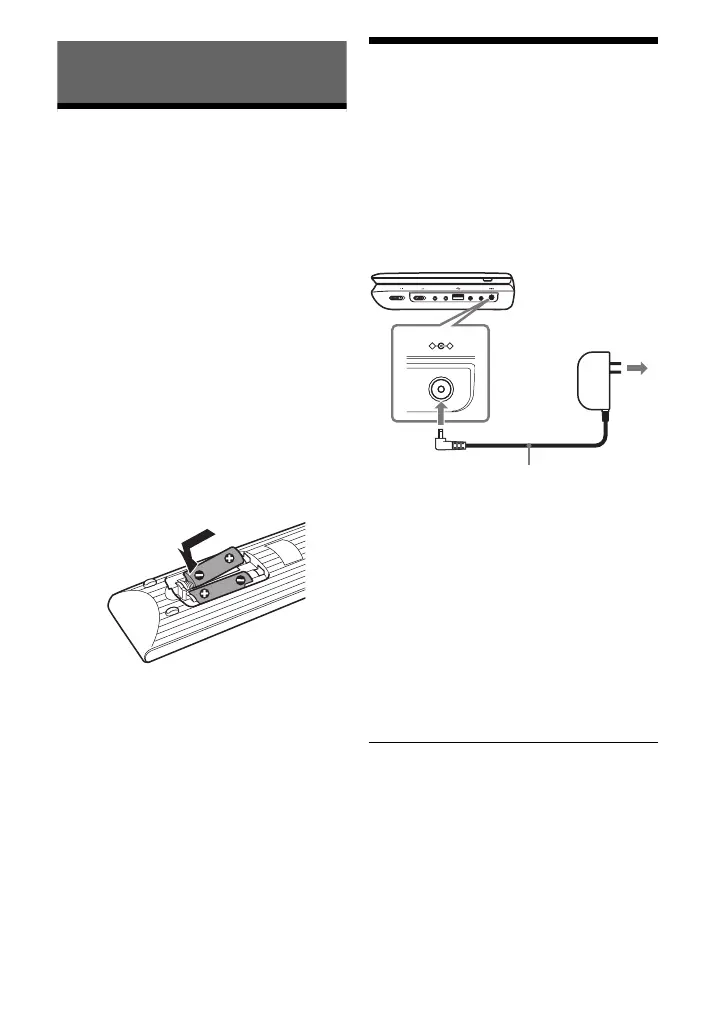
Preparing the remote
Insert two Size AA (R6) batteries by
matching the 3 and # ends on the
batteries to the markings inside the
compartment.
Charging the Battery
Charge the rechargeable battery before
using the player for the first time, or when
the battery is depleted.
1 Connect the AC adaptor.
When charging begins, the CHARGE
indicator lights up in orange.
When charging ends, the CHARGE
indicator lights off.
Disconnect the AC adaptor.
z
Charging takes longer if the player is turned on.
When you only want to charge the battery, turn
off the player.
b
Charge the battery in an ambient temperature of
between 5 °C (41 °F) to 35 °C (95 °F).
HOLD
A PHONES B
AUDIO
IN/OUT
VIDEO
IN/OUT
DC IN 9.5V
POWER OFF ON
INPUT SELECT
DC IN 9.5V
AC Adaptor (supplied)
To a wall
outlet
01US01COV.book Page 8 Wednesday, May 25, 2011 9:54 AM













 To Next Page