EasyManua.ls Logo

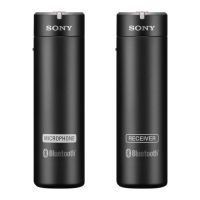
Sony DWM-02N/14 - User Manual

Sony DWM-02N/14
21 pages
Print Icon
To Next Page IconTo Next Page
Loading...
Digital Wireless
Microphone
Operating Instructions
DWM-02N
4-585-174-04 (1)
© 2015 Sony Corporation

Questions and Answers

  • J
    Joseph GraySep 23, 2025
    How to fix a dark display on my Sony DWM-02N/14 Microphone?
    • M
      Ms. Tracy MezaSep 23, 2025
      If the display on your Sony Microphone is too dark, it's likely that the display brightness is set to low. Adjust the brightness of the display.
  • C
    Cristina HooperAug 23, 2025
    What to do if my Sony DWM-02N/14 Microphone does not turn on?
    • T
      Tina GutierrezAug 25, 2025
      If your Sony Microphone doesn't turn on, first check if the batteries are correctly inserted into the battery compartment. If they are not, reinsert them with the correct orientation. Also, make sure the batteries are not exhausted; if they are, replace them with new ones.
  • J
    Joshua VillaAug 25, 2025
    What to do if wireless remote control is not possible with Sony DWM-02N/14 Microphone?
    • J
      Jennifer CareyAug 26, 2025
      If wireless remote control isn't working with your Sony Microphone, first ensure that pairing has been established between the microphone and receiver by carrying out pairing. Check the wireless remote control condition level. If it is low, decrease the distance between the microphone and the receiver. If the microphone was previously paired with another receiver, carry out pairing again with the microphone that you want to control on the receiver.
  • T
    Tracy KellerAug 27, 2025
    How to turn off Sony DWM-02N/14 when the power switch is locked?
    • A
      alexis19Aug 27, 2025
      If the power on your Sony Microphone doesn't turn off even when the POWER switch is set to OFF, it's likely that the POWER switch is locked. Turn off the POWER SW LOCK function.
  • S
    Stacy RobersonAug 27, 2025
    Why does my Sony DWM-02N/14 Microphone have interruptions in reception?
    • A
      Amber HoAug 28, 2025
      If you're experiencing interruptions in the reception of your Sony Microphone, try decreasing the distance between the microphone and the receiver to improve signal strength. Also, check the transmission power setting; if it's set to “L: 1mW”, increase it.
  • S
    Stephanie HamiltonSep 17, 2025
    How to fix weak bass on Sony Microphone?
    • S
      Sandra HarmonSep 18, 2025
      If the bass is weak on your Sony Microphone, it might be because the frequency of the low-cut filter is set too high. While monitoring the sound, decrease the low-cut filter frequency to a level that produces the proper sound quality.
  • L
    Leah HallSep 14, 2025
    How to fix interruptions in reception with my Sony DWM-02N/14 Microphone?
    • D
      David CollinsSep 14, 2025
      To fix interruptions in reception with your Sony Microphone, try decreasing the distance between the microphone and the receiver to improve reception. Also, if the transmission power setting is set to “L: 1mW”, increase the transmission power.
  • J
    jefferyleeSep 15, 2025
    How to fix too much bass on Sony DWM-02N/14 Microphone?
    • D
      Donna CampbellSep 16, 2025
      If your Sony Microphone produces excessive bass, it might be because the frequency response extends into the low range. Try using the low-cut filter to reduce the bass.
  • M
    Melissa OrtizSep 6, 2025
    Why does my USB keyboard not work with my Sony DWM-02N/14?
    • P
      Paul CrawfordSep 6, 2025
      If the USB keyboard is not working with your Sony Microphone, you might be using a USB keyboard that is not compatible with the microphone. Check the conditions for using a USB keyboard with the microphone.
  • C
    Christopher MurraySep 3, 2025
    Why is wireless remote control not possible on my Sony DWM-02N/14?
    • B
      Brianna LynnSep 3, 2025
      If wireless remote control is not working with your Sony Microphone, first ensure that pairing has been established between the microphone and receiver. Check the wireless remote control condition level and decrease the distance between the microphone and the receiver if the level is low. If the microphone was previously paired with another receiver, carry out pairing again with the desired receiver.

Sony DWM-02N/14 Specifications

General IconGeneral
BrandSony
ModelDWM-02N/14
CategoryMicrophone
LanguageEnglish

Related product manuals