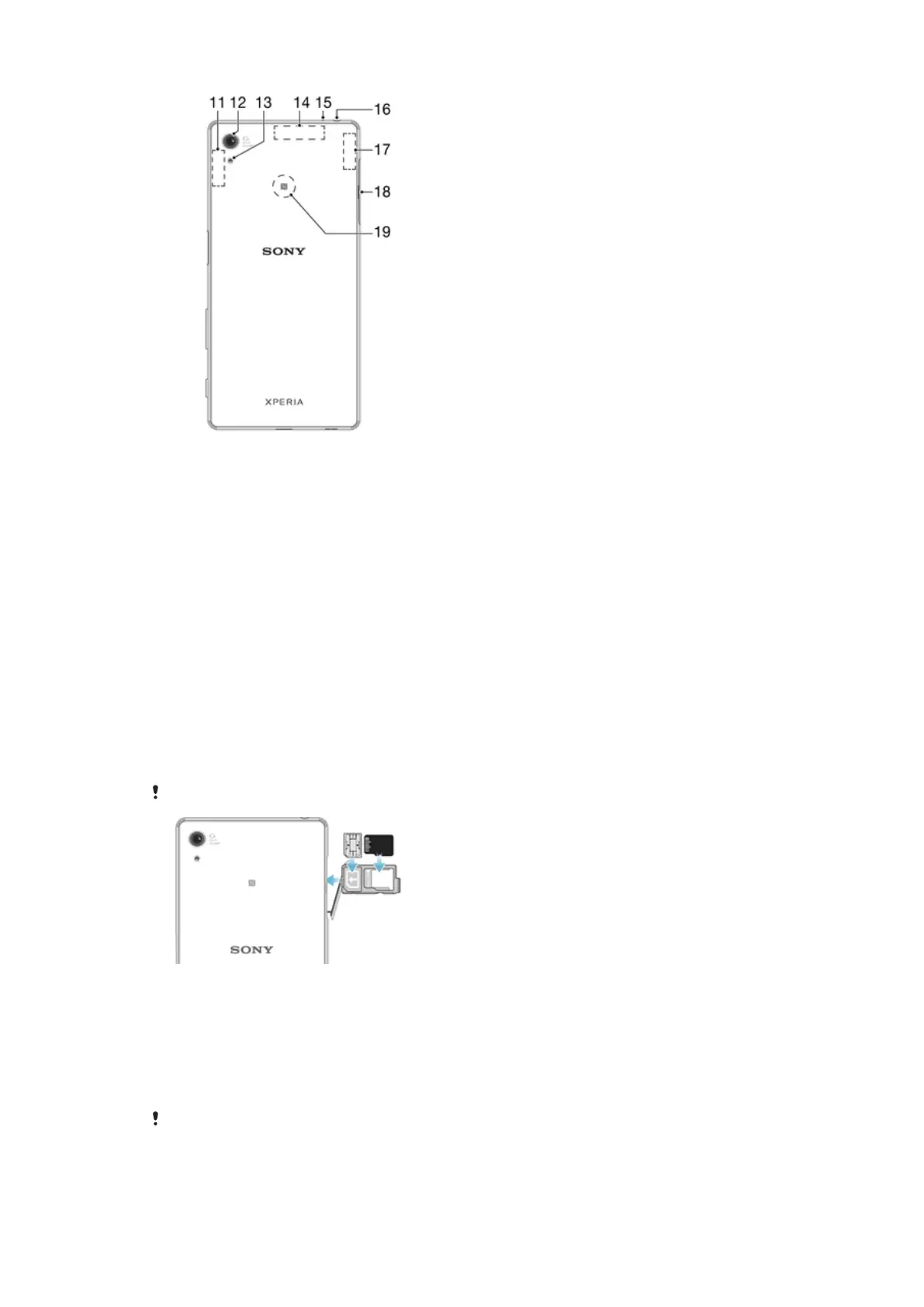
1. Charging light/Notification light
2. Front camera lens
3. Ear speaker
4. Proximity/Light sensor
5. Power key/Fingerprint sensor
6. Volume/Zoom key
7. Camera key
8. Main microphone/Speaker
9. Charger/USB cable port
10. Strap hole
11. Main Wi-Fi/Bluetooth antenna area
12. Main camera lens
13. Camera light
14. GPS antenna area
15. Second microphone
16. Headset jack
17. Second Wi-Fi antenna area
18. Nano SIM/Memory card tray cover
19. NFC™ detection area
Assembly
Your device only supports nano SIM cards.
To Insert the Nano SIM Card
1
With the device facing down, open the cover for the nano SIM and memory card
tray.
2
Drag out the tray using your fingernail.
3
Place the nano SIM card in the correct slot in the tray, then reinsert the tray.
4
Close the cover.
If you insert a nano SIM card while the device is powered on, the device restarts automatically.
8
This is an internet version of this publication. © Print only for private use.










 To Next Page