72
RKEDAnoitanitseD
82
RKEDAnoitanitseD
13
elbasiD/elbanEffotuhSotuA
63
tsetNO/FFO)MV(noitaludoMyticoleV
14
MVNesilaitini-eR
34
dnuosAlauDtceleS
44
dnuosBlauDtceleS
54
dnuosonoMtceleS
64
dnuosoeretStceleS
84
nigrivnonsaMVNteS
94
nigrivsaMVNteS
35
elbasiD/elbanEnoitaludomrevOMF
55
)SPLA/YNOS(noitcelesrenuT
95
stracS2roPIP+stracS3ledoMtceleS
86
)melborpN(erusaemretnuoc62XelbasiD/elbanE
37
)47.6/5.6(metsys2K/DnotiewZelbanE
47
)47.5/5.6(metsys3K/DnotiewZelbanE
87
thgirllufecnalaB
97
tfelllufecnalaB
78
tsetsyeklacoL
99
unememiTgnikroWdnarorrEyalpsiD
00
ffoedom'TT'
10
mumixamerutciP
20
muminimerutciP
30
%53otemuloVenohpdaeh/rekaepsteS
40
%05otemuloVenohpdaeh/rekaepsteS
50
%56otemuloVenohpdaeh/rekaepsteS
60
%08otemuloVenohpdaeh/rekaepsteS
70
edomgniegA
80
noitidnoCgnippihS
11
tnemtsujdaerutcipbuS
21
tnemtsujdaruolocbuS
31
tnemtsujdassenthgirBbuS
41
tnemtsujdanoitisoPHtxeT
51
tseTlioCnoitatoR
61
%05levelerutciP
91
elbasiD/elbanEedoMyrotcaF
12
RKEDAnoitanitseD
22
LBnoitanitseD
32
RKEDAnoitanitseD
42
UnoitanitseD
52
RKEDAnoitanitseD
62
LBnoitanitseD
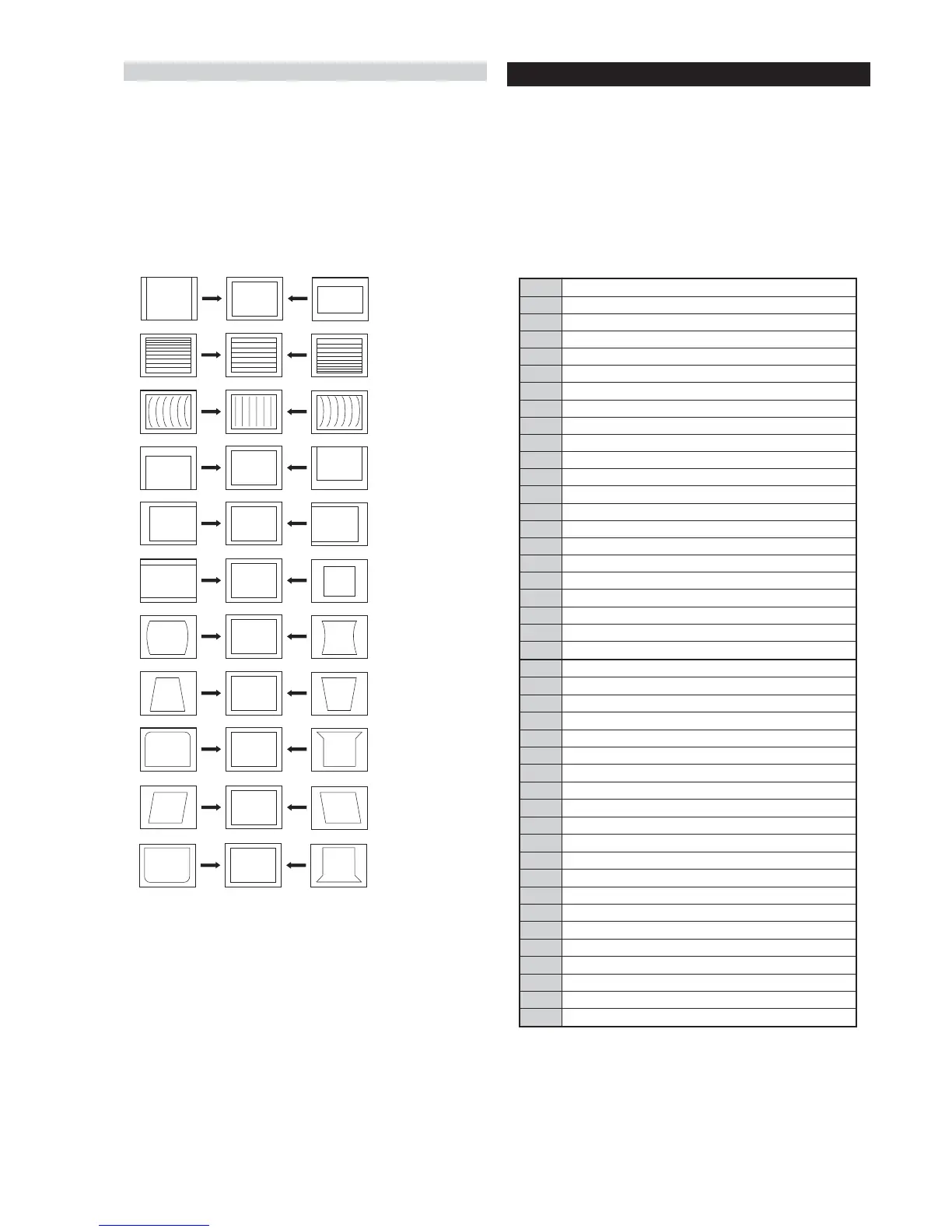
1. Set the TV set or operation in Service Mode.
[ See Page 21 ].
2. Select ‘Geometry’ from the on screen menu display and press
‘Right Arrow’.
3. The ‘Geometry’ menu will appear on the screen.[See Page 21]
4. Select and adjust each item in order to obtain the optimum image.
Deflection System Adjustment
V SIZE
V LIN
AFC BOW
V POSITION
H POSITION
H SIZE
PIN AMP
TRAPEZIUM
UP CORNER PIN
AFC ANGLE
LO CORNER PIN
Test Mode 2 is available by setting the TV for operation in Service
Mode [ As shown on Page 21 ] , OSD ‘TT’ appears. The functions
described below are available by selecting the two numbers. To
release the ‘Test mode 2’, press 00, 10, 20 ... twice or switch the TV
set into Stand-by mode. In ‘TT Menu’ mode, it is possible to remove
the Menu from the screen by pressing the Speaker Off button once.
Pressing the Speaker OFF button a second time will cause the Menu
to reappear. The function is kept even when the menu is not displayed
on screen !!.
4-2. TEST MODE 2:





 To Next Page