EasyManua.ls Logo

Sony FH-B7CD - Page 16

Sony FH-B7CD
57 pages
Print Icon
To Next Page IconTo Next Page
To Previous Page IconTo Previous Page
Loading...
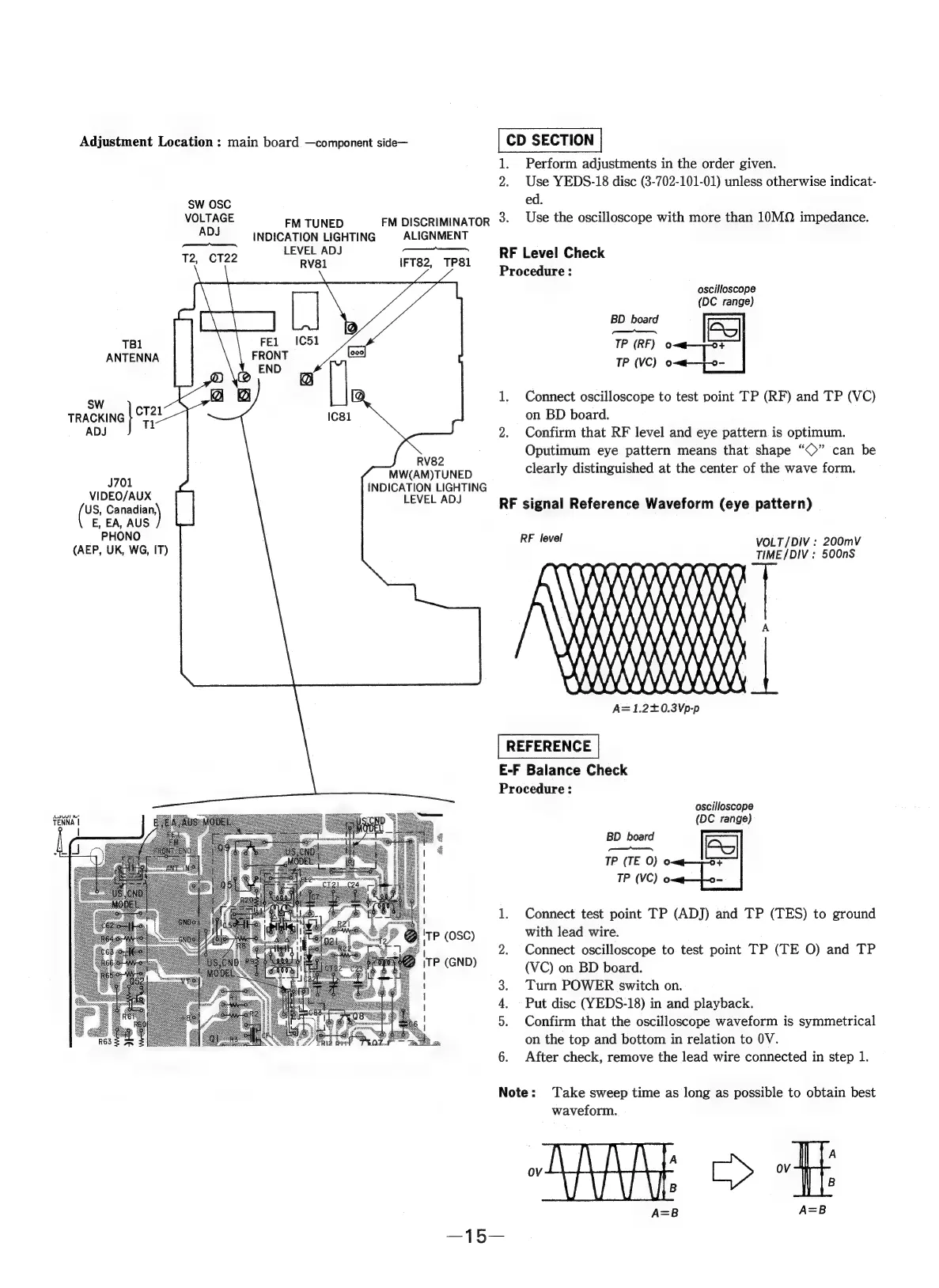
Adjustment
Location
:
main
board
—component
side—
CD
SECTION
1.
Perform
adjustments
in
the
order
given.
2.
Use
YEDS-18
disc
(3-702-101-01)
unless
otherwise
indicat-
SW
OSC
ed.
VOLTAGE
FM
TUNED
FM
DISCRIMINATOR
2
Use
the
oscilloscope
with
more
than
10MQ
impedance.
ADJ
INDICATION
LIGHTING
|
ALIGNMENT
LEVEL
ADJ
———
T2,
CT22
aval
IFT82,
TP8I
RF
Level
Check
Procedure
:
oscilloscope
(DC
range)
TB1
ANTENNA
Sw
1.
Connect
oscilloscope
to
test
point
TP
(RF)
and
TP
(VC)
TRACKING
pls
on
BD
board.
ADJ
2.
Confirm
that
RF
level
and
eye
pattern
is
optimum.
Oputimum
eye
pattern
means
that
shape
“©”
can
be
Byes
clearly
distinguished
at
the
center
of
the
wave
form
16
MW(AM)TUNED
y
&
;
INDICATION
LIGHTING
VIDEO/AUX
LEVEL
ADJ
es
Sage
E,
EA,
AUS
PHONO
(AEP,
UK,
WG,
IT)
RF
signal
Reference
Waveform
(eye
pattern)
LAK
AA
AAAAAAAA
}
en
\
HAH
i}
WA
XI
E-F
Balance
Check
Procedure
:
oscilloscope
(DC
range)
1.
Connect
test
point
TP
(ADJ)
and
TP
(TES)
to
ground
TP
(OSC)
with
lead
wire.
Connect
oscilloscope
to
test
point
TP
(TE
O)
and
TP
TP
(GND)
(VC)
on
BD
board.
3.
Turn
POWER
switch
on.
4.
Put
disc
(YEDS-18)
in
and
playback.
5.
Confirm
that
the
oscilloscope
waveform
is
symmetrical
on
the
top
and
bottom
in
relation
to
0V.
6.
After
check,
remove
the
lead
wire
connected
in
step
1.
Note:
Take
sweep
time
as
long
as
possible
to
obtain
best
waveform.
A
A
OV
OV
B
B

Related product manuals