EasyManua.ls Logo

Sony FH-B7CD - Page 7

Sony FH-B7CD
57 pages
Print Icon
To Next Page IconTo Next Page
To Previous Page IconTo Previous Page
Loading...
HCD-
PT
E00
|
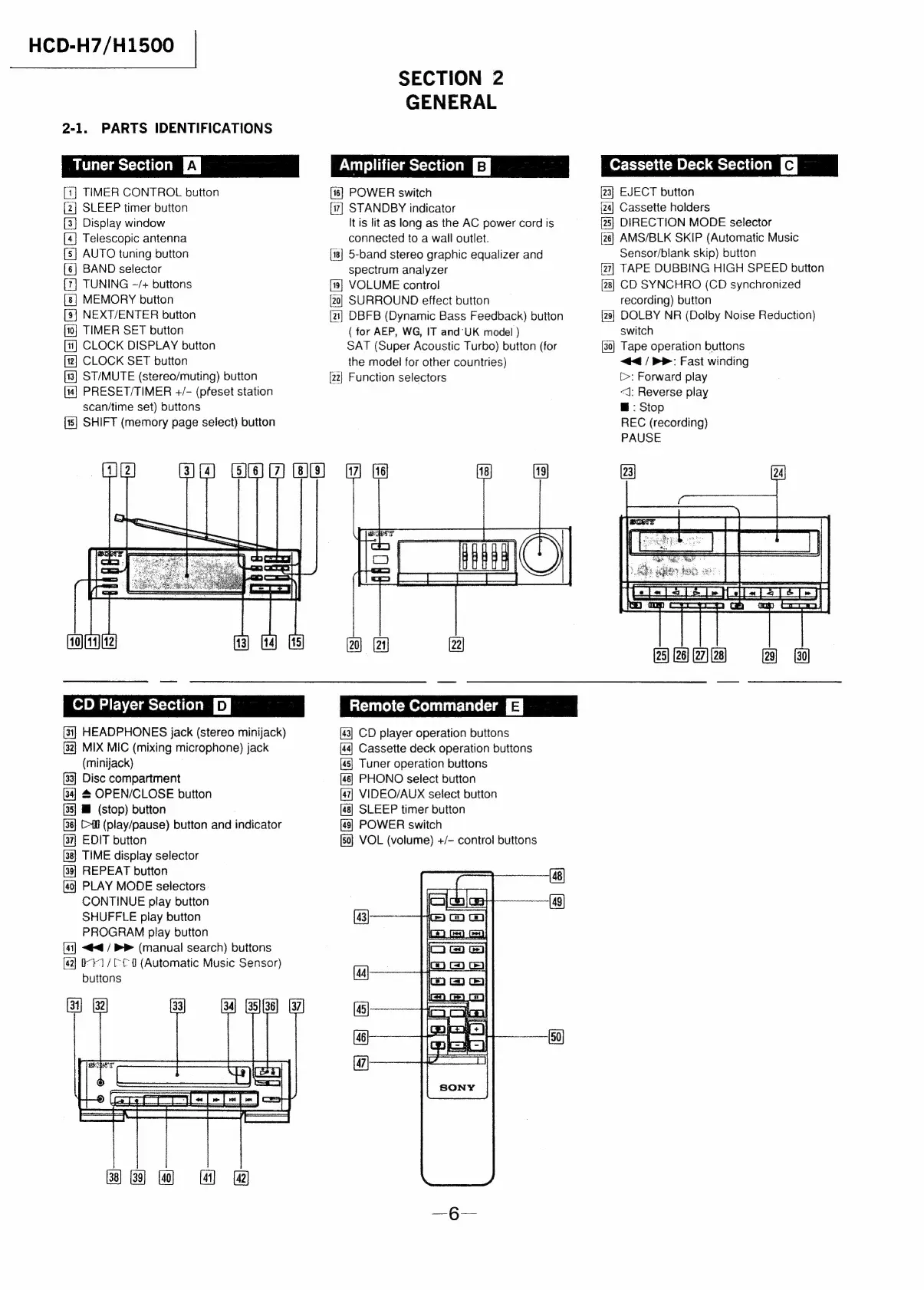
2-1.
PARTS
IDENTIFICATIONS
Tuner
Section
Ey
[1]
TIMER
CONTROL
button
3
SLEEP
timer
button
[3]
Display
window
[4]
Telescopic
antenna
[5]
AUTO
tuning
button
[6]
BAND
selector
TUNING
-/+
buttons
MEMORY
button
NEXT/ENTER
button
TIMER
SET
button
[1]
CLOCK
DISPLAY
button
CLOCK
SET
button
ST/MUTE
(stereo/muting)
button
PRESET/TIMER
+/-
(pfeset
station
scan/time
set)
buttons
[15]
SHIFT
(memory
page
select)
button
SECTION
2
GENERAL
PM
mtr
le
B
|
[16]
POWER
switch
STANDBY
indicator
It
is
lit
as
long
as
the
AC
power
cord
is
connected
to
a
wall
outlet.
[18]
5-band
stereo
graphic
equalizer
and
spectrum
analyzer
[9]
VOLUME
control
[20]
SURROUND
effect
button
[21]
DBFB
(Dynamic
Bass
Feedback)
button
(
for
AEP,
WG,
IT
and'UK
model
)
SAT
(Super
Acoustic
Turbo)
button
(for
the
model
for
other
countries)
[22]
Function
selectors
Cassette
Deck
Section
|
[23]
EJECT
button
[24]
Cassette
holders
[28]
DIRECTION
MODE
selector
[26]
AMS/BLK
SKIP
(Automatic
Music
Sensor/blank
skip)
button
TAPE
DUBBING
HIGH
SPEED
button
[28}
CD
SYNCHRO
(CD
synchronized
recording)
button
DOLBY
NR
(Dolby
Noise
Reduction)
switch
[30]
Tape
operation
buttons
<4
/
>:
Fast
winding
C>:
Forward
play
<J:
Reverse
play
@
:
Stop
REC
(recording)
PAUSE
CD
Player
Section
pj
[31]
HEADPHONES
jack
(stereo
minijack)
[32}
MIX
MIC
(mixing
microphone)
jack
(minijack)
[33]
Disc
compartment
#
OPEN/CLOSE
button
[35]
IJ
(stop)
button
C>fl
(play/pause)
button
and
indicator
EDIT
button
TIME
display
selector
REPEAT
button
PLAY
MODE
selectors
CONTINUE
play
button
SHUFFLE
play
button
PROGRAM
play
button
<4
/
PP
(manual
search)
buttons
[42]
11/010
(Automatic
Music
Sensor)
buttons
i
Remote
Commander
CD
player
operation
buttons
Cassette
deck
operation
buttons
Tuner
operation
buttons
PHONO
select
button
VIDEO/AUX
select
button
SLEEP
timer
button
POWER
switch
VOL
(volume)
+/-
control
buttons
=
=~
sa]
&
&

Related product manuals