EasyManua.ls Logo

Sony FH-E737CD - Storing and Recalling Personal EQ Files

Sony FH-E737CD
70 pages
Print Icon
To Next Page IconTo Next Page
To Previous Page IconTo Previous Page
Loading...
Using
the
Graphic
Equalizer
Storing
Your
Individual
Graphic
Equalizer
Settings
Personal
File
By
storing
your
individual
settings
for
the
graphic
equalizer
in
the
Personal
File,
you
can
easily
call
up
the
settings
at
any
time.
You
can
store
up
to
5
settings.
(Possible
only
with
the
remote
commander.)
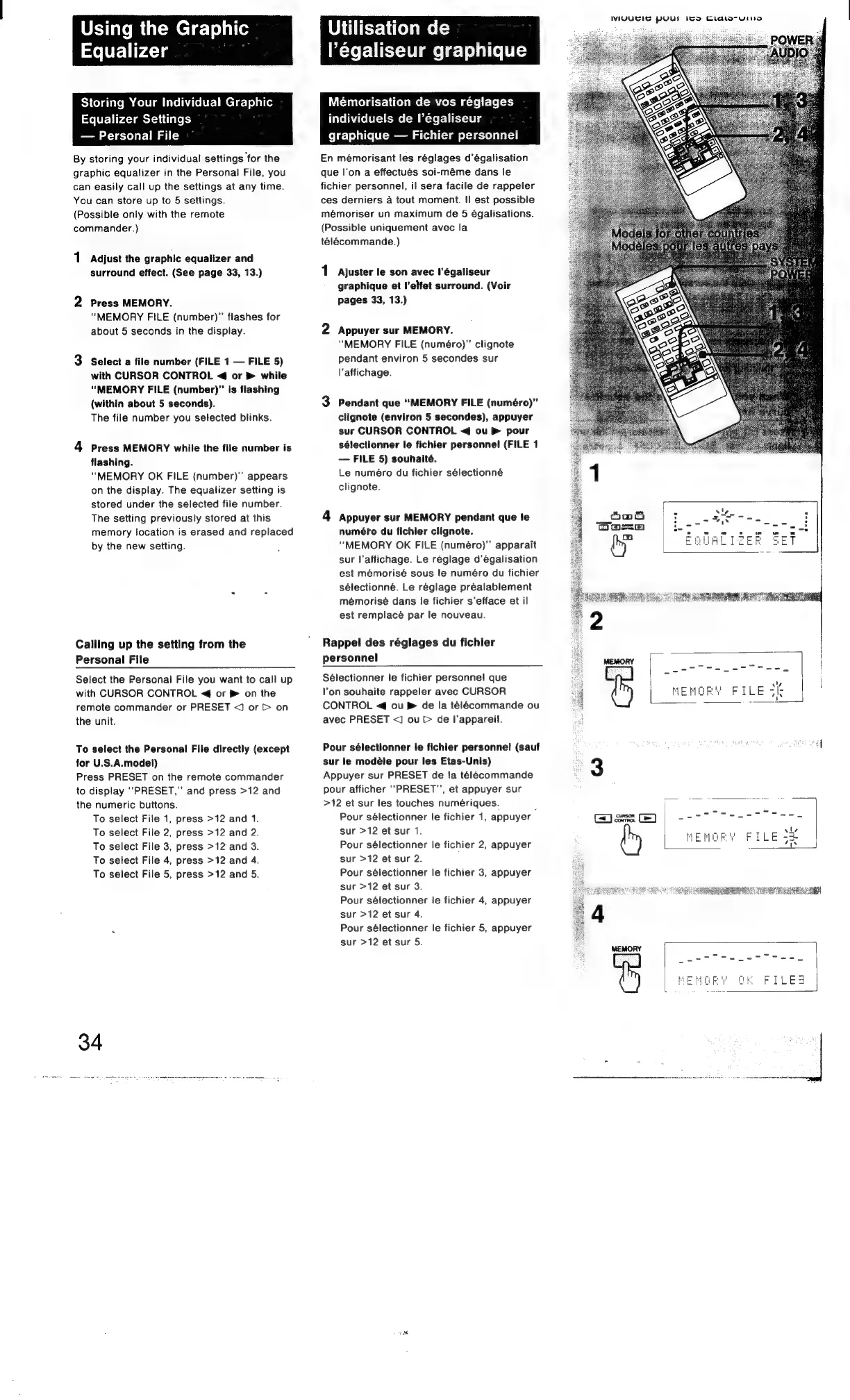
1
Adjust
the
graphic
equalizer
and
surround
effect.
(See
page
33,
13.)
2
Press
MEMORY.
“MEMORY
FILE
(number)”’
flashes
for
about
5
seconds
in
the
display.
3
Select
a
file
number
(FILE
1
FILE
5)
with
CURSOR
CONTROL
<4
or
®
while
“MEMORY
FILE
(number)”
is
flashing
(within
about
5
seconds).
The
file
number
you
selected
blinks.
4
Press
MEMORY
while
the
file
number
is
flashing.
“MEMORY
OK
FILE
(number)”
appears
on
the
display.
The
equalizer
setting
is
stored
under
the
selected
file
number.
The
setting
previously
stored
at
this
memory
location
is
erased
and
replaced
by
the
new
setting.
Calling
up
the
setting
from
the
Personal
File
Select
the
Personal
File
you
want
to
call
up
with
CURSOR
CONTROL
<4
or
®
on
the
remote
commander
or
PRESET
<J
or
>
on
the
unit.
To
select
the
Personal
File
directly
(except
for
U.S.A.model)
Press
PRESET
on
the
remote
commander
to
display
PRESET,”
and
press
>12
and
the
numeric
buttons.
To
select
File
1,
press
>12 and
1.
To
select
File
2,
press
>12
and
2.
To
select
File
3,
press
>12
and
3.
To
select
File
4,
press
>12
and
4.
To
select
File
5,
press
>12 and
5.
Utilisation
de
l’égaliseur
graphique
Mémorisation
de
vos
réglages
individuels
de
l’égaliseur
graphique
Fichier
personnel
En
mémorisant
les
réglages
d’égalisation
que
l’on
a
effectués
soi-méme
dans
le
fichier
personnel,
il
sera
facile
de
rappeler
ces
derniers
4
tout
moment.
!|
est
possible
mémoriser
un
maximum
de
5
égalisations.
(Possible
uniquement
avec
la
telécommande.)
1
Ajuster
le
son
avec
l’égaliseur
graphique
et
l’elfet
surround.
(Voir
pages
33,
13.)
2
Appuyer
sur
MEMORY.
“MEMORY
FILE
(numéro)
clignote
pendant
environ
5
secondes
sur
l'affichage.
3
Pendant
que
“MEMORY
FILE
(numéro)”
clignote
(environ
5
secondes),
appuyer
sur
CURSOR
CONTROL
<q
ou
®
pour
sélectionner
le
fichier
personnel
(FILE
1
FILE
5)
souhaité.
Le
numéro
du
fichier
sélectionné
clignote.
4
Appuyer
sur
MEMORY
pendant
que
!e
numéfo
du
fichier
clignote.
“MEMORY
OK
FILE
(numéro)”’
apparait
sur
l'affichage.
Le
réeglage
d’égalisation
est
mémorisé
sous
le
numéro
du
fichier
sélectionné.
Le
réglage
préalablement
mémorisé
dans
le
fichier
s’efface
et
il
est
remplacé
par
le
nouveau.
Rappel
des
réglages
du
fichier
personnel
Sélectionner
le
fichier
personnel!
que
Von
souhaite
rappeler
avec
CURSOR
CONTROL
<4
ou
®
de
la
télécommande
ou
avec
PRESET
<]
ou
>
de
I’appareil.
Pour
sélectionner
le
fichier
personne!
(sauf
sur
le
modéle
pour
les
Etas-Unis)
Appuyer
sur
PRESET
de
la
télecommande
pour
afficher
“‘PRESET"’,
et
appuyer
sur
>12
et
sur
les
touches
numériques.
:
Pour
sélectionner
le
fichier
1,
appuyer
sur
>12
et
sur
1.
Pour
sélectionner
le
fichier
2,
appuyer
sur
>12
et
sur
2.
Pour
sélectionner
le
fichier
3,
appuyer
sur
>12
et
sur
3.
Pour
sélectionner
le
fichier
4,
appuyer
sur
>12
et
sur
4.
Pour
sélectionner
le
fichier
5,
appuyer
sur
>12
et
sur
5.
WIVYUEIS
puUul
Ito
Cidtorwine
en]
Seated
|
Se
MEMORY
FILE
st

Other manuals for Sony FH-E737CD

Related product manuals