36 (GB)
Selecting the On-screen
Language
You can select the on-screen language from Japanese,
English, German, French, Spanish or Italian.
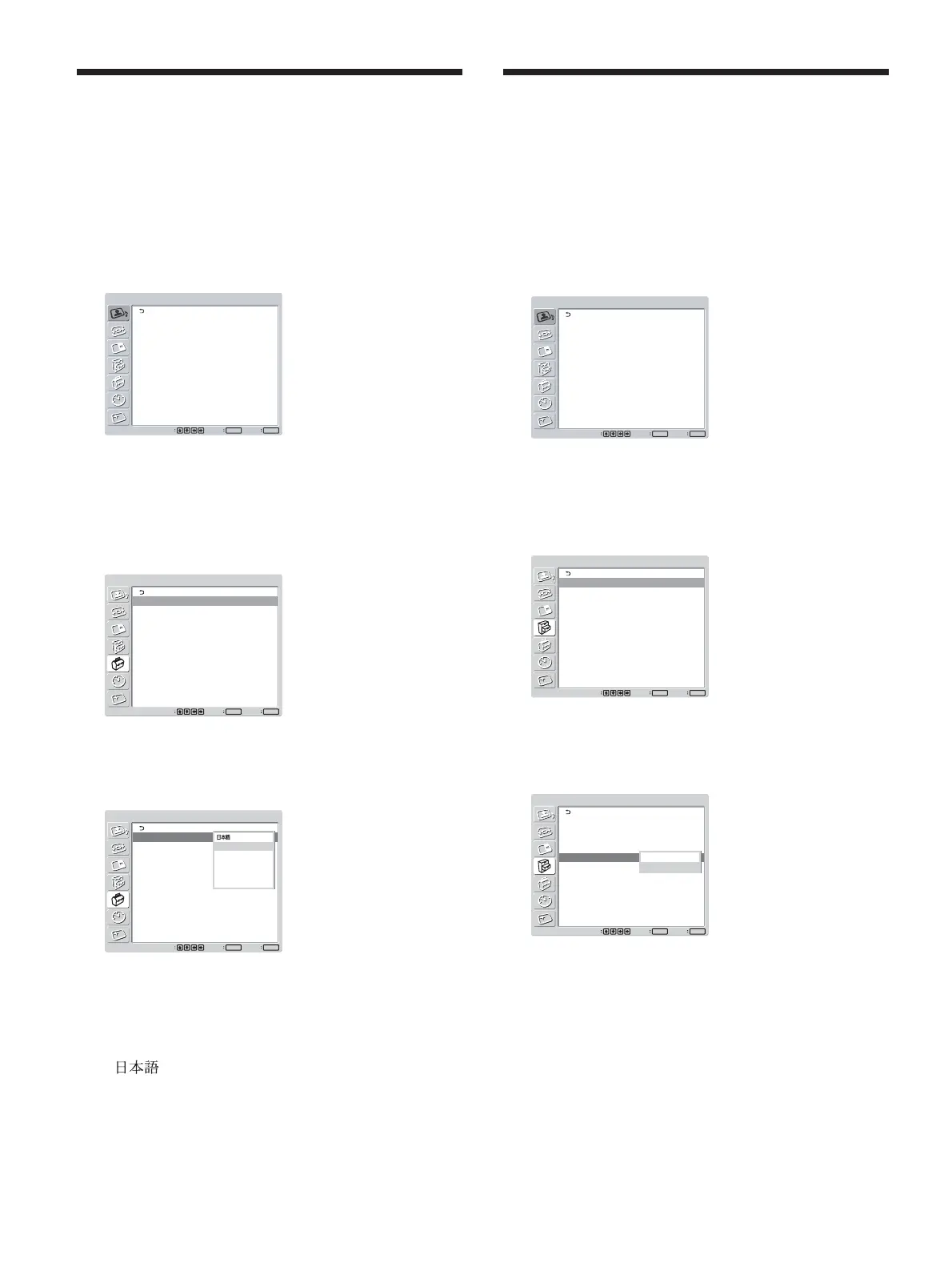
1 Press MENU.
The main menu appears on the screen.
PICTURE/SOUND CONTROL
Picture Mode:
Adjust Picture
Adjust Sound
Standard
Set
ENTER
Exit
MENU
Select
2 Press
M
/
m
to move the cursor (yellow) to
“INITIAL SETUP/INFORMATION” and press
ENTER.
The INITIAL SETUP/INFORMATION menu
appears on the screen.
INITIAL SETUP/INFORMATION
Language:
Color System:
Auto Shut Off:
Auto Screen Adjust:
Information
All Reset
English
Auto
Off
On
Set
ENTER
Exit
MENU
Select
3 Press
M
/
m
to move the cursor (yellow) to
“Language” and press ENTER.
The following menu appears on the screen.
INITIAL SETUP/INFORMATION
Language:
Color System:
Auto Shut Off:
Auto Screen Adjust:
Information
All Reset
English
Auto
Off
On
DHCP
Set
ENTER
Exit
MENU
Select
English
Deutsch
Français
Español
Italiano
4 Press
M
/
m
to move the cursor (yellow) to the
language of your choice and press ENTER.
The on-screen language is switched to the one you
have selected.
: Japanese
English: English
Deutsch: German
Français: French
Español: Spanish
Italiano: Italian
Selecting the On-screen Language / Adjusting Color Matrix
Adjusting Color Matrix
You can set Color Matrix to show pictures in natural
colors when a signal with a signal format (480I(525I),
480P(525P), 1080I(1125I), or 720P(750P)) is input to
the component input adapter.
1 Press MENU.
The main menu appears on the screen.
PICTURE/SOUND CONTROL
Picture Mode:
Adjust Picture
Adjust Sound
Standard
Set
ENTER
Exit
MENU
Select
2 Press M/m to move the cursor (yellow) to
“CUSTOM SETUP” and press ENTER.
The CUSTOM SETUP menu appears on the
screen.
CUSTOM SETUP
Power Saving:
Speaker Out:
Closed Caption:
Display:
Color Matrix:
HD Mode:
RGB Mode:
Sync Mode:
Remote
Input Setting: Selectable
Standard
Off
Off
Off
Y/PB/PR
1080i
DTV
H/Comp
Set
ENTER
Exit
MENU
Select
3 Press M/m to move the cursor (yellow) to “Color
Matrix” and press ENTER.
The following menu appears on the screen.
CUSTOM SETUP
Power Saving:
Speaker Out:
Closed Caption:
Display:
Color Matrix:
HD Mode:
RGB Mode:
Sync Mode:
Remote
Input Setting: Selectable
Standard
Off
Off
Off
Y/PB/PR
1080i
DTV
H/Comp
Set
ENTER
Exit
MENU
Select
Y/CB/CR
Y/PB/PR
4 Select the color matrix with M/m.
Y/CB/CR: When the signal format is 480I or
480P.
Y/PB/PR: When signal format is 1080I or 720P.
Refer to the operating instructions of each device for details
on the settings.
5 Press ENTER to return to the previous screen.





 To Next Page