CCD-TRV107/TRV108/TRV308/
TRV408/TRV608
RMT-708
US Model
Canadian Model
CCD-TRV108/TRV308/TRV608
E Model
CCD-TRV107/TRV108/TRV308/
TRV408/TRV608
Korea Model
CCD-TRV408
Hong Kong Model
Tourist Model
CCD-TRV107/TRV408
Argentina Model
CCD-TRV108/TRV608
Brazilian Model
CCD-TRV108
SERVICE MANUAL
M2100 MECHANISM
VIDEO CAMERA RECORDER
For MECHANISM ADJUSTMENT, refer to the “8mm
Video MECHANICAL ADJUSTMENT MANUAL
IX
M2000 MECHANISM ” (9-929-861-11).
SPECIFICATIONS
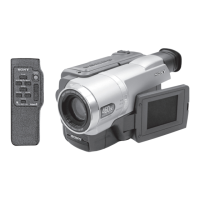
Photo : CCD-TRV108
Video camera
recorder
System
Video recording system
2 rotary heads
Helical scanning
FM system
Audio recording system
Rotary heads, FM system
Video signal
NTSC color, EIA standards
Usable cassette
8mm video format cassette
Hi8 or standard 8
Recording/playback time (using
120 min. Standard 8/Hi8 video
cassette)
SP mode: 2 hours
LP mode: 4 hours
Fastforward/rewind time (using
120 min. Standard 8/Hi8 video
cassette)
Approx. 5 min.
Viewfinder
Electric Viewfinder (monochrome)
Image device
CCD-TRV107/TRV108:
3.0 mm (1 / 6 type) CCD
(Charge Coupled Device)
Approx. 270 000 pixels
(Effective: Approx. 250 000 pixels)
CCD-TRV308/TRV408/TRV608:
4.5mm (1/4 type) CCD
(Charge Coupled Device)
Approx. 320 000 pixels
(Effective: Approx. 200 000 pixels)
Lens
Combined power zoom lens
Filter diameter 37 mm (1 7/16 in.)
CCD-TRV107:
20
× (Optical), 450× (Digital)
CCD-TRV108/TRV308:
20
× (Optical), 460× (Digital)
CCD-TRV408/TRV608:
20
× (Optical), 560× (Digital)
Focal length
3.6 - 72 mm (5/32 - 2 7/8 in.)
When converted to a 35 mm still
camera
CCD-TRV107/TRV108:
51.8 - 1 036 mm (2 - 40 6 / 8 in.)
CCD- TRV308/TRV408/TRV608:
41 - 820 mm (1 5 / 8 - 32 3 / 8 in.)
Color temperature
Auto
Minimum illumination
0.4 lx (lux) (F 1.4)
0 lx (lux) (in the NightShot mode)*
CCD-TRV308/TRV408/TRV608:
1 lx (lux) (F 1.4)
CCD-TRV107/TRV108:
* Objects unable to be seen due to
the dark can be shot with
infrared lighting.
Input/output connectors
S video output
4-pin mini DIN
Luminance signal: 1 Vp-p,
75 Ω (ohms), unbalanced
Chrominance signal: 0.286 Vp-p,
75 Ω (ohms), unbalanced
Audio/Video output
AV MINIJACK, 1 Vp-p, 75 Ω
(ohms), unbalanced, sync negative
327 mV, (at output impedance
more than 47 kΩ (kilohms))
Output impedance with less than
2.2 kΩ (kilohms)/Monaural
minijack
(ø 3.5 mm)
RFU DC OUT
Mini-mini jack (ø 2.5 mm)
DC 5V
USB jack (CCD-TRV608 only)
mini-B
LCD screen
Picture
CCD-TRV107/TRV108/TRV308/
TRV408:
6.2 cm (2.5 type)
50.3
× 37.4 mm (2 × 1 1/2 in.)
CCD-TRV608:
7.5 cm (3 type)
61.0
× 43.8 mm (2 1/2 × 1 3/4 in.)
Total dot number
CCD-TRV107/TRV108/TRV308/
TRV408:
61 600 (280
× 220)
CCD-TRV608:
123 200 (560
× 220)
General
Power requirements
7.2 V (battery pack)
8.4 V (AC power adaptor)
Average power consumption
(when using the battery pack)
During camera recording using
LCD
CCD-TRV107/TRV108/TRV308/
TRV408: 2.6 W
CCD-TRV608: 3.1 W
Viewfinder
1.9 W
Operating temperature
0 °C to 40 °C (32 °F to 104 °F)
Recommended charging
temperature
10 °C to 30 °C (50 °F to 86 °F)
Storage temperature
–20 °C to +60 °C (–4 °F to +140 °F)
Dimensions (Approx.)
90
× 102 × 197 mm
(3 5/8
× 4 1/8 × 7 7/8 in.)
(w/h/d)
— Continued on next page —
Ver 1.1 2002. 03


 To Next Page
 General








