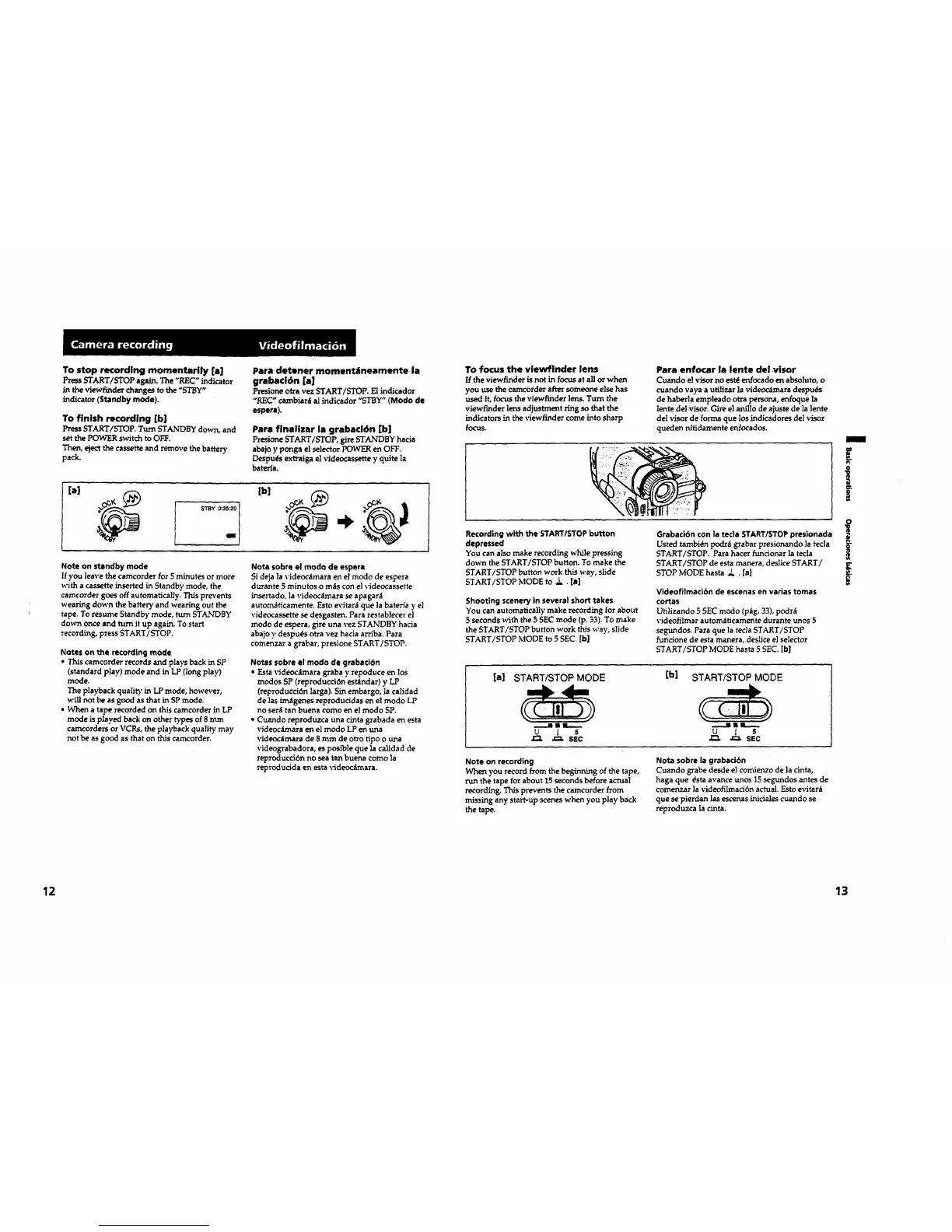
To stop recording momentarily [a]
Press START/STOP again. The "REC"indicator
in the viewfinder changes tothe "STBY"
indicator (Standby mode).
To finish recording [b]
PressSTART/STOP. Turn STANDBY down, and
setthePOWER switchtoOFF.
Then, ejectthecassetteand remove thebattery
pack.
Para detaner moment_tnearnente la
grabad6n [a]
Presioneo_'avez START/STOP. El indicador
"REC" cambiar_ al indicador "STBY" (Modo de
espera).
Para finalizar la grabaci6n [b]
Presione START/STOP, gireSTANDBY hacia
abajoy ponga elselectorPOWER en OFF,
Despu_s extraigaelvideocassettey quitela
baterJa.
[a]
Note on standby mode
Ifyou leavethecamcorder for5 minutes ormore
witha cassetteinsertedinStandby mode, the
camcordergoes offautomatically."I'hisprevents
wearingdown thebatteryand wearingout the
tape.To resume Standbymode, turnSTANDBY
down onceand turnitup again.To start
recording,pressSTART/STOP.
Notes on the recordingmode
* Thiscamcorder recordsand playsbackinSP
(standardplay)mode and inLP (longplay)
mode.
The playbackqualityinLP mode, however,
willnot be asgood asthatinSP mode.
. When a taperecordedon thiscameorder in LP
mode isplayed backon othertypesof 8 mm
camcordersor VCRs, theplaybackqualitymay
notbe asgood asthaton thiscamcorder.
Note sobre elmodo de espera
Sidejalavideoc_mara en elmodo de espera
durante 5 minutos o m_ts con el \'ideocassette
insertado, la videoc_mara se apagar_
autom_ficamente. Esto evitar_ que ]a bateHa y el
videocassette se desgasten. Para restablecer el
modo de espera, gire una vez STANDBY hacia
abajo y despu_s otTavez hacia arriba. Para
comenzar a grabar, preslone START/STOP.
Notes sobre el modo de grabacl6n
• Esta videocdmara graba y repoduce en los
modos SP (reproducci6n estdndar) y LP
(reproducci6n larga). Sin embargo, ]a calidad
de ]as im_fgenes reproducidas en el modo LP
no ser_; tan buena como en el modo SP.
• Cuando reproduzca una cinta grabada en esta
videocdmara en el modo LP en uLna
_'ideoc_mara de 8 mm de otto tipo o una
videograbadora, es poslble que la calidad de
reproducci6n no sea tan buena como ]a
reproducida en esta \_deoc_imara.
To focus the vlewfinder lens
If the viewfinder is not in focus at all or when
you use the camcorder after someone else has
used it, focus the viewfinder lens. Turn the
viewfinder lens adjustment ring so that the
indicators in the viewfinder come into sharp
focus.
Para enfocar la lente del visor
Cuando el visor no est_ enfocado en absoluto, o
cuando vaya a utilizer la vide_ara despu_s
de haberla empleado otra persona, enfoque ]a
lente del visor. Gire el anillo de ajuste de la ]ente
del visor de forma que los indicadores del visor
queden nitidamente enfocados.
Recording with the STARTISTOP button
depressed
You can also make recording while pressing
down the START/STOP button. To make the
START/STOP button work this way, slide
START/STOP MODE to ! . [el
Shooting sceneryinseveralshorttakes
You can automaticallymake recordingforabout
5 secondswith the5 SEC mode (p.33).To make
theSTART/STOP buttonwork thisway, slide
START/STOP MODE to 5 SEC. [b]
Grabacibn con la tecla START/STOP presionada
Usted tambidn podrd grabar presionando ]atecla
START/STOP. Para hater funcionar ]a tecla
START/STOP de esta manera, deslice START/
STOP MODE hasta Z . [a]
Vldeofilmaci6n de escenasen varias tomas
€ortas
Utilizando 5 SEC modo (p_g. 33), podr_
videofilmar autom_ticamente durante unos 5
segundos. Para que la tecla START/STOP
funcione de esta manera, deslice el selector
START/STOP MODE haste 5 SEC. [b]
[a] START/STOP MODE
[b] START/STOP MODE
u i s u l s
J_ ._, SEC
Note on recording
When you record from the beginning of the tape,
run the tape for about 15 seconds before actual
recording. This prevents the camcorder from
missing any start-up scenes when you play back
the tape.
Note sobre la grabaci6n
Cuando grebe desde el comJenzode la cinta,
haga que _sta avance unos 15 segundos antes de
comenzar la videofilmaci6n actual. Esto evitar_t
que se pierdan las escenas iniciales cuando se
reproduzca la cinta.
m
E
o
12 13









 To Next Page