About:
Shows the current version and the copyright year of HAP Music Transfer.
Exit:
Quits HAP Music Transfer.
[14] Using menus (Windows)
Using the context menu for the HAP Music Transfer task
tray icon (Windows only)
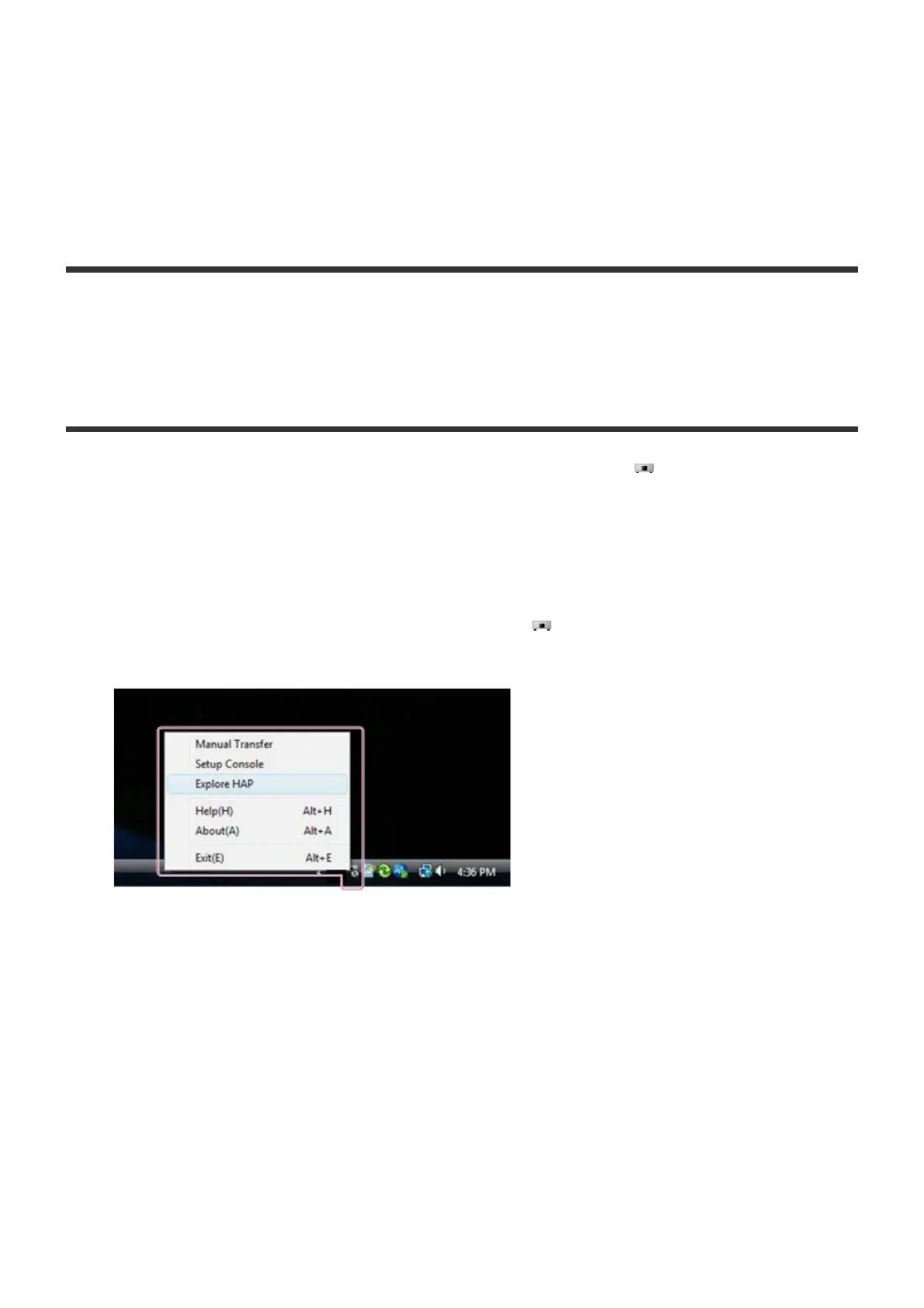
You can use the context menu, which can be displayed from (the HAP Music
Transfer icon) in the task tray, to start file transfer, open the HAP Music Transfer
operation window, open the explorer and display the hard disk drive of the HDD
AUDIO PLAYER, and more.
1. Right-click (tap and hold on the touch panel) in the task tray.
The context menu appears.
2. Select the desired item.
Descriptions of the displayed item
The following items can be selected.
Manual Transfer/Stop Transferring:
Select [Manual Transfer] to start the transfer of music files immediately.
[Stop Transferring] appears during the transfer, and can be used to stop the transfer.
Setup Console:
Opens a HAP Music Transfer window.



 To Next Page