EasyManua.ls Logo

Sony HCD-H170 - Page 8

Sony HCD-H170
91 pages
Print Icon
To Next Page IconTo Next Page
To Previous Page IconTo Previous Page
Loading...
iy
eis
ing!
16
Rehan
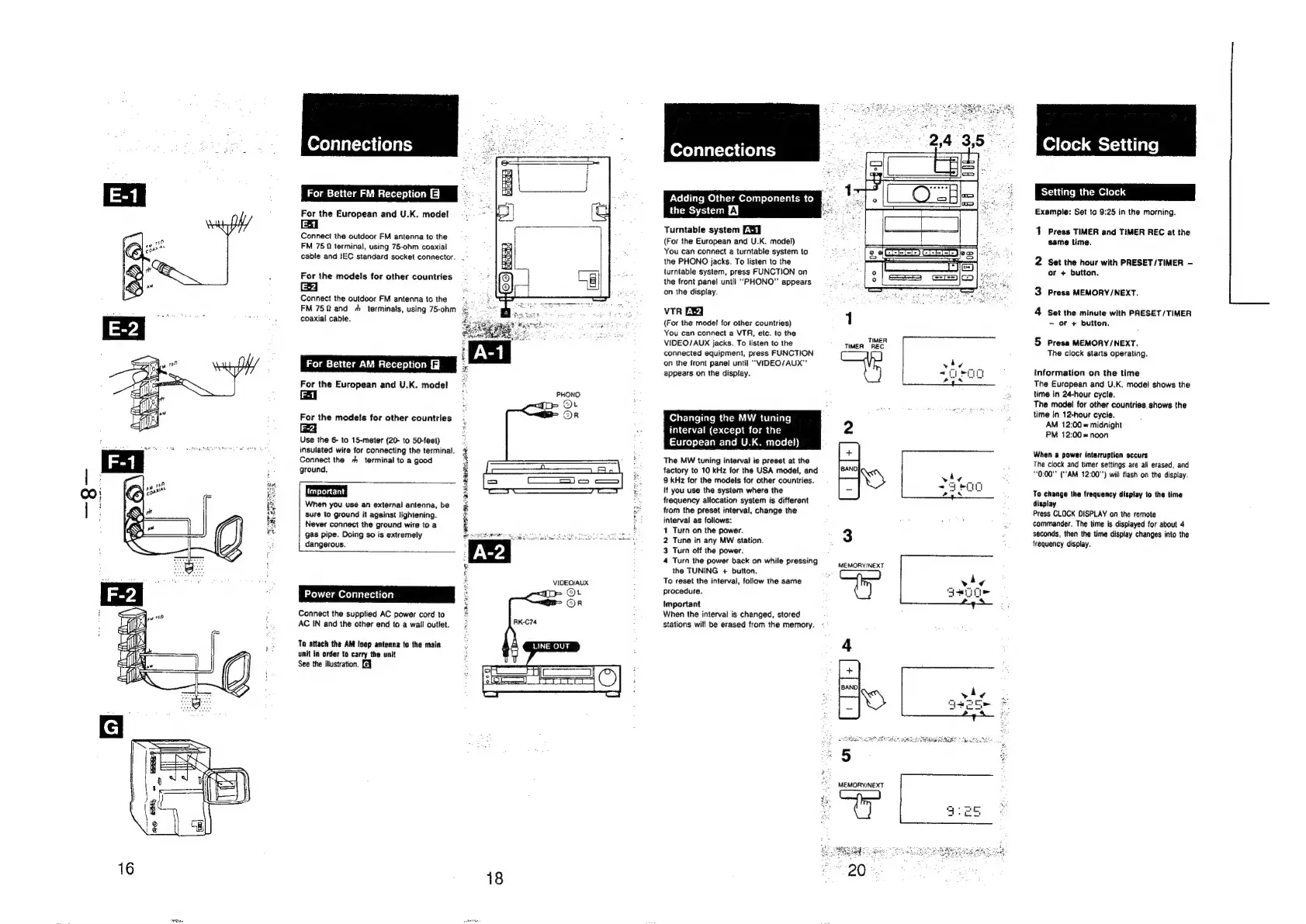
Connections
For
Better
FM
Reception
&
3
For
the
European
and
U.K.
model
1E-1
Connect
the
outdoor
FM
antenna
to
the
FM
75
2
terminal,
using
75-ohm
coaxial
cable
and
!EC
standard
socket
connector.
-
For
the
models
for
other
countries
ea
Connect
the
outdoor
FM
antenna
to
the
j
FM
752
and
+h
terminals,
using
75-ohm
=
coaxial
cable.
For
Better
AM
Reception
For
the
European
and
U.K.
model
For
the
models
for
other
countries
ewe
Use
the
6-
to
15-meter
(20-
to
50-feet)
insulated
wire
for
connecting
the
terminal.
Connect
the
+
terminal
to
a
good
ground.
When
you
use
an
external
antenna,
be
sure
to
ground
it
against
lightening.
Never
connect
the
ground
wire
to
a
gas
pipe.
Doing
so
is
extremely
dangerous.
ER
RE
AE
NRRL
EE
Power
Connection
Connect
the
supplied
AC
power
cord
to
AC
IN
and
the
other
end
to
a
wail
outlet.
RK-C74
To
attach
the
AM
loop
antenna
to
the
main
unit
in
order
to
carry
the
unit
3
See
the
illustration.
[e¥
VIDEO/AUX
D>
Ot
Or
LINE
OUT
18
Adding
Other
Components
to
the
System
EY
Turntable
system
DS]
(For
the
European
and
U.K.
model)
You
can
connect
a
turntable
system
to
the
PHONO
jacks.
To
listen
to
the
turntable
system,
press
FUNCTION
on
the
front
panel
until
“PHONO”
appears
‘on
the
display.
VTR
Ey
(For
the
model
for
other
countries)
You
can
connect
a
VTR,
etc.
to
the
VIDEO/AUX
jacks.
To
listen
to
the
connected
equipment,
press
FUNCTION
on
the
front
panel
until
“VIDEO/AUX”’
appears
on
the
display.
Changing
the
MW
tuning
interval
(except
for
the
European
and
U.K.
mode!)
The
MW
tuning
interval
is
preset
at
the
factory
to
10
kHz
for
the
USA
model,
and
9
kHz
for
the
models
for
other
countries.
if
you
use
the
system
where
the
frequency
allocation
system
is
different
from
the
preset
interval,
change
the
interval
as
follows:
1
Turn
on
the
power.
2
Tune
in
any
MW
station.
3
Turn
off
the
power.
4
Turn
the
power
back
on
while
pressing
the
TUNING
+
button.
To
reset
the
interval,
follow
the
same
procedure.
Important
When
the
interval
is
changed,
stored
stations
will
be
erased
from
the
memory.
1
TIMER:
TIMER
REC
MEMORY/NEXT
MEMORY/NEXT
~
*
Clock
Setting
Setting
the
Clock
Example:
Set
to
9:25
in
the
morning.
1
Press
TIMER
and
TIMER
REC
at
the
same
time,
2
Set
the
hour
with
PRESET/TIMER
-
or
+
button.
3
Press
MEMORY
/NEXT.
4
Set
the
minute
with
PRESET
/TIMER
-
oF
+
button,
5
Press
MEMORY/NEXT.
The
clock
starts
operating.
Information
on
the
time
The
European
and
U.K.
model
shows
the
time
in
24-hour
cycle.
The
model
for
other
countries.
shows
the
time
In
12-hour
cycie.
AM
12:00
=
midnight
PM
12:00
=
noon
When
a
power
interruption
occurs
The
clock
and
timer
settings
are
all
erased,
and
“0:00""
(‘"AM
12:00")
will
flash
on
the
display.
To
change
the
frequency
display
to
the
time
display
Press
CLOCK
DISPLAY
on
the
remote
commander.
The
time
is
displayed
for
about
4
seconds,
then
the
time
display
changes
into
the
frequency
display.

Related product manuals