EasyManua.ls Logo

Sony HCD-H170 - Page 9

Sony HCD-H170
91 pages
Print Icon
To Next Page IconTo Next Page
To Previous Page IconTo Previous Page
Loading...
OBFB
$-SUA
a
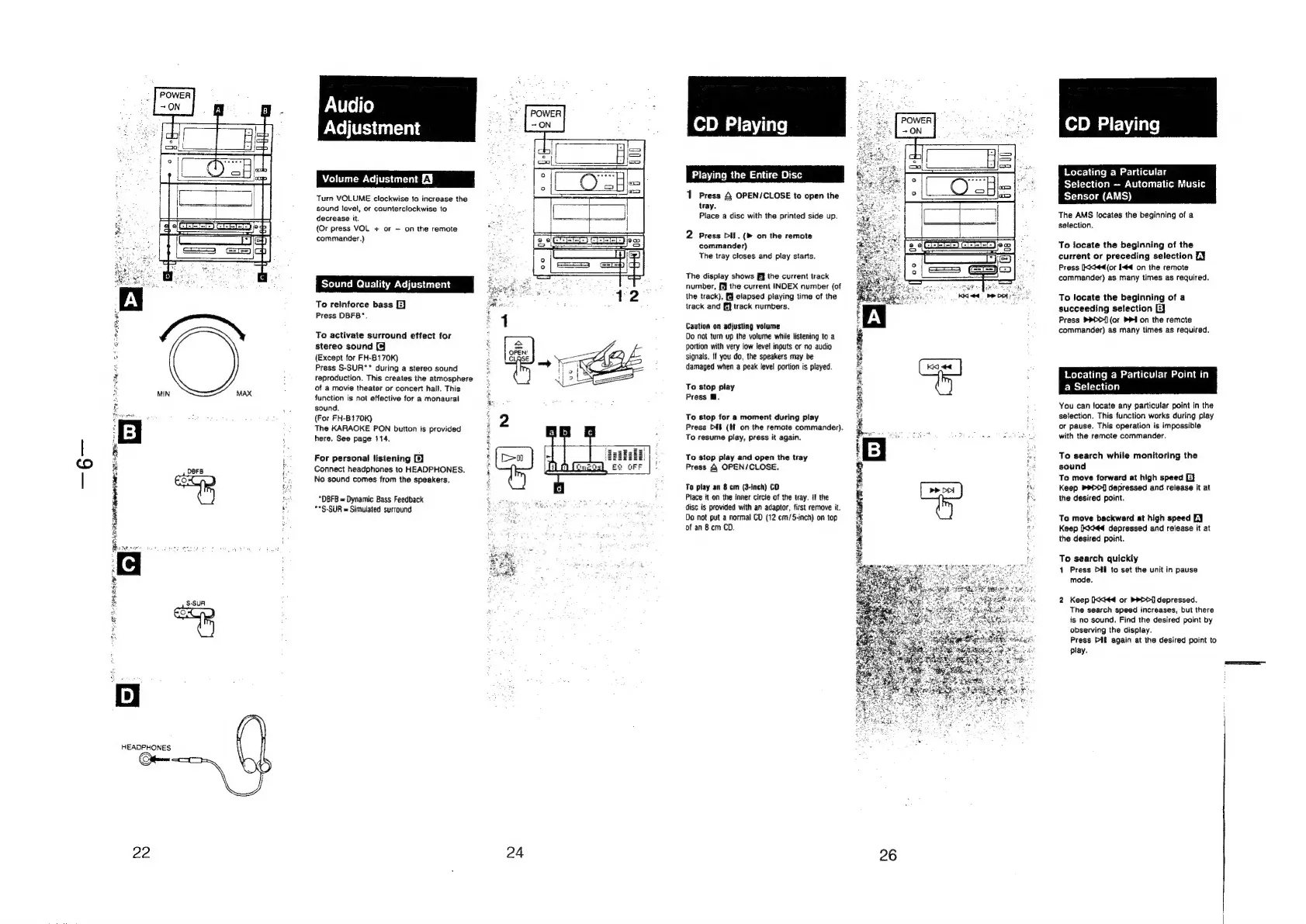
Audio
Adjustment
Volume
Adjustment
£¥
Turn
VOLUME
clockwise
to
increase
the
sound
level,
or
counterclockwise
to
decrease
it.
(Or
press
VOL
+
or
on
the
remote
commander.)
Sound
Quality
Adjustment
To
reinforce
bass
EJ
Press
DBFB*.
To
activate
surround
effect
for
stereo
sound
[9
(Except
for
FH-B170K)
Press
S-SUR**
during
a
stereo
sound
reproduction.
This
creates
the
atmosphere
of
a
movie
theater
or
concert
hall.
This
function
is
not
effective
for
a
monaural
sound.
(For
FH-B170K)
The
KARAOKE
PON
button
is
provided
here,
See
page
114.
For
personal
listening
2)
Connect
headphones
to
HEADPHONES.
No
sound
comes
from
the
speakers.
“DBFB
=
Dynamic
Bass
Feedback
**§-SUR
=
Simulated
surround
Eo
OFF
SOE
LAE
EB
aR
Rete
24
CD
Playing
Playing
the
En
Cc
1
Press
&
OPEN/CLOSE
to
open
the
tray.
Place
a
disc
with
the
printed
side
up.
2
Press
Di.
(>
on
the
remote
commander)
The
tray
closes
and
play
starts.
The
display
shows
Ff]
the
current
track
number,
[J
the
current
INDEX
number
(of
the
track),
elapsed
playing
time
of
the
track
and
i}
track
numbers.
Caution
on
adjusting
volume
Do
not
turn
up
the
volume
while
listening
to
a
portion
with
very
low
level
inputs
or
no
audio
signals.
If
you
do,
the
speakers
may
be
damaged
when
a
peak
level
portion
is
played.
To
stop
play
Press
Ml.
To
stop
for
a
moment
during
play
Press
Dit
(tf
on
the
remote
commander).
To
resume
play,
press
it
again.
To
stop
play
and
open
the
tray
Press
&
OPEN/CLOSE.
To
play
an
8
cm
(3-inch)
CD
Piace
it
on
the
inner
circle
of
the
tray.
if
the
disc
is
provided
with
an
adaptor,
first
remove
it.
Do
not
put
a
normal
CD
(12
cm/5-inch)
on
top
of
an
8cm
CD.
CD
Playing
Locating
a
Particular
Selection
Automatic
Music
Sensor
(AMS)
The
AMS
locates
the
beginning
of
a
selection.
To
locate
the
beginning
of
the
current
or
preceding
selection
LY
Press
[Kkiéd(or
I44
on
the
remote
commander)
as
many
times
as
required.
To
locate
the
beginning
of
a
succeeding
setection
[EE]
Press
>PD>{
(or
PPI
on
the
remote
commander)
as
many
times
as
required.
Locating
a
Particular
Point
i
a
Selection
You
can
locate
any
particular
point
in
the
selection.
This
function
works
during
play
or
pause.
This
operation
is
impossible
with
the
remote
commander.
To
search
while
monitoring
the
sound
To
move
forward
at
high
speed
E}
Keep
PDD]
depressed
and
release
it
at
the
desired
point.
To
move
backward
at
high
speed
[J
Keep
Ikk#44
depressed
and
release
it
at
the
desired
point.
To
search
quickly
1
Press
Dil
to
set
the
unit
in
pause
mode.
2
Keep
Ixki¢4
or
PDD]
depressed.
The
search
speed
increases,
but
there
is
no
sound.
Find
the
desired
paint
by
observing
the
display.
Press
DIE
again
at
the
desired
point
to
play.

Related product manuals