EasyManua.ls Logo

Sony HCD-H7 - Page 12

Sony HCD-H7
54 pages
Print Icon
To Next Page IconTo Next Page
To Previous Page IconTo Previous Page
Loading...
HCD-H7/H1500
|
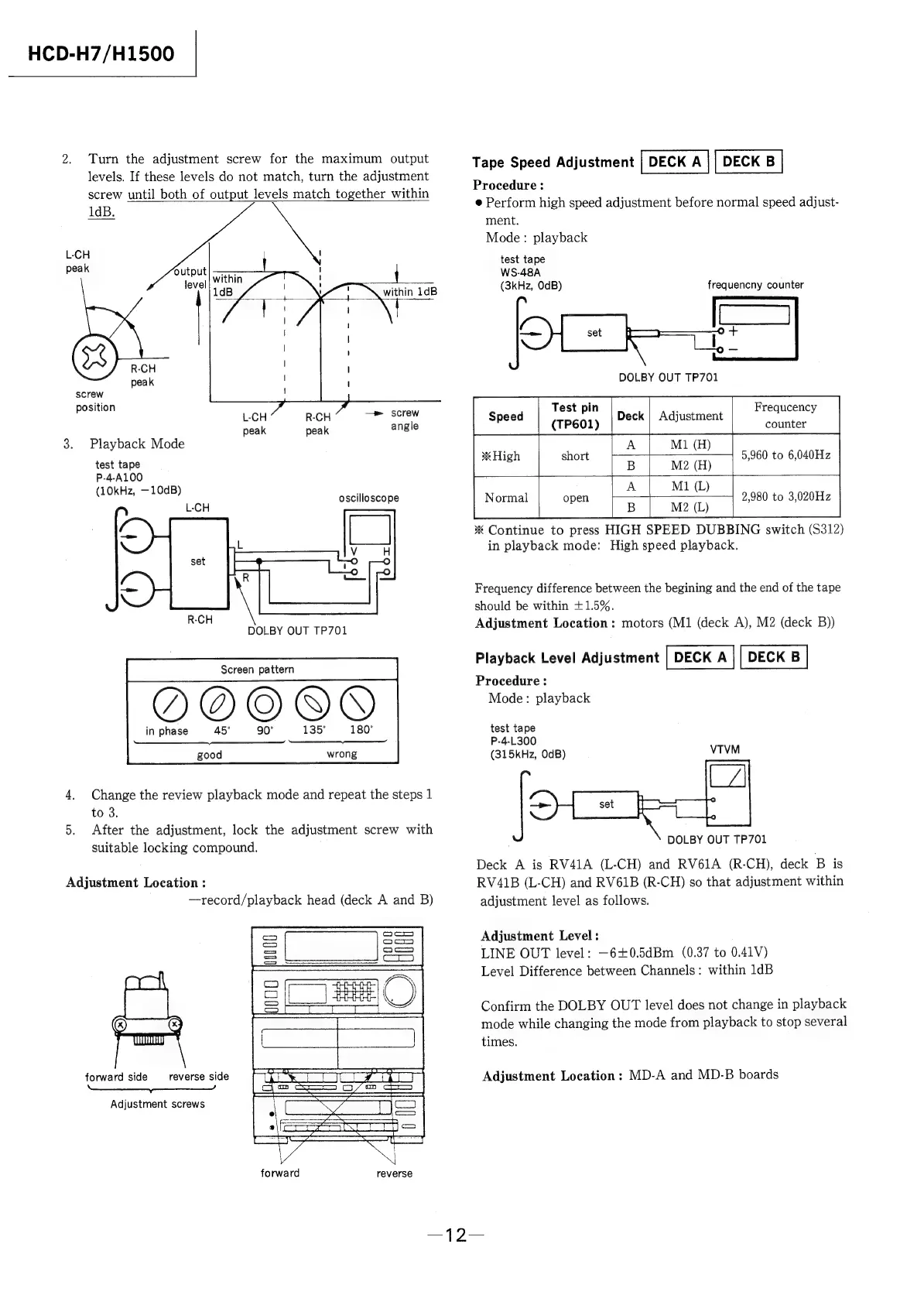
2.
Turn
the
adjustment
screw
for
the
maximum
output
levels.
If
these
levels
do
not
match,
turn
the
adjustment
screw
until
both
of
output
levels
match
together
within
1dB.
L-CH
peak
within
1dB
R-CH
peak
screw
position
L-CH
R-CH
ee
Ree
peak peak
angle
3.
Playback
Mode
test
tape
P-4-A100
(10kHz,
—10dB)
;
oscilloscope
L-CH
DOLBY
OUT
TP701
Screen
pattern
in
phase
45°
90°
135° 180°
need
good
wrong
4.
Change
the
review
playback
mode
and
repeat
the
steps
1
to
3.
5.
After
the
adjustment,
lock
the
adjustment
screw
with
suitable
locking
compound.
Adjustment
Location
:
—record/playback
head
(deck
A
and
B)
forward
side
reverse
side
Adjustment
screws
forward
reverse
Tape
Speed
Adjustment
Procedure:
@
Perform
high
speed
adjustment
before
normal
speed
adjust-
ment.
Mode:
playback
test
tape
WS-48A
(3kHz,
OdB)
k
|
otf
DOLBY
OUT
TP701
frequencny
counter
Test
pin
(TP601)
Frequcency
counter
Adjustment
5,960
to
6,040Hz
M2
(H)
M1
(L)
2,980
to
3,020Hz
M2
(L)
*
Continue
to
press
HIGH
SPEED
DUBBING
switch
(S312)
in
playback
mode:
High
speed
playback.
*
High
i
short
Normal
open
Frequency
difference
between
the
begining
and
the
end
of
the
tape
should
be
within
+1.5%.
Adjustment
Location:
motors
(M1
(deck
A),
M2
(deck
B))
Playback
Level
Adjustment
Procedure
:
Mode:
playback
test
tape
P-4-L300
(315kHz,
OdB)
DOLBY
OUT
TP701
Deck
A
is
RV41A
(L-CH)
and
RV61A
(R-CH),
deck
B
is
RV41B
(L-CH)
and
RV61B
(R-CH)
so
that
adjustment
within
adjustment
level
as
follows.
Adjustment
Level
:
LINE
OUT
level:
—6+0.5dBm
(0.37
to
0.41V)
Level
Difference
between
Channels:
within
1dB
Confirm
the
DOLBY
OUT
level
does
not
change
in
playback
mode
while
changing
the
mode
from
playback
to
stop
several
times.
Adjustment
Location
:
MD-A
and
MD-B
boards

Related product manuals