EasyManua.ls Logo

Sony HCD-H700 - CD Playing; Playing in a Random Order - Shuffle Play; To stop playing; To cancel shuffle play

Sony HCD-H700
91 pages
Print Icon
To Next Page IconTo Next Page
To Previous Page IconTo Previous Page
Loading...
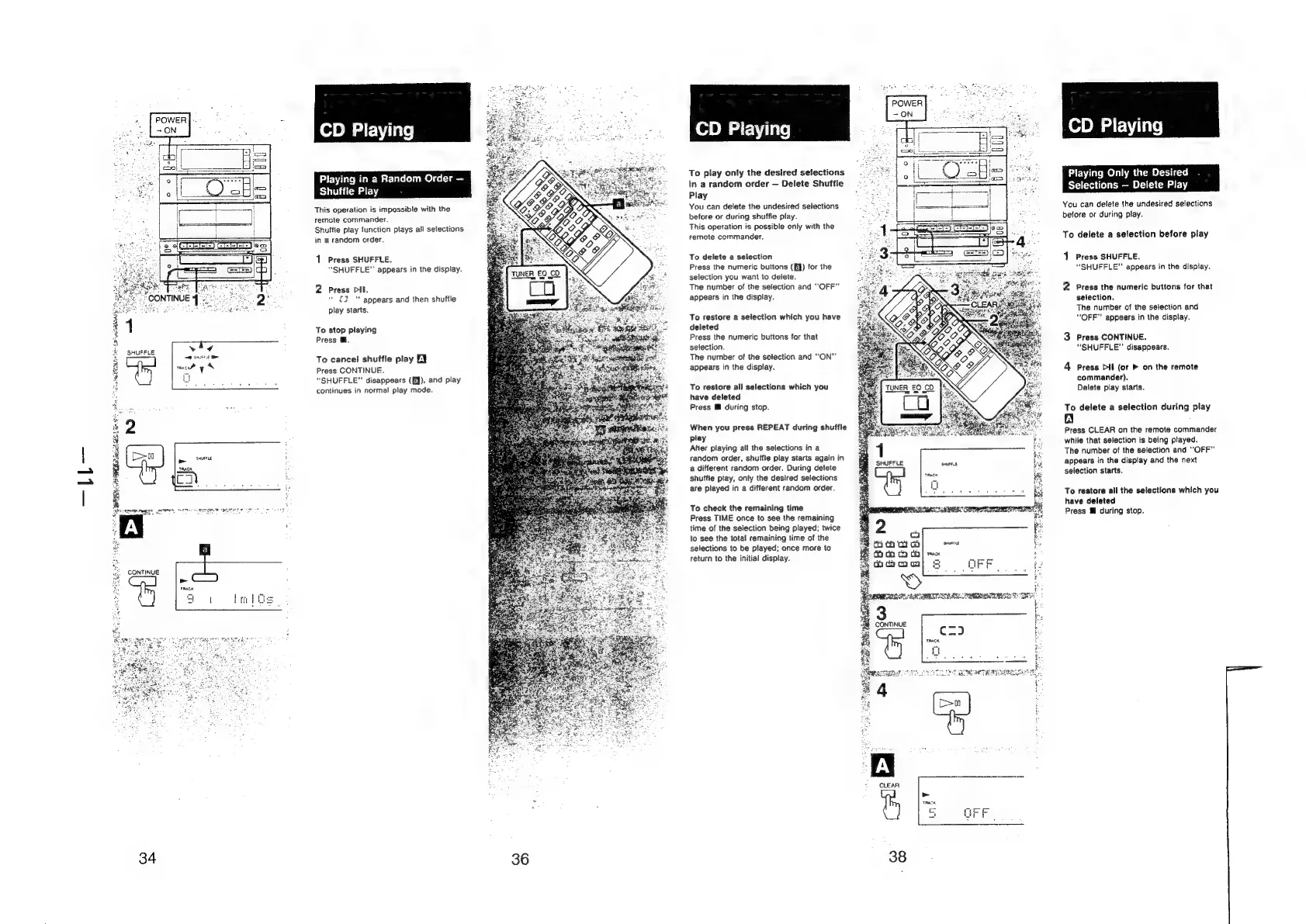
SHUFFLE
CONTINUE
oi
34
vomrgtneme
pemien
sown
So
Playing
in
a
Random
Order
Shuffie
Play
This
operation
is
impossible
with
the
remote
commander.
Shuffle
play
function
plays
all
selections
in
a
random
order.
1
Press
SHUFFLE.
“SHUFFLE”
appears
in
the
display.
2
Press
Dil.
"'
appears
and
then
shuffle
play
starts,
“oe
2
To
stop
playing
Press
@.
To
cancel
shuffle
play
EY
Press
CONTINUE.
“SHUFFLE”
disappears
(EJ),
and
play
continues
in
normal
play
mode.
36
CD
Playing
To
play
only
the
desired
selections
in
a
random
order
—
Delete
Shuffle
Play
You
can
delete
the
undesired
selections
before
or
during
shuffle
play.
This
operation
is
possible
only
with
the
remote
commander.
To
delete
a
selection
Press
the
numeric
buttons
(EY)
for
the
selection
you
want
to
delete.
The
number
of
the
selection
and
“OFF”
appears
in
the
display.
To
restore
a
selection
which
you
have
deleted
Press
the
numeric
buttons
for
that
selection.
The
number
of
the
selection
and
“ON”
appears
in
the
display.
To
restore
all
selections
which
you
have
deleted
Press
M
during
stop.
When
you
press
REPEAT
during
shuffle
play
After
playing
all
the
selections
in
a
random
order,
shuffte
play
starts
again
in
a
different
random
order.
During
delete
shuffle
play,
only
the
desired
selections
are
played
in
a
different
random
order.
To
check
the
remaining
time
Press
TIME
once
to
see
the
remaining
time
of
the
selection
being
played;
twice
to
see
the
total
remaining
time
of
the
selections
to
be
played;
once
more
to
return
to
the
initial
display.
cx)
TRACK
-CD
Playing
Playing
Only
the
Desired
Selections
—
Delete
Play
You
can
delete
the
undesired
selections
before
or
during
play.
To
delete
a
selection
before
play
1
Press
SHUFFLE.
“SHUFFLE”
appears
in
the
display.
2
Press
the
numeric
buttons
for
that
selection.
The
number
of
the
selection
and
“OFF”
appears
in
the
display.
3
Press
CONTINUE.
“SHUFFLE”
disappears.
4
Press
Dil
(or
>
on
the
remote
commander).
Delete
play
starts.
To
delete
a
selection
during
play
A
Press
CLEAR
on
the
remote
commander
while
that
selection
is
being
played.
The
number
of
the
selection
and
“OFF”
appears
in
the
display
and
the
next
selection
starts.
To
restore
all
the
selections
which
you
have
deleted
Press
™
during
stop.