EasyManua.ls Logo

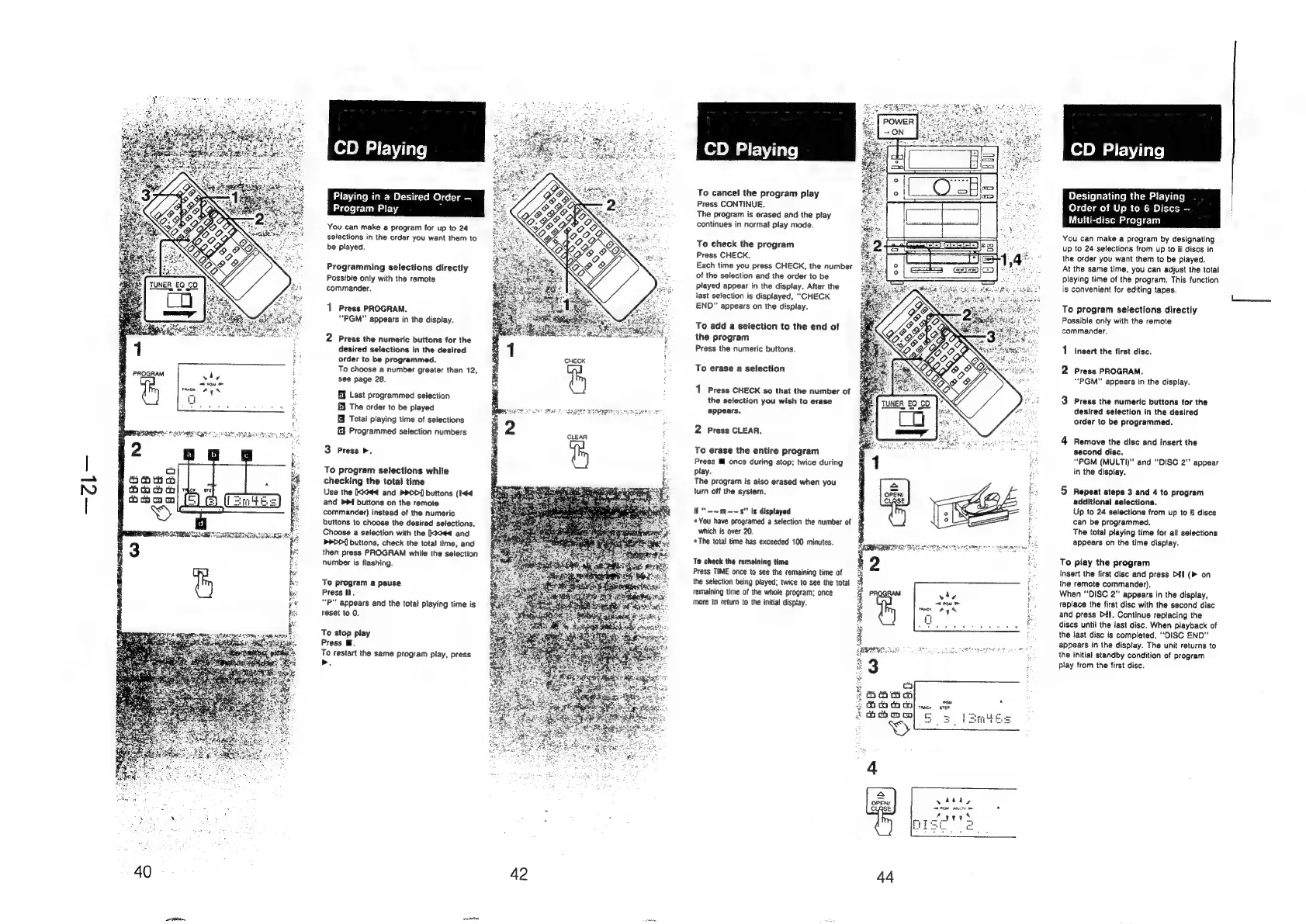
Sony HCD-H700 - CD Playing; Playing in a Desired Order - Program Play; To program selections directly; To program selections while checking the total time

Sony HCD-H700
91 pages
Print Icon
To Next Page IconTo Next Page
To Previous Page IconTo Previous Page
Loading...
Playing
in
a
Desired
Order
Program
Play
You
can
make
a
program
for
up
to
24
selections
in
the
order
you
want
them
to
be
played.
Programming
selections
directly
Possible
only
with
the
remote
commander.
1
Press
PROGRAM.
“PGM"
appears
in
the
display.
2
Press
the
numeric
buttons
for
the
desired
selections
in
the
desired
order
to
be
programmed,
To
choose
a
number
greater
than
12,
see
page
28.
Ef
Last
programmed
selection
EY
The
order
to
be
played
Total
playing
time
of
selections
J
Programmed
selection
numbers
3
Press
>.
To
program
selections
while
checking
the
total
time
Use
the
Ikki
and
>>D>D]
buttons
(I-44
and
bP
buttons
on
the
remote
commander)
instead
of
the
numeric
buttons
to
choose
the
desired
selections.
Choose
a
selection
with
the
kkkd
and
>rDD{]
buttons,
check
the
total
time,
and
then
press
PROGRAM
while
the
selection
number
is
flashing.
To
program
a
pause
Press
Hl.
“P"
appears
and
the
total
playing
time
is
reset
to
0.
To
stop
play
Press
Ml.
To
restart
the
same
program
play,
press
>.
40 42
CD
Playing
To
cancel
the
program
play
Press
CONTINUE.
The
program
is
erased
and
the
play
continues
in
normal
play
mode.
To
check
the
program
Press
CHECK.
Each
time
you
press
CHECK,
the
number
of
the
selection
and
the
order
to
be
played
appear
in
the
display.
After
the
last
selection
is
displayed,
‘““CHECK
END"
appears
on
the
display.
To
add
a
selection
to
the
end
of
the
program
Press
the
numeric
buttons.
To
erase
a
selection
1
Press
CHECK
so
that
the
number
of
the
selection
you
wish
to
erase
appears.
2
Press
CLEAR.
To
erase
the
entire
program
Press
Ml
once
during
stop;
twice
during
Play.
The
program
is
also
erased
when
you
turn
off
the
system.
ii
“--m~~s"
is
displayed
You
have
programed
a
selection
the
number
of
which
is
over
20.
«The
total
time
has
exceeded
100
minutes.
To
check
the
remaining
time
Press
TIME
once
to
see
the
remaining
time
of
the
selection
being
played;
twice
to
see
the
total
remaining
time
of
the
whole
program;
once
more
to
return
to
the
initial
disptay.
WR
RE
eid
44
CD
Playing
Designating
the
Playing
Order
of
Up
to
6
Discs
—
Multi-disc
Program
You
can
make
a
program
by
designating
up
to
24
selections
from
up
to
6
discs
in
the
order
you
want
them
to
be
played.
At
the
same
time,
you
can
adjust
the
total
playing
time
of
the
program.
This
function
is
convenient
for
editing
tapes.
To
program
selections
directly
Possible
only
with
the
remote
commander.
1
Insert
the
tirst
disc.
2
Press
PROGRAM.
“PGM"
appears
in
the
display.
3
Press
the
numeric
buttons
for
the
desired
selection
in
the
desired
order
to
be
programmed.
4
Remove
the
disc
and
insert
the
second
disc,
“PGM
(MULTI)”
and
“DISC
2"
appear
in
the
display.
5
Repeat
steps
3
and
4
to
program
additional
selections.
Up
to
24
selections
from
up
to
6
discs
can
be
programmed.
The
total
playing
time
for
all
selections
appears
on
the
time
display.
To
play
the
program
Insert
the
first
disc
and
press
DHf
(
on
the
remote
commander).
When
“DISC
2"
appears
in
the
display,
replace
the
first
disc
with
the
second
disc
and
press
Dil.
Continue
replacing
the
discs
until
the
last
disc.
When
playback
of
the
last
disc
is
completed,
“DISC
END”’
appears
in
the
display.
The
unit
returns
to
the
initial
standby
condition
of
program
play
from
the
first
disc.