EasyManua.ls Logo

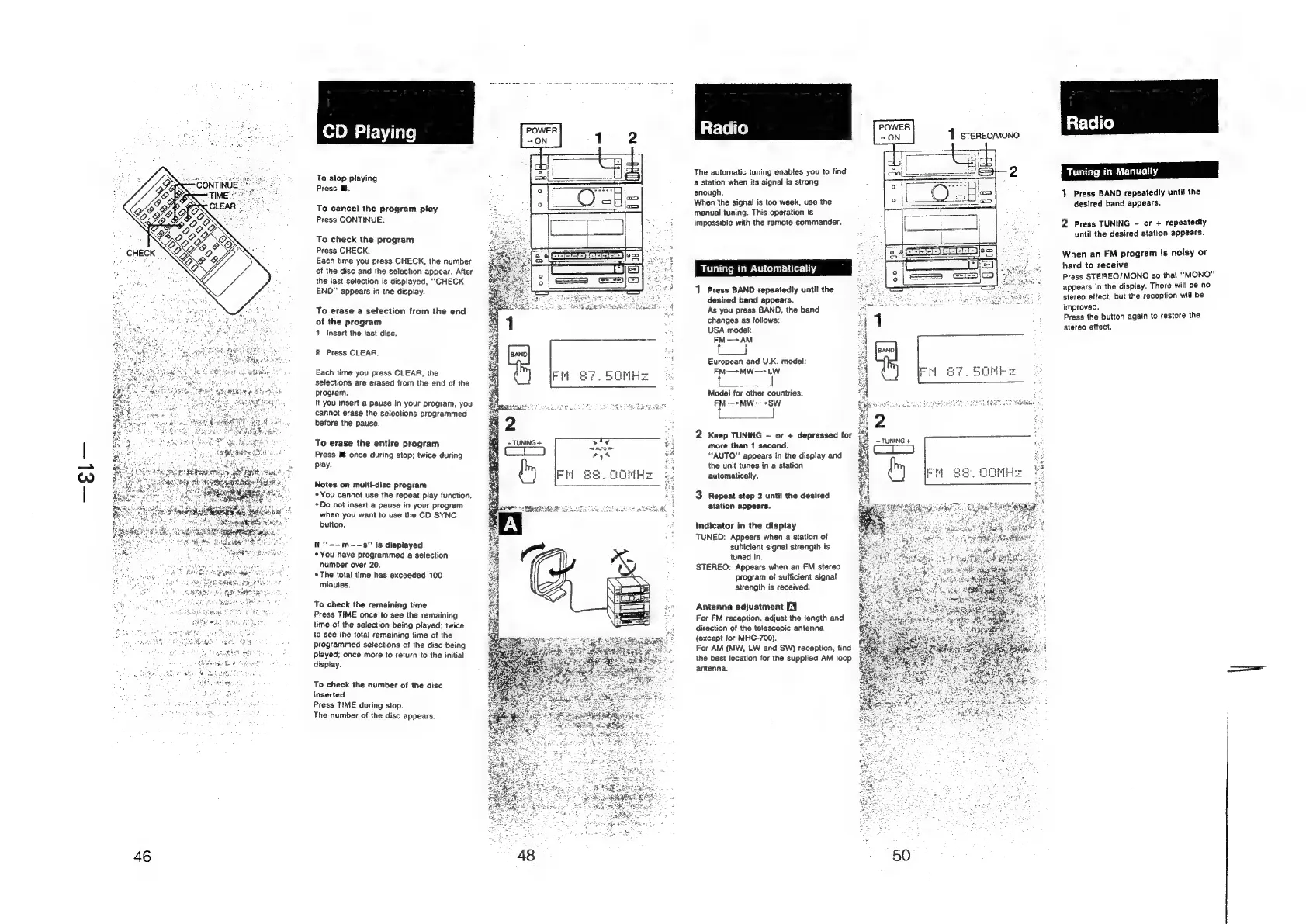
Sony HCD-H700 - CD Playing; To stop recording; To cancel the program play; To check the program

Sony HCD-H700
91 pages
Print Icon
To Next Page IconTo Next Page
To Previous Page IconTo Previous Page
Loading...
.
RegeEN
ie
To
stop
playing
Press
@.
To
cancel
the
program
piay
Press
CONTINUE.
To
check
the
program
Press
CHECK.
Each
time
you
press
CHECK,
the
number
of
the
disc
and
the
selection
appear.
After
the
last
selection
is
displayed,
“CHECK
END”
appears
in
the
display.
To
erase
a
selection
from
the
end
of
the
program
1.
Insert
the
fast
disc.
2
Press
CLEAR.
Each
time
you
press
CLEAR,
the
selections
are
erased
from
the
end
of
the
program.
If
you
insert
a
pause
in
your
program,
you
cannot
erase
the
seiections
programmed
before
the
pause.
To
erase
the
entire
program
Press
Mf
once
during
stop;
twice
during
play.
Notes
on
multi-dise
program
*
You
cannot
use
the
repeat
play
function.
*Do
not
insert
a
pause
in
your
program
when
you
want
to
use
the
CD
SYNC
button.
if
'*-~m--s”
is
displayed
*
You
have
programmed
a
selection
number
over
20.
+The
total
time
has
exceeded
100
minutes.
To
check
the
remaining
time
Press
TIME
once
to
see
the
remaining
time
of
the
selection
being
played;
twice
to
see
the
total
remaining
time
of
the
programmed
selections
of
the
disc
being
played;
once
more
to
return
to
the
initial
display.
To
check
the
number
of
the
disc
inserted
Press
TIME
during
stop.
The
number
of
the
disc
appears.
46
The
automatic
tuning
enables
you
to
find
a
station
when
its
signal
is
strong
enough.
When
the
signal
is
too
week,
use
the
manual
tuning.
This
operation
is
impossible
with
the
remote
commander.
Tuning
in
Automatically
1
Press
BAND
repeatedly
until
the
desired
band
appears.
As
you
press
BAND,
the
band
changes
as
follows:
USA
model:
FM
—*+
AM
European
and
U.K.
model:
FM—*MW-->
LW
Model
for
other
countries:
FM—*MW--+SW
2
Keep
TUNING
~
or
+
depressed
for
more
than
1
second.
“AUTO"
appears
in
the
display
and
the
unit
tunes
in
a
station
automatically.
3
Repeat
step
2
until
the
desired
station
appears.
Indicator
in
the
display
TUNED:
Appears
when
a
station
of
sufficient
signal
strength
is
tuned
in.
STEREO:
Appears
when
an
FM
stereo
Program
of
sufficient
signal
strength
is
received.
Antenna
adjustment
EY
For
FM
reception,
adjust
the
length
and
direction
of
the
telescopic
antenna
(except
for
MHC-700).
For
AM
(MW,
LW
and
SW)
reception,
find
the
best
location
for
the
supplied
AM
loop
=<:
antenna.
50
atlelie)
Tuning
in
Manually
1
Press
BAND
repeatedly
unti}
the
desired
band
appears.
2
Press
TUNING
-
or
+
repeatedly
until
the
desired
station
appears.
When
an
FM
program
is
noisy
or
hard
to
receive
Press
STEREO/MONO
so
that
“MONO”
appears
in
the
display.
There
will
be
no
stereo
effect,
but
the
reception
will
be
improved.
Press
the
button
again
to
restore
the
stereo
effect.