EasyManua.ls Logo

Sony HCD-H700 - Radio; Storing Stations; To tune in a preset station; Tape Playback

Sony HCD-H700
91 pages
Print Icon
To Next Page IconTo Next Page
To Previous Page IconTo Previous Page
Loading...
MEMORY/NEXT
|
52
ee
ee
a
telel(e)
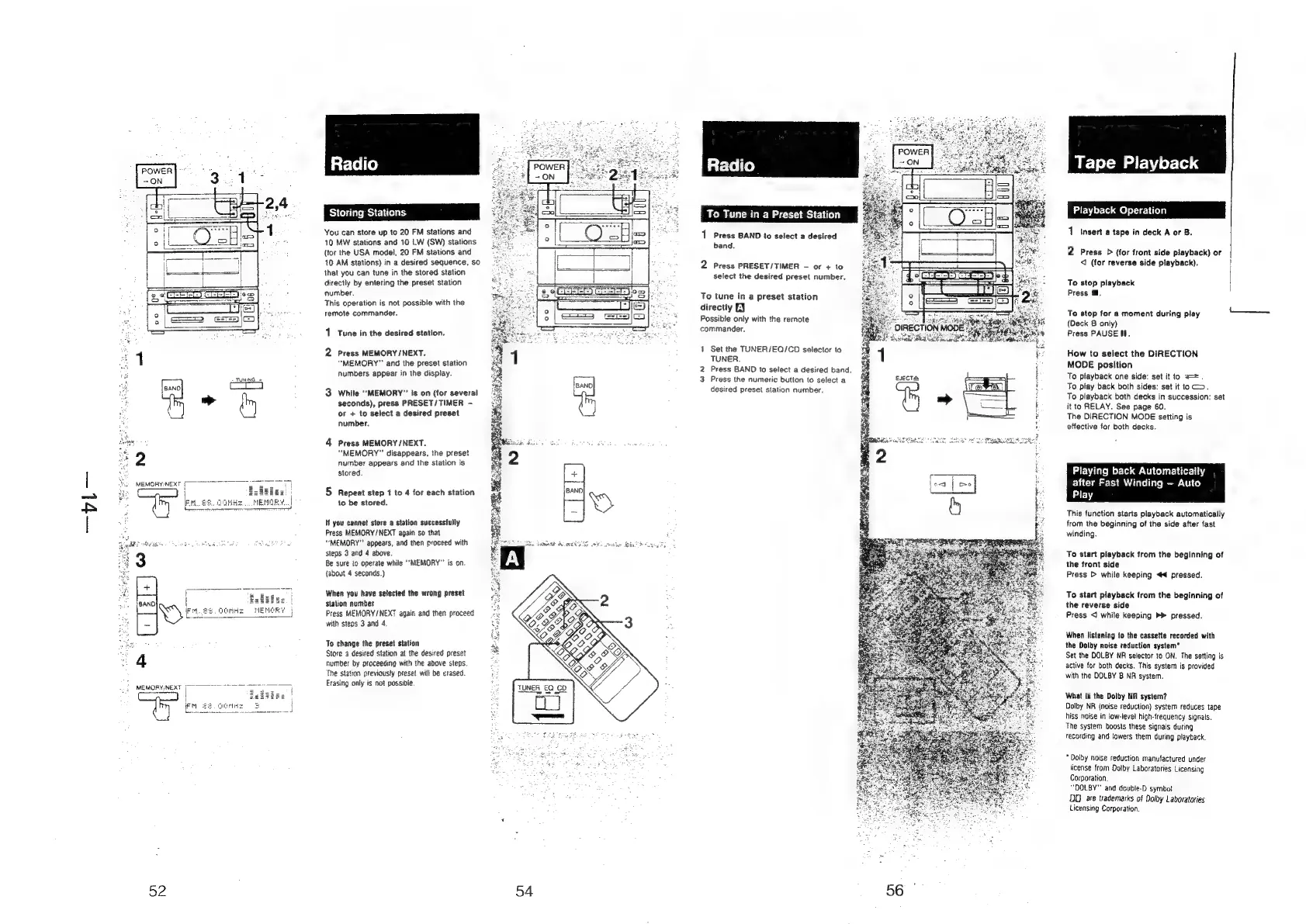
Storing
Stations
You
can
store
up
to
20
FM
stations
and
10
MW
stations
and
10
LW
(SW)
stations
(tor
the
USA
model,
20
FM
stations
and
10
AM
stations)
in
a
desired
sequence,
so
that
you
can
tune
in
the
stored
station
directly
by
entering
the
preset
station
number.
This
operation
is
not
possible
with
the
remote
commander.
1
Tune
in
the
desired
station.
2
Press
MEMORY/NEXT.
“MEMORY"
and
the
preset
station
Numbers
appear
in
the
display.
3
While
“MEMORY”
is
on
(for
several
seconds),
press
PRESET/TIMER
—
or
+
to
select
a
desired
preset
number.
4
Press
MEMORY
/NEXT.
“MEMORY”
disappears,
the
preset
number
appears
and
the
station
is
stored
5
Repeat
step
1
to
4
for
each
station
to
be
stored.
If
you
cannot
store
a
station
successfully
Press
MEMORY
/
NEXT
again
so
that
“MEMORY”
appears,
and
then
proceed
with
steps
3
and
4
above.
Be
sure
io
operate
while
‘MEMORY’
is
on
{about
4
seconds.)
When
you
have
selected
the
wrong
preset
station
number
Press
MEMORY/NEXT
again
and
then
proceed
with
steps
3
and
4.
To
change
the
preset
station
Store
a
desired
station
at
the
desired
preset
number
by
proceeding
with
the
above
steps.
The
station
previously
preset
will
be
erased.
Erasing
only
is
not
possible.
54
‘o
Tune
in
a
Preset
Station
1
Press
BAND
to
select
a
desired
band.
2
Press
PRESET/TIMER
-
or
+
to
select
the
desired
preset
number.
To
tune
in
a
preset
station
directiy
LY
Possible
only
with
the
remote
commander.
1
Set
the
TUNER/EQ/CO
selector
to
TUNER.
2
Press
BAND
to
select
a
desired
band.
3
Press
the
numeric
button
to
select
a
desired
preset
station
number.
EJECTS
Tape
Playback
Piayback
Op:
felal
1
insert
a
tape
in
deck
A
or
B.
2
Press
D
{for
front
side
playback)
or
<I
(for
reverse
side
playback).
To
stop
playback
Press
@.
To
stop
for
a
moment
during
play
(Deck
B
only)
Press
PAUSE
ff.
How
to
select
the
DIRECTION
MODE
position
To
playback
one
side:
set
it
to
===.
To
play
back
both
sides:
set
it
toc>.
To
playback
both
decks
in
succession:
set
it
to
RELAY.
See
page
60.
The
DIRECTION
MODE
setting
is
effective
for
both
decks.
Playing
back
Automatically
after
Fast
Winding
—
Auto
Play
This
function
starts
playback
automatically
from
the
beginning
of
the
side
after
fast
winding.
To
start
playback
from
the
beginning
of
the
front
side
Press
>
while
keeping
4
pressed.
To
start
playback
from
the
beginning
of
the
reverse
side
Press
<
while
keeping
»>
pressed.
When
listening
to
the
cassette
recorded
with
the
Dolby
noise
reduction
system"
Set
the
DOLBY
NR
selector
to
ON.
The
setting
is
active
for
both
decks.
This
system
is
provided
with
the
DOLBY
B
NA
system.
What
is
the
Dolby
NR
system?
Dolby
NR
(noise
reduction)
system
reduces
tape
hiss
noise
in
low-level
high-frequency
signals.
The
system
boosts
these
signais
during
recording
and
lowers
them
during
playback.
*
Doiby
noise
reduction
manufactured
under
license
fram
Dotby
Laboratories
Licensing
Corporation.
“DOLBY”
and
double-D
symbot
DD
are
trademarks
of
Dolby
Laboratories
Licensing
Corporation.