EasyManua.ls Logo

Sony HCD-H700 - Tape Playback; Locating the Beginning of a Selection during Playback - Automatic Music Sensor (AMS); Notes on Cassettes; Playing Both Decks in Succession - Relay Play

Sony HCD-H700
91 pages
Print Icon
To Next Page IconTo Next Page
To Previous Page IconTo Previous Page
Loading...
58
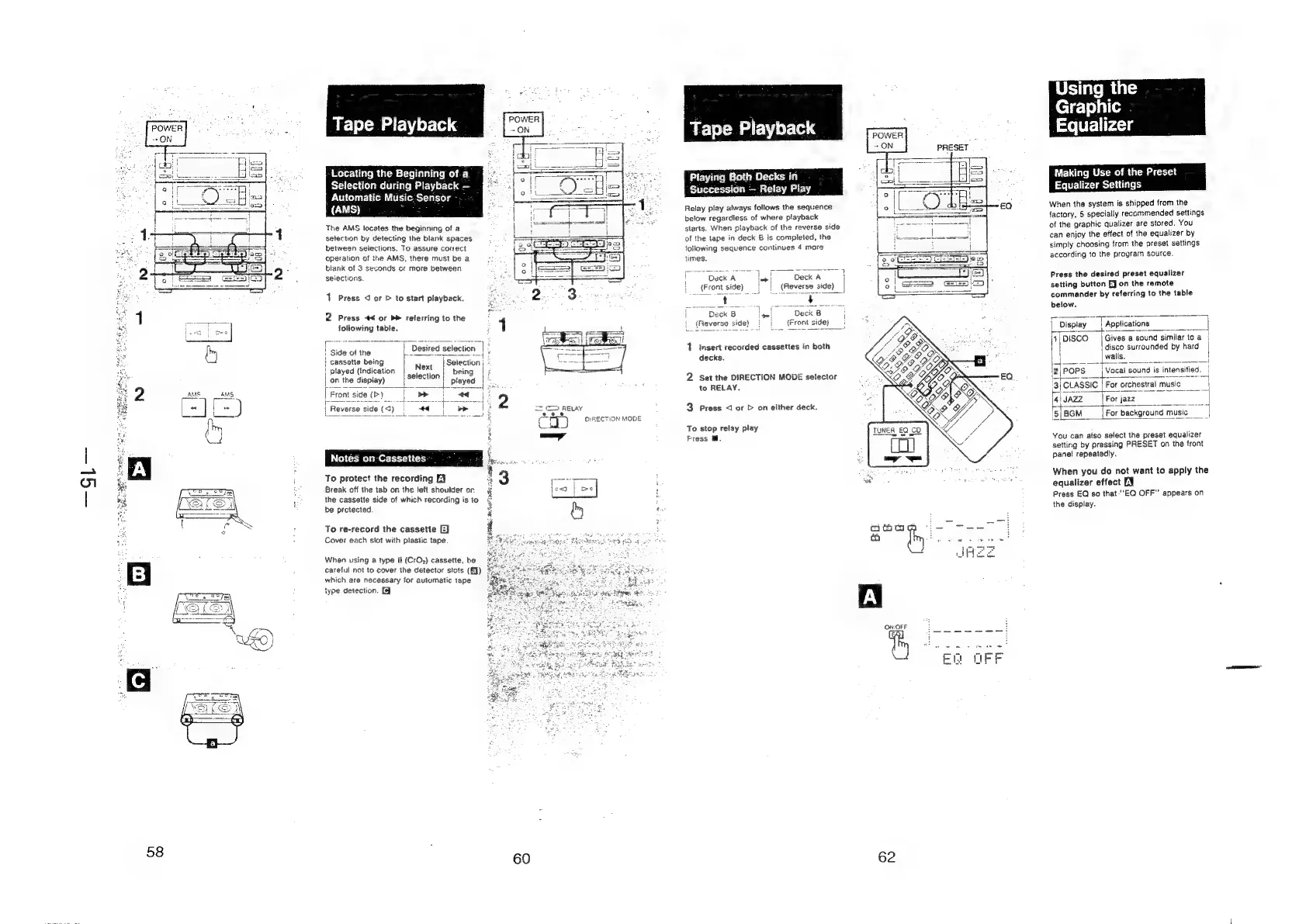
Tape
Playback
-Locating
the
Beginning
of
a
Selection
during
Playback
—
Automatic
Music.
Sensor
{AMS)
:
The
AMS
locates
the
beginning
of
a
selection
by
detecting
the
blank
spaces
between
selections.
To
assure
correct
operation
of
the
AMS,
there
must
be
a
biank
of
3
seconds
or
more
between
selections.
1
Press
<
or
>
to
start
playback.
2
Press
*<
or
b>
referring
to
the
following
table.
pa
a
al
Se
ee
oe
l
Gide
arin
|
Desired
selection
|
:
pe
et
|
cassette
being
Ni
|
Selectio
|
played
(Indication
ext
|
being
|
on
the
display)
i
selection
|
|
Front
side
(>)
i
fie
eee
|
Reverse
side
(<)
I
+
DIRECTION
MODE
Notes
on
Cassettes
;
To
protect
the
recording
E¥
i
Break
off
the
tab
on
the
ieft
shoulder
or
&
the
cassette
side
of
which
recording
is to
&
be
protected.
i
i
:
To
re-record
the
cassette
EJ
Cover
each
slot
with
plastic
tape
Wher
using
a
type
Il
(CrO2)
cassette,
be
careful
not
to
cover
the
detector
slots
(Eq)
which
are
necessary
for
automatic
tape
type
detection.
{9
60
Relay
play
always
follows
the
sequence
below
regardless
of
where
playback
starts.
When
playback
of
the
reverse
side
of
the
tape
in
deck
B
is
completed,
the
following
sequence
continues
4
more
times.
fer
eae
ep
ee
ee
ae
ee
H
Deck
A
si
Deck
A
'
(Front
side)
|
|
(Reverse
side)
|
een
Bas
is
ae
Seu
|
Deck
8
|e!
Deck
B
(Reverse
side)
}
|
{Front
side)
i
1
msert
recorded
cassettes
in
both
decks.
2
Set
the
DIRECTION
MODE
selector
to
RELAY.
3
Press
<l
or
>
on
either
deck.
To
stop
relay
play
Fress
.
POWER
ON:OFF
62
PRESET
Using
the
Graphic
Equalizer
Making
Use
of
the
Preset
Equalizer
Settings
When
the
system
is
shipped
from
the
factory,
5
specially
recommended
settings
of
the
graphic
qualizer
are
stored.
You
can
enjoy
the
effect
of
the
equalizer
by
simply
choosing
from
the
preset
settings
according
10
the
proyrarn
source.
Press
the
desired
preset
equalizer
setting
button
EJ
on
the
remote
commander
by
referring
to
the
table
below.
T
Display
|
sober
a]
BISCO,
Gives
a
sound
similar
to
a
i
disco
surrounded
by
hard
|
wails.
a
Eee
Sang
nas
POPS
Vocat
sound
is
inte!
CLASSIC
|
For
orchestral
music
Bi
2
3
AZZ
|For
jazz
|
t
t
|
I
4
ah
zs
.
5|
BGM
[For
background
music
You
can
atso
select
the
preset
equalizer
setting
by
pressing
PRESET
on
the
front
pane!
repeatedly.
When
you
do
not
want
to
apply
the
equalizer
effect
EY
Press
EQ
so
that
"EQ
OFF”
appears
on
the
display.