EasyManua.ls Logo

Sony HCD-H700 - Timer-Activated Operation; Setting the Wake Up Timer; Setting the Recording Timer; To change the time and program

Sony HCD-H700
91 pages
Print Icon
To Next Page IconTo Next Page
To Previous Page IconTo Previous Page
Loading...
100
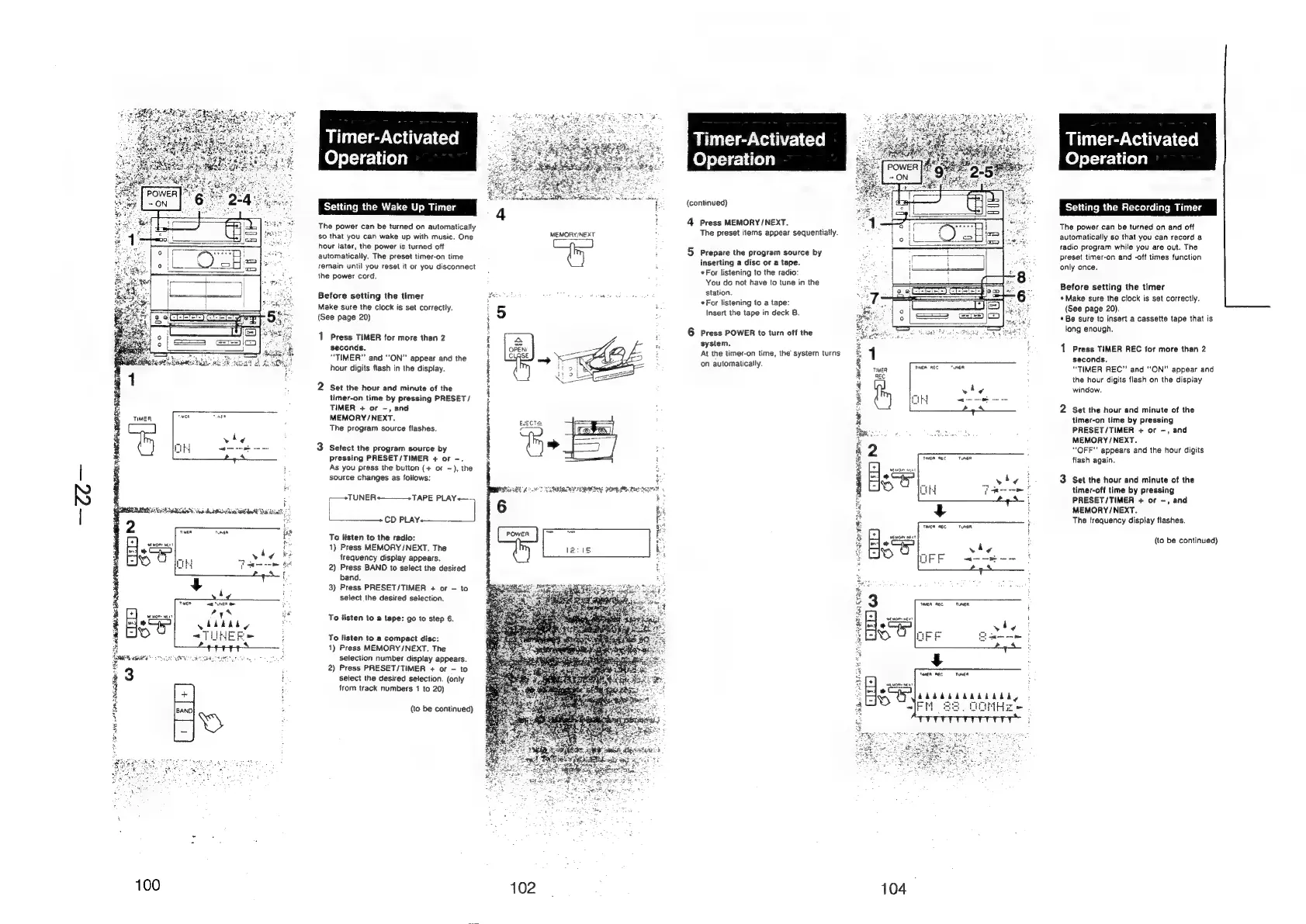
Timer-Activated
Operation
Setting
the
Up
Timer
The
power
can
be
turned
on
automatically
so
that
you
can
wake
up
with
music.
One
hour
later,
the
power
is
turned
off
automatically.
The
preset
timer-on
time
remain
until
you
reset
it
or
you
disconnect
the
power
cord.
Before
setting
the
timer
Make
sure
the
clock
is
set
correctly.
(See
page
20)
1
Press
TIMER
for
more
than
2
seconds.
“TIMER”
and
“ON”
appear
and
the
hour
digits
flash
in
the
display.
2
Set
the
hour
and
minute
of
the
timer-on
time
by
pressing
PRESET/
TIMER
+
or
-,
and
MEMORY
/NEXT.
The
program
source
flashes.
3
Select
the
program
source
by
pressing
PRESET/TIMER
+
or
-.
As
you
press
the
button
(+
or
—),
the
source
changes
as
follows:
ie
ara
PLAY+—-
cD
safe
ded
To
listen
to
the
radio:
1)
Press
MEMORY/NEXT.
The
frequency
display
appears.
2)
Press
BAND
to
select
the
desired
band.
3)
Press
PRESET/TIMER
+
or
to
select
the
desired
selection.
To
listen
to
a
tape:
go
to
step
6.
To
listen
to
a
compact
disc:
1)
Press
MEMORY/NEXT.
The
selection
number
display
appears.
2)
Press
PRESET/TIMER
+
or
-
to
select
the
desired
selection.
(only
from
track
numbers
1
to
20)
(to
be
continued)
102
MEMORY/NEXT
BRERA
Hore
He
Beg
5
i
Timer-Activated
Operation
(continued)
4
Press
MEMORY
/NEXT.
The
preset
items
appear
sequentially.
5
Prepare
the
program
source
by
inserting
a
disc
or
a
tape.
*
For
listening
to
the
radio:
You
do
not
have
to
tune
in
the
station.
«For
listening
to
a
tape:
Insert
the
tape
in
deck
B.
6
Press
POWER
to
turn
off
the
system,
At
the
timer-on
time,
the
system
turns
on
automatically.
TMEA
RES
TUNER
OH
TER
REC
|
TUNER,
Abdbdadddada,
104
4
FM
68.
OOMHe}
Timer-Activated
Operation
Setting
the
Recording
Timer
The
power
can
be
turned
on
and
off
automatically
so
that
you
can
record
a
radio
program
while
you
are
out.
The
preset
timer-on
and
-off
times
function
only
once.
Before
setting
the
timer
«Make
sure
the
clock
is
set
correctly.
(See
page
20).
©
Be
sure
to
insert
a
cassette
tape
that
is
long
enough.
1
Press
TIMER
REC
for
more
than
2
seconds.
“TIMER
REC”
and
“ON”
appear
and
the
hour
digits
flash
on
the
display
window.
2
Set
the
hour
and
minute
of
the
timer-on
time
by
pressing
PRESET/TIMER
+
or
-,
and
MEMORY
/NEXT.
“OFF”
appears
and
the
hour
digits
flash
again.
3
Set
the
hour
and
minute
of
the
timer-off
time
by
pressing
PRESET/TIMER
+
or
-,
and
MEMORY
/NEXT.
The
frequency
display
flashes.
(to
be
continued)

Related product manuals