EasyManua.ls Logo

Sony HCD-H700 - Timer-Activated Operation; To change the time and program; Sleep Timer Operation; To turn off the system before the system is turned off by the sleep timer

Sony HCD-H700
91 pages
Print Icon
To Next Page IconTo Next Page
To Previous Page IconTo Previous Page
Loading...
a
&
co
esa
go
ea
ace,
eee
ot
aaa
SE
NEAT
PERRI
“e
D2
BSE
De
ae
et
é
or
MEMORY/NEXT
ey
ae
4
?
+
oO
EJECTS.
106
OFF
Timer-Activated
Operation
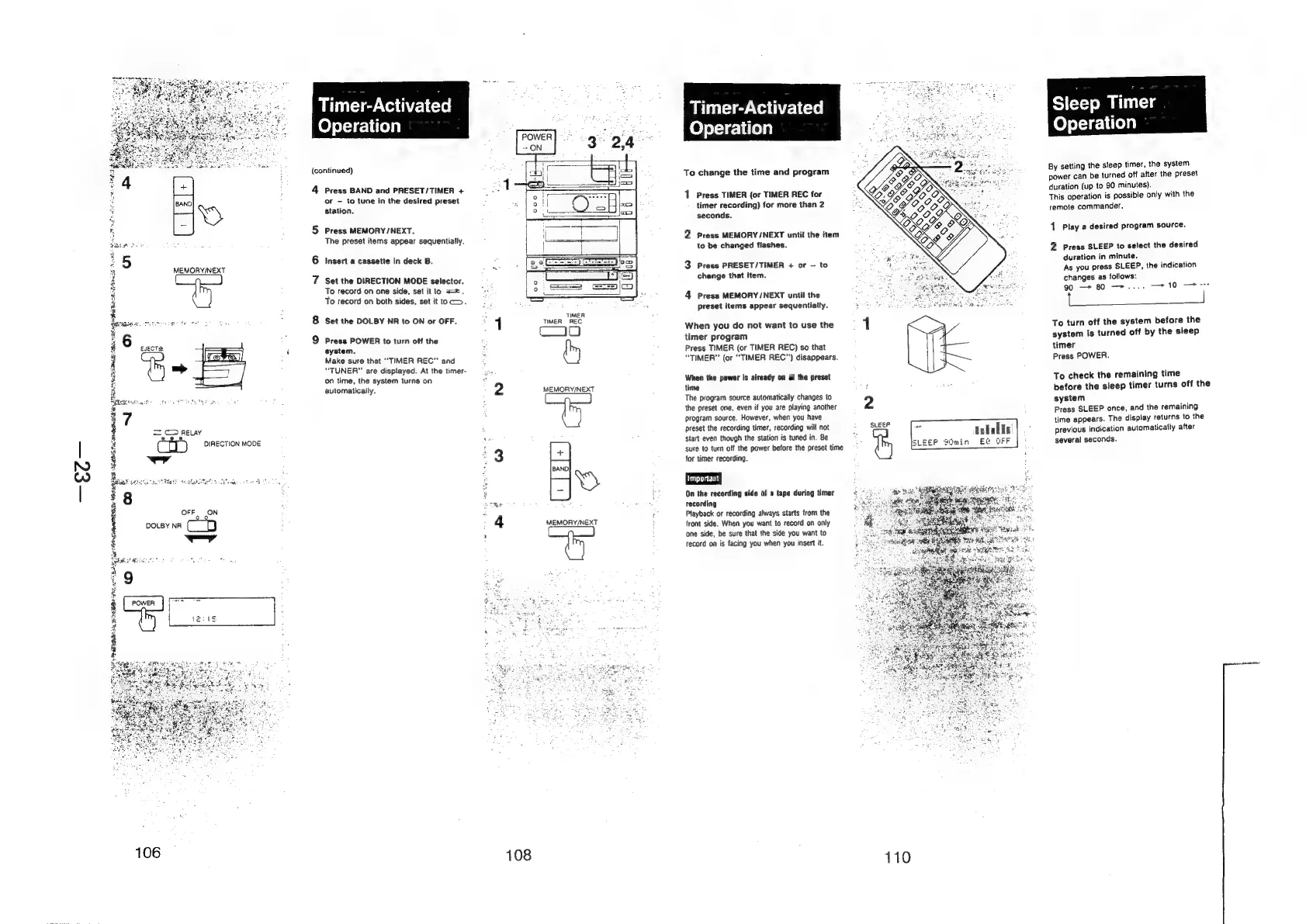
(continued)
4
Press
BAND
and
PRESET/TIMER
+
or
—
to
tune
in
the
desired
preset
station.
5
Press
MEMORY
/NEXT.
The
preset
items
appear
sequentially.
6
Insert
a
cassette
in
deck
B.
7
Set
the
DIRECTION
MODE
selector.
To
record
on
one
side,
set
itto
=.
To
record
on
both
sides,
set
it
toc.
8
Set
the
DOLBY
NR
to
ON
or
OFF.
9
Press
POWER
to
turn
off
the
system.
Make
sure
that
“TIMER
REC”
and
“TUNER”
are
displayed.
At
the
timer-
on
time,
the
system
turns
on
automatically.
108
TIMER
TIMER
REC
oy
MEMORY/NEXT
MEMORY/NEXT
Timer-Activated
Operation
To
change
the
time
and
program
1
Press
TIMER
(or
TIMER
REC
for
timer
recording)
for
more
than
2
seconds.
2
Press
MEMORY/NEXT
until
the
item
to
be
changed
flashes.
3
Press
PRESET/TIMER
+
or
-
to
change
that
item.
4
Press
MEMORY/NEXT
until
the
preset
items
appear
sequentially.
When
you
do
not
want
to
use
the
timer
program
Press
TIMER
(or
TIMER
REC)
so
that
“TIMER”
(or
“TIMER
REC”)
disappears.
When
the
power
is
already
on
at
the
preset
time
The
program
source
automatically
changes
to
the
preset
one,
even
if
you
are
playing
another
2
program
source.
However,
when
you
have
preset
the
recording
timer,
recording
will
not
:
SLEEP
i
Eallz
start
even
though
the
station
is
tuned
in.
Be
coutie
ee
OFF
sure
to
turn
off
the
power
before
the
preset
time
.
=
—
for
timer
recording.
On
the
recording
side
of
a
tape
during
timer
recording
Playback
or
recording
always
starts
from
the
front
side.
When
you
want
to
record
on
only
‘one
side,
be
sure
that
the
side
you
want
to
record
on
is
facing
you
when
you
insert
it.
110
Sleep
Timer
Operation
By
setting
the
sleep
timer,
the
system
power
can
be
turned
off
after
the
preset
duration
(up
to
90
minutes).
This
operation
is
possible
only
with
the
remote
commander.
1
Play
a
desired
program
source.
2
Press
SLEEP
to
select
the
desired
duration
in
minute.
As
you
press
SLEEP,
the
indication
changes
as
follows:
90
—*
80
->..
en
To
turn
off
the
system
before
the
system
is
turned
off
by
the
sleep
timer
Press
POWER.
To
check
the
remaining
time
before
the
sleep
timer
turns
off
the
system
Press
SLEEP
once,
and
the
remaining
time
appears.
The
display
returns
to
the
previous
indication
automatically
after
several
seconds.