EasyManua.ls Logo

Sony HCD-H700 - Microphone Mixing; Mixing Operation; Recording the sound mixed with a source; Recording from a microphone only

Sony HCD-H700
91 pages
Print Icon
To Next Page IconTo Next Page
To Previous Page IconTo Previous Page
Loading...
AE
RRARERCES
SR
ch
A
SRI
aes
1
rd
ea
va
*
MIC
1
LEVEL
MIC
2
LEVEL
:
rol
gl
\
QO
MIN
MAX
MIN
MAX
MIX
MIC
MIC
1
LEVEL
MIC
2
LEVEL
ts
OuKOmE
MIN
MAX
MIN
MAX
112
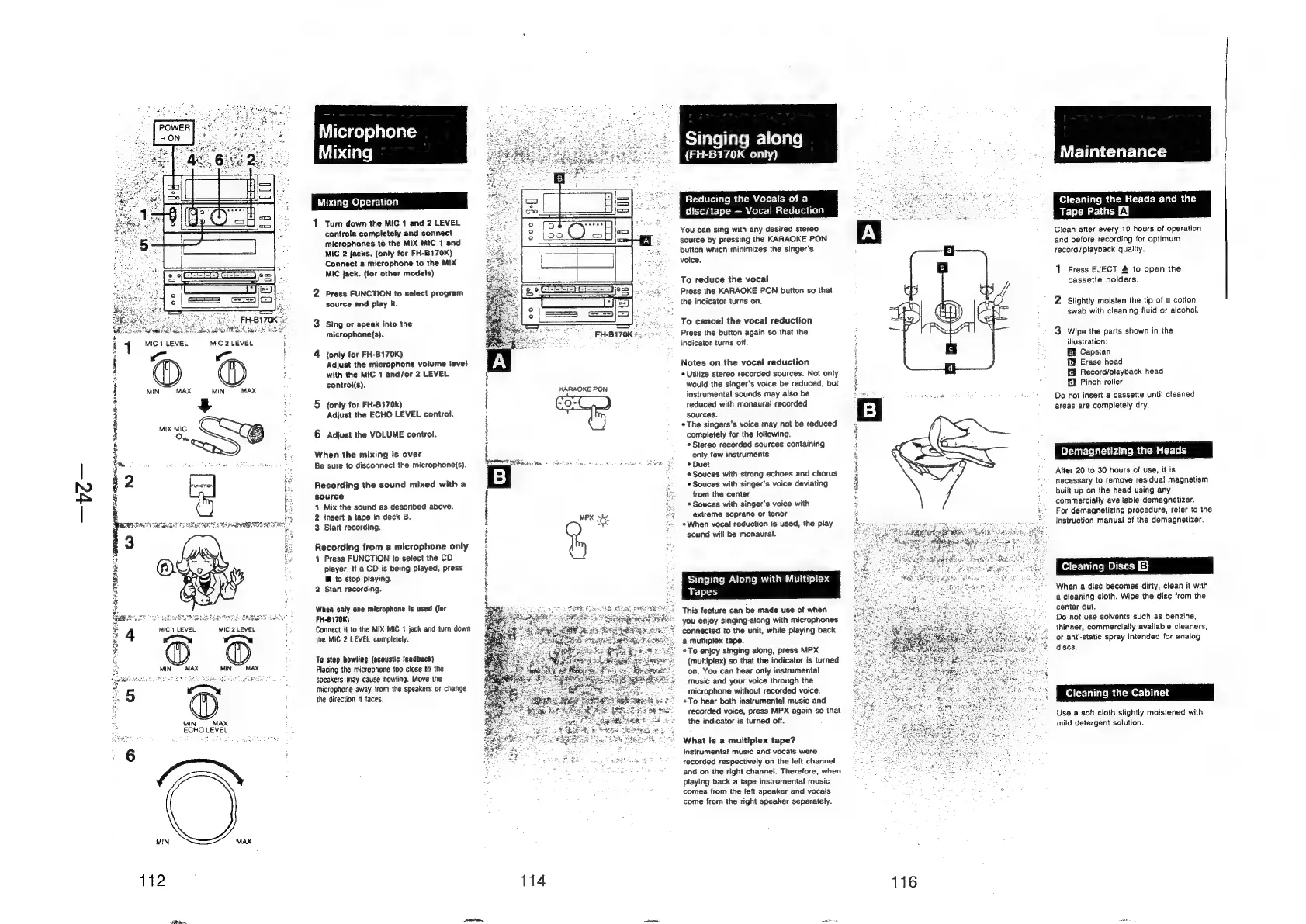
Microphone
Mixing
Mixing
Operation
1.
Turn
down
the
MIC
1
and
2
LEVEL
controls
completely
and
connect
microphones
to
the
MIX
MIC
1
and
MIC
2
jacks.
(only
for
FH-B170K)
Connect
a
microphone
to
the
MIX
MIC
jack.
(for
other
modeis)
2
Press
FUNCTION
to
select
program
source
and
play
It.
3
Sing
or
speak
into
the
microphone(s).
4
(only
for
FH-8170K)
Adjust
the
microphone
volume
level
with
the
MIC
1
and/or
2
LEVEL
control(s).
t
H
i
5
(only
for
FH-8170k)
{
Adjust
the
ECHO
LEVEL
control.
6
Adjust
the
VOLUME
control.
£
When
the
mixing
is
over
{
Be
sure
to
disconnect
the
microphone(s).
Spawn
ent
Aiassacs
=
Recording
the
sound
mixed
with
a
source
I
1
Mix
the
sound
as
described
above.
2
insert
a
tape
in
deck
B.
|
3
Start
recording.
E
Recording
from
a
microphone
only
1
Press
FUNCTION
to
select
the
CD
player.
If
a
CD
is
being
played,
press
@
to
stop
playing.
2
Stan
recording.
When
only
one
microphone
is
used
(for
FH-B170K)
Connect
it
to
the
MIX MIC
1
jack
and
turn
down
the
MIC
2
LEVEL
completely.
To
stop
howling
(acoustic
feedback)
Placing
the
microphone
too
close
to
the
speakers
may
cause
howling.
Move
the
microphone
away
from
the
speakers
or
change
the
direction
it
faces.
114
KARAOKE
PON
MPX
she
Tale
liale
mere
ale)
(FH-B170K
only)
Reducing
the
Vocals
of
a
disc/tape
—
Vocal
Reducti
You
can
sing
with
any
desired
stereo
source
by
pressing
the
KARAOKE
PON
button
which
minimizes
the
singer's
voice.
To
reduce
the
vocal
Press
the
KARAOKE
PON
button
so
that
the
indicator
turns
on.
To
cancel
the
vocai
reduction
Press
the
button
again
so
that
the
indicator
turns
off.
Notes
on
the
vocal
reduction
*
Utilize
stereo
recorded
sources.
Not
only
would
the
singer’s
voice
be
reduced,
but
instrumental
sounds
may
also
be
reduced
with
monaural
recorded
sources.
The
singers's
voice
may
not
be
reduced
completely
for
the
following.
*
Stereo
recorded
sources
containing
only
few
instruments
*
Duet
*Souces
with
strong
echoes
and
chorus
*
Souces
with
singer's
voice
deviating
from
the
center
*Souces
with
singer's
voice
with
extreme
soprano
or
tenor
When
vocal
reduction
is
used,
the
play
sound
will
be
monaural.
Singing
Along
with
Multiplex
Tapes
This
feature
can
be
made
use
of
when
you
enjoy
singing-along
with
microphones
connected
to
the
unit,
while
playing
back
a
multiplex
tape.
*To
enjoy
singing
along,
press
MPX
(multiplex)
so
that
the
indicator
is
turned
on.
You
can
hear
only
instrumental
music
and
your
voice
through
the
microphone
without
recorded
voice.
*To
hear
both
instrumental
music
and
recorded
voice,
press
MPX
again
so
that
the
indicator
is
turned
off.
What
is
a
multiplex
tape?
Instrumental
music
and
vocals
were
recorded
respectively
on
the
leit
channel
and
on
the
right
channel.
Therefore,
when
playing
back
a
tape
instrumental
music
comes
from
the
left
speaker
and
vocals
come
from
the
right
speaker
separately.
ENA
acenting
a
Reaves
B
OD
dat
ee
A,
ae
Maintenance
Cleaning
the
Heads
and
the
Tape
Paths
EY
Clean
after
every
10
hours
of
operation
and
before
recording
for
optimum
record/playback
quality.
1
Press
EJECT
&
to
open
the
cassette
holders.
iw)
Slightly
moisten
the
tip
of
a
cotton
swab
with
cleaning
fluid
or
atcohol.
w&
Wipe
the
parts
shown
in
the
illustration:
£4
Capstan
f
Erase
head
fA
Record/playback
head
£1
Pinch
roller
Do
not
insert
a
cassette
until
cleaned
areas
are
completely
dry.
Demagnetizing
the
Heads
Alter
20
to
30
hours
of
use,
it
is
necessary
to
remove
residual
magnetism
built
up
on
the
head
using
any
commercially
available
demagnetizer.
For
demagnetizing
procedure,
refer
to
the
instruction
manual
of
the
demagnetizer.
Cleaning
Dises
EJ
When
a
disc
becomes
dirty,
clean
it
with
a
cleaning
cloth.
Wipe
the
dise
from
the
center
out.
Do
not
use
solvents
such
as
benzine,
thinner,
commercially
available
cleaners,
or
anti-static
spray
intended
for
analog
discs.
Cleaning
the
Cabinet
Use
a
soft
cloth
slightly
moistened
with
mild
detergent
solution.