EasyManua.ls Logo

Sony HDR-CX360E - Quick Reference Guides; Screen Indicators and Meanings

Sony HDR-CX360E
76 pages
Print Icon
To Next Page IconTo Next Page
To Previous Page IconTo Previous Page
Loading...
70
GB
Quick reference
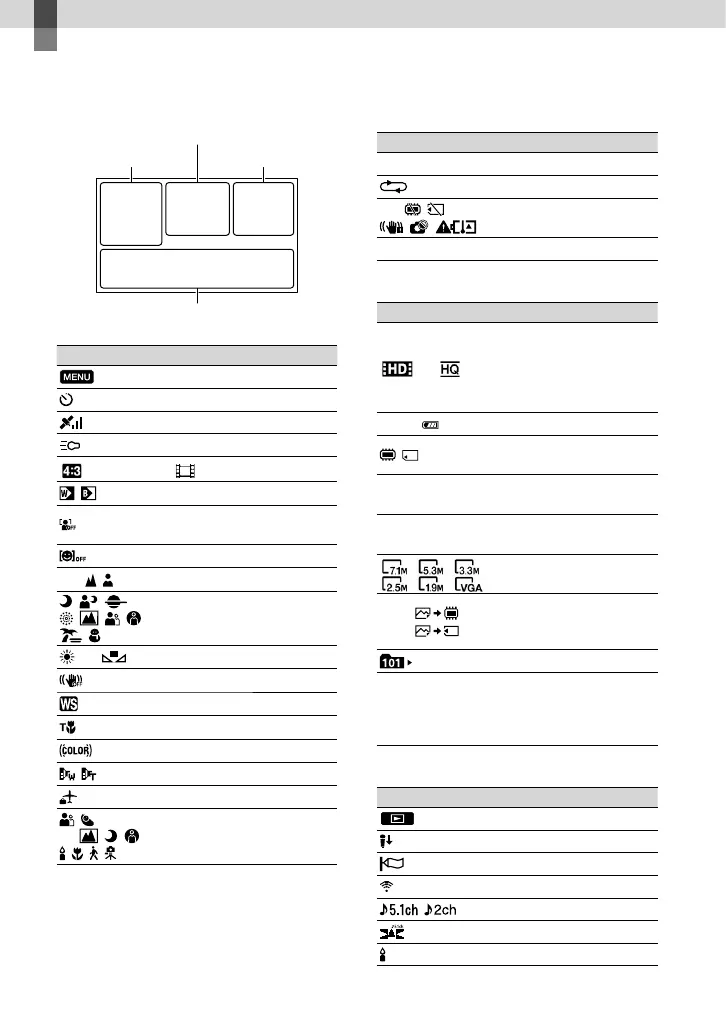
Screen indicators
Left
Indicator Meaning
MENU button
Self-timer recording
GPS triangulating status
Video light
Wide Mode
Fader
[Face Detection] set to
[Off]
[Smile Shutter] set to [Off]
Manual focus
Scene Selection
White Balance
SteadyShot off
White Balance Shift
Tele Macro
x.v.Color
Conversion Lens
Destination
Intelligent Auto (face
detection/scene detection/
camera-shake detection)
Center
Indicator Meaning
[STBY]/[REC] Recording status
Slide show set
Warning
Playback mode
Right
Indicator Meaning
50i
Recording image quality
(HD/STD), frame rate
(50p/50i/25p) and
recording mode (PS/FX/
FH/HQ/LP)
60min
Remaining battery
Recording/playback/
editing media
0:00:00
Counter (hour:minute:
second)
00Min
Estimated recording
remaining time
Photo size
9999
9999
Approximate number of
recordable photos and
photo size
Playback folder
100/112
Current playing movie or
photo/Number of total
recorded movies or photos
Bottom
Indicator Meaning
View Images button
Micref Level low
Wind Noise Reduct.
Blt-in Zoom Mic
Audio Mode
Audio Level Display
Low Lux
Left Right
Center
Bottom

Table of Contents