Welcome
!
Congratulations
on
your
purchase
of
the
Sony
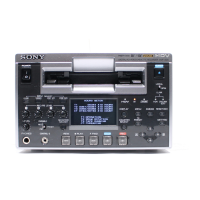
EV-S2000
Video
Cassette
Recorder.
This
video
cassette
recorder
is
the
result
our
commitment
to
bring
Sony
customers
high
quality,
state-of-the-art
technology.
Thank
you
for
choosing
Sony.
Table
of
Contents
Warning
...........000
neesentunesesedees
iseseseuateeteasee
siestgaeasacse
avesosoes
2
Precautions
............0
sseeseasoonseee
sienosceassantees
Mscstusteseseeanss
eoseeee
4
Chapter
1
Introduction
How
to
Use
This
Manual
...........ccccssoes
sbeasseeveueos
advsteednsacees
§
Unpacking
.........rcccceee
ssiasbandssstsentese
icedstenbasicsvabevecssssene
e000
D
OVEFVIEW
.......scsccrcessersesacsssrscesessccnsverveseccorserecsecescosscscreecerer
6
identifying
the
Parts
and
Controls
..........
sevedeseeteust
Raeacbeee
7
Chapter
2
Hookups
and
Getting
Started
#10
Hookup
1
Audio/Video
(A/V)
Hookup
................ssesssess
Hookup
2
Antenna
Hookup
............ccecccsscscescserseees
‘2
Hookup
3
Simple
Cable
Hookup
00.0.0...
csccseereseereee
14
Hookup
4
Alternate
Cable
Hookup.....................csssessees
16
Hookup
5
Advanced
Cable
Hookup
...........scssssescseneee
18
Chapter
3
Preparation
Preparing
the
Remote
Commander
............-sersssssseceore
2
Inserting
Batteries
...........ccccscsscecssescscetssressereesees
21
Setting
the
Command
Mode
.............csssessssseseserees
21
Manufactures
and
Their
Code
Numbers
.............:sc00
22
Setting
the
Manufacture's
Code
Number
...............00+
23
Setting
the
Time
and
Date.................
sicvetoatteas
scosaeassvseteee
Presetting
the
Active
Channels
...........sccccccssssrsesceroveees
Presetting
All
Receivable
Channels
Automatically.
skaasen
38
Presetting
Desired
Channels
or
Disabling
Unwanted
GCHANNEIS
fisccisscisscsscssssscsesecssocssassaoescecssceossssesesssonasonentes
26
FIMO
TUNING
.........s.scrscsrsrscrrcnscresscssssverereressesecsscssessnevees
26
Cable
TV
Channel
Assignment
.............ccscereerserseeneee
27
Using
the
SET
UP
MENU
.............
00
28
MONU
ChOICES
...........sccrcccrecserstscsscerscetecstsctessrscssscesrees
28
Chapter
4
Basic
Operations
Playback
.........0
ivbasacoscsesatesceresesessesee
Sisessssnesbscostecseas
sseeee
SO
Inserting
a
Video
Cassette
.
sas
dodevnsustetbdaSsdeduasdacaasvesseoseed
30
Ejecting
the
Cassette
0.0...
cssscscsecrsesesscrersssscseeees
30
Handling
the
Cassette
.............ccsesccsssesesescssecsesererees
30
Playing
Back
a
Cassette
.....0.....cccsccserscreerssceceeeeees
31
Information
ON
the
SCrEeON
............scseccscsrcsesestecseeeeeees
32
Indexing
Tape
Content
............cessressssseseessersseteeers
32
Locating
a
Particular
Scene
Later
...............ssccsssssrereeee
32
Listening
More
Easily
to
Conversation
Recorded
with
a
CAMCOPGel
-.iiccesescsecs.cisisescescasseasenssestucasesesssbesusteseseotouses
32
RECOPING
........creccsrsccncocccssccersecsccccssceescecssececseerenes
soeeeee
OS
Recording
TV
Programs............cscssccsrscsccrcerecsseseeeens
34
PAUSING
-.3.ccscccesssdesssesscd
sisenannssteossecdeltsseaseeseotsoacauctnenseses
34
Recording
with
the
TV
Off
00.0...
cesccsccssecsecterscereees
35
Watching
One
TV
Program
While
Recording
ANOUNOD
si
csccesscsnccsccucesecesesccoesconssenssscscedsocsesseessaescdenessasts
35
Recording
Multi-Channel
TV
Sound
Broadcasts...........
35
Timer-Activated
RECOrding
.............cscrccrscsscecseeesees
seeeee
SO
Setting
the
Timer................
..
36
Daily/Weekly
Recording
...................
.38
The
Timer
Recording
Standby
Mode
o.........sssscssssss
38
Overlapping
Timer
Recordings
...........-..sscssorerserecees
39
Checking
the
Timer
Settings
.............ceccsctessesseeeee
40
Changing
or
Cancelling
the
Timer
Settings..................
41
Using
the
VCR
Before
Timer
Recording
Starts............
41
Quick
-Timer
Recording
.............ccccssccscsseressccscessersnenes
42
Chapter5
Advanced
Operations
Variable
Speed
Playback
...........c.cccsrsssccerscessesscesosscesesees
44
StU
PICU
5.0.
3escceaccdseccasecesdssdeseecoasossvetedeesceoessescservensss
44
Picture
Search
During
Playback
............cccsssesoreesees
44
Locked
Picture
Search
..........ccscscssecsesssscsssesesesssessees
44
X
2,
—X
2
Speed
Playback
............
cc
cctssssecstessreseseeees
45
=H
1
PlAYDACK
5.
0sscccssnesascesesessaaserastacsssaastacebesndecasanscosses
45
Skip
S@@reh
isiccscsssceicsccasessscstescscensessushisecenssssscensssensastoses
45
Frame-by-Frame
Picture
...........csccsscssssesscesrsecesccssoees
45
Slow
Motion
Playback
.............scsscssscrecssesssssesecessnnsees
46
Adjusting
Tracking
During
Variable
Speed
Playback
...46
Adjusting
the
Picture
Quality—SHARPNESS
..............
47
Cutting
out
the
Unwanted
Scenes
—
SHUTTLE
EDIT
..........sssesscerssscssscnssssscssessocsenessesoesernseseroee
4B
Chapter
6
Editing
Overview
of
the
Editing
Functions................cccssseceee
SO
Tape
Dubbing
.............csrerccrscrsorcscsescscsscreececsessecssecsessenee
OT
Editing
from
the
Other
VCR
..........cecccessessssecereesnesoeees
51
Editing
onto
the
Other
VOR...........sscssssctcesersseserereres
53
Assemble
Editing/Insert
Editing
................c.-.ccssssssssceeee
54
Assemble
Editing
...........ccccscercsscsseeseserscsrseetscseeseeees
55
Insert
Editing
.............cseseerscssseeescssesesseecsrecssenereees
56
Synchronized
Editing
...............ccccsscersesscsessacsseceoesees
0000
OF
Connecting
Video
Equipment
with
the
LANC
COMMECHON
ss
edscssisecnsseccssccsodsssetascensdbecsossensssscsoeosaccansossonnt
58
Connecting
Video
Equipment
with
the
CONTROL
S
Connector
............scsccsesecsscsscrssesoresnsenees
59
LANC
MODE
Settting.................-sccsscsssssosessccnsssesesoonsesses
60
Synchronized
Assemble
Editing...............scsresrrseee
61
Chapter
7
Additional
Information
Technical
information
..............
sbedcssadeceedseeaacssusvocsanen
en
+3
General
Setup
Information
.............sccsscsssserrsesceessesooes
63
Setting
the
RF
UNIT
uu...
ec
cccteereceseteseeeteceeeee
63
Attaching
the
F-type
Connector
0.0...
cesseceescsereeee
64
Attaching
the
External
Antenna
Connector
..................
65
Attaching
the
EAC66
U/V
Band
Separator/Mixer.........
65
Troubleshooting
.............crrcsvesccescessenccesscersoncssesssooees
66
On-Screen
Help
Messages..................crcccccssorseeossees
oe
68
Taking
Care
of
Your
VCR
..............cccscscsccscssorseescssncnceeee
69
Specifications.
.............c.ccccccsssrerscsscsees
eataalaicsduateacesee
sone
ZO
WOK
ise
cssiarethecctinsrersderdeneti
einai
e
|




 To Next Page