EasyManua.ls Logo

Sony HMZ-T1 - User Manual

Sony HMZ-T1
64 pages
Print Icon
To Next Page IconTo Next Page
Loading...
4-297-824-61(1)
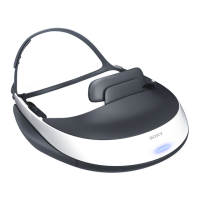
HMZ-T1
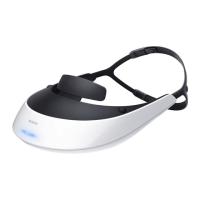
Head
Mounted
Display
Reference Guide GB
CT
Before Initial Use
Refer to the “Startup Guide” for instructions on
connecting the system, wearing the unit, and completing
initial settings.

Other manuals for Sony HMZ-T1

Questions and Answers

  • J
    Jack MartinezAug 19, 2025
    How to fix Sony HMZ-T1 when the system does not turn on?
    • K
      Kimberly ObrienAug 19, 2025
      Ensure the mains lead is fully plugged in and that the head mounted unit connecting cord is fully inserted in the HMD OUT jack. Keep in mind that startup can take a few seconds.
  • M
    michelle96Aug 23, 2025
    Why is there no sound or static, or why can't I increase the volume on my Sony HMZ-T1?
    • A
      Alexander BrownAug 23, 2025
      First, adjust the volume using the VOL +/– buttons. Then, refer to the Startup Guide to ensure the mains lead, HDMI cable, and connecting cord of the head mounted unit are correctly connected. Confirm that the source signal is supported by the system. If connected via an AV amplifier, try connecting the equipment directly to the processor unit. Also, check the settings for HDMI CEC-compatible home theater systems or AV amplifiers.
  • C
    colejosephAug 26, 2025
    Why is the power indicator flashing red on my Sony HMZ-T1 3D Glasses?
    • H
      hensonbillyAug 26, 2025
      The head mounted unit or processor unit may be damaged or overheated. Wait until the unit cools off and the flashing stops. If the problem persists, it may indicate damage.
  • H
    harrisjosephAug 27, 2025
    Why is the screen dark or blurry on my Sony 3D Glasses?
    • B
      Barbara WolfAug 28, 2025
      Consult the Startup Guide to confirm that the mains lead, HDMI cable, and connecting cord of the head mounted unit are correctly connected, and ensure you are wearing the head mounted unit correctly. Try performing the “Lens span adjustment” again in the setting menu. Clean the lenses with a soft, dry cloth.
  • S
    stephengreeneAug 30, 2025
    How to fix Sony HMZ-T1 when video is not shown in 3D?
    • S
      Samantha YoungAug 30, 2025
      Try changing the “3D Display” setting in “3D Settings.” Restart the connected equipment used for 3D playback. Check the settings of the playback equipment connected to the processor unit.
  • D
    David CallahanSep 1, 2025
    What to do if Sony 3D Glasses system does not go off?
    • D
      Debra MartinezSep 1, 2025
      Hold down the 1 (Power On/Standby) button for at least one second.
  • C
    Crystal GillSep 3, 2025
    Why is video and audio not playing on TV via HDMI OUT jack when Sony HMZ-T1 3D Glasses are off?
    • G
      gordonmiguelSep 3, 2025
      Ensure that the HDMI cables are fully connected. Set “HDMI pass-through” in “General Setup” to “On.” Switch the input source on the TV to this system. Check the HDMI output settings on the playback equipment.
  • J
    Jerry WestSep 5, 2025
    How to activate automatically 3D display on Sony HMZ-T1?
    • D
      David GonzalezSep 5, 2025
      Ensure the “Auto 3D” setting in “3D Settings” is set to “On.” If it still doesn't work, try changing the “3D Display” setting in “3D Settings” to “Over-Under” or “Side-by-Side.”
  • S
    Shannon CareySep 7, 2025
    Why do the screens suddenly go off on my Sony HMZ-T1 3D Glasses?
    • W
      williamssharonSep 7, 2025
      After 3 hours of continuous viewing, the system will display a warning screen and go off after 90 seconds of inactivity. Make sure you are wearing the head mounted unit correctly.
  • D
    Diana SmithSep 9, 2025
    How to enable surround sound effect on Sony HMZ-T1?
    • G
      Gregory FoxSep 9, 2025
      Make sure the “Surround” setting in “Sound” is not set to “Off.”

Summary

Health Precautions

Watching Video with the Head Mounted Display

Discusses potential discomfort, recommends breaks, and advises on environments for use.

Precautions

Extended Listening at High Volume Warning

Warns that listening at high volume for extended periods may harm hearing.

Product Information

Supplied Accessories

Lists all accessories included with the system purchase.

Fitting the Head Mounted Unit

Adjusting the Forehead Supporter

Instructions on choosing forehead supporter thickness and adjusting its height for a comfortable fit.

Ensuring a Comfortable Fit

Guidance on balancing weight, adjusting straps, and ensuring a secure, comfortable fit.

Confirming Screen Alignment

Correct Display Alignment

Instructions on adjusting lens span adjusters for proper intersection of 'I' marks and the horizontal line.

System Settings

Lens Span Adjustment

How to adjust lens span for optimal viewing experience by matching interpupillary distance.

Troubleshooting

Troubleshooting Power Supply

Solutions for the system not turning on or not turning off, checking connections and power button.

Troubleshooting Video Issues

Solutions for no video, distorted video, dark/blurry screens, and incorrect 3D display.

Troubleshooting Audio Issues

Solutions for no sound, static, volume problems, and lack of surround sound effect.

Troubleshooting HDMI Control

Solutions for issues with controlling connected equipment via HDMI CEC buttons on the head mounted unit.

Troubleshooting Other Issues

Solutions for power indicator flashing, no video/audio on TV, unresponsive buttons, and 'DEMO' display.

Sony HMZ-T1 Specifications

General IconGeneral
Product colorBlack, White
InterfaceHDMI
Weight and Dimensions IconWeight and Dimensions
Weight600 g
Dimensions (WxDxH)210 x 110 x 196 mm

Related product manuals