6
GB
Guide to parts and controls
For more information, refer to the pages indicated in parentheses.
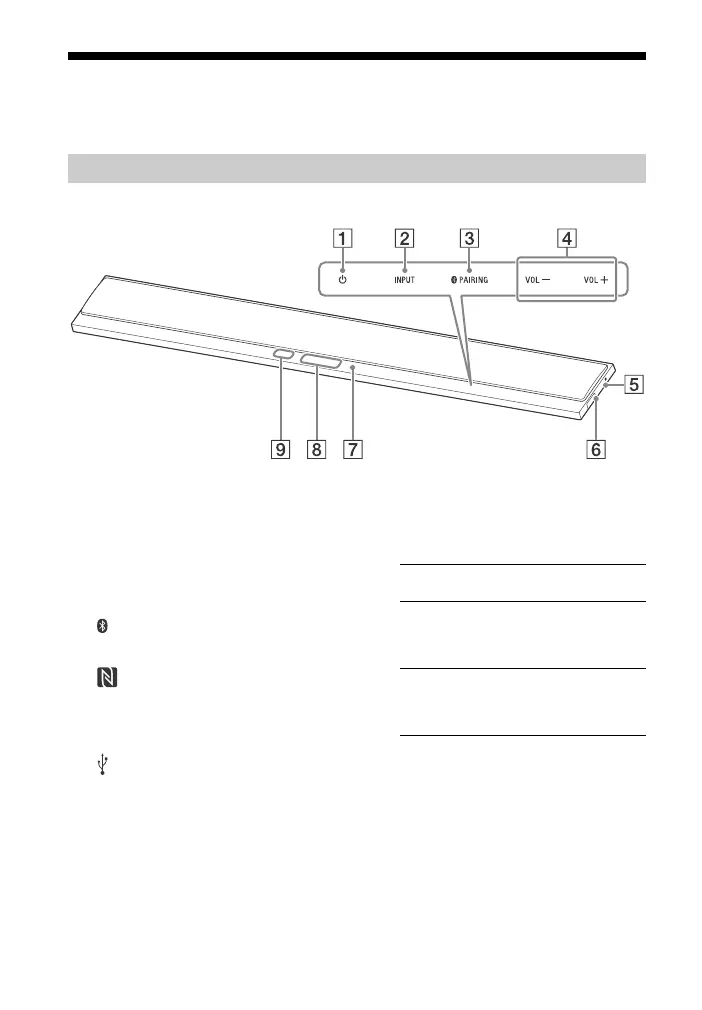
Top and side panel
(power) touch key
Turns on the system, or sets it to
standby mode.
INPUT touch key
Selects the device you want to
use.
PAIRING touch key
VOL (volume) +/– touch key
(N-Mark) (page 13)
Position the NFC-compatible
device near this indication to
activate the NFC function.
(USB) port (page 10)
Place your fingernail in the slot
(from bottom) to open the cover.
Blue LED indicator
Shows the BLUETOOTH status as
follows.
Top panel display
Remote control sensor
About touch keys
The touch keys work when you touch
them lightly. Do not press on them with
excessive force.
Bar Speaker
During BLUETOOTH
pairing
Flashes quickly
The system is
attempting to connect
with a BLUETOOTH
device
Flashes
The system has
established connection
with a BLUETOOTH
device
Lights up



 To Next Page