22
GB
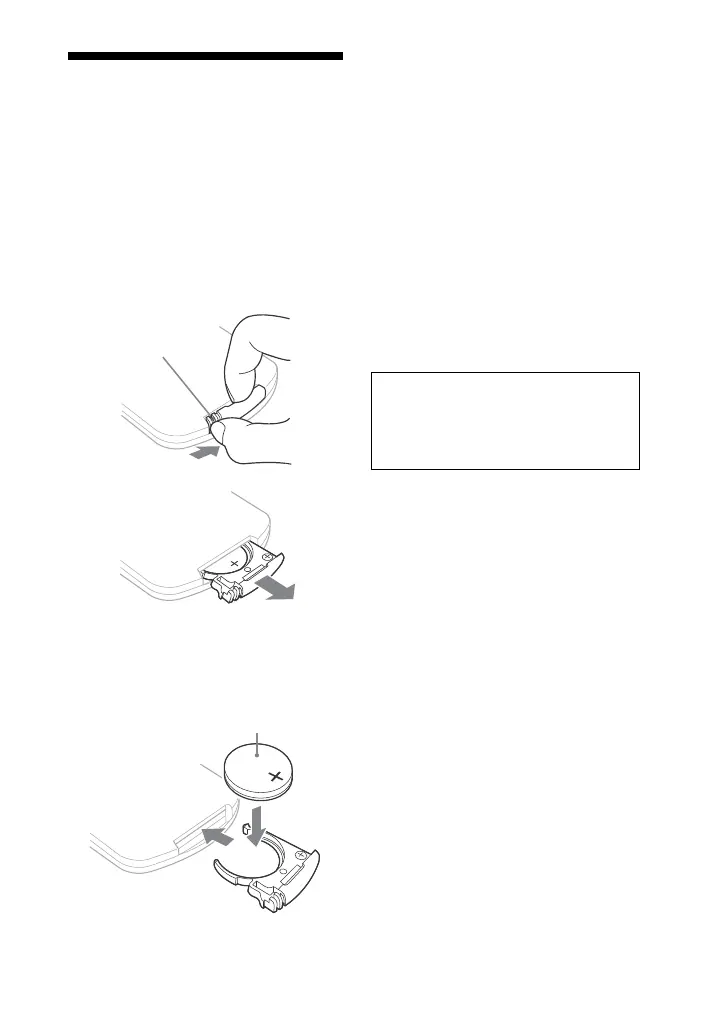
Changing the battery
The working distance of the remote
shortens as the battery becomes
exhausted. When the remote no
longer operates the unit, replace the
battery with a new CR2025 lithium
battery.
1 Push and hold the latch of the
battery holder, then pull out the
battery holder.
2 Replace the battery with the “+”
facing up, then insert the battery
holder into the slot.
Notes
If you do not use the remote for a long
period of time, remove the battery to
avoid possible damage from battery
leakage and corrosion.
Dispose of used battery promptly. Keep
the lithium battery out of the reach of
children. Should the battery be
swallowed, immediately consult a
doctor.
Wipe the battery with a dry cloth to
assure a good contact.
Be sure to observe the correct polarity
when installing the battery.
Do not hold the battery with metallic
tweezers, otherwise a short-circuit may
occur.
Use of batteries other than the CR2025
may cause a fire or explosion.
+ facing up
Battery holder
CAUTION
Danger of explosion if battery is
incorrectly replaced.
Replace only with the same or
equivalent type.



 To Next Page