7
US
Getting Started
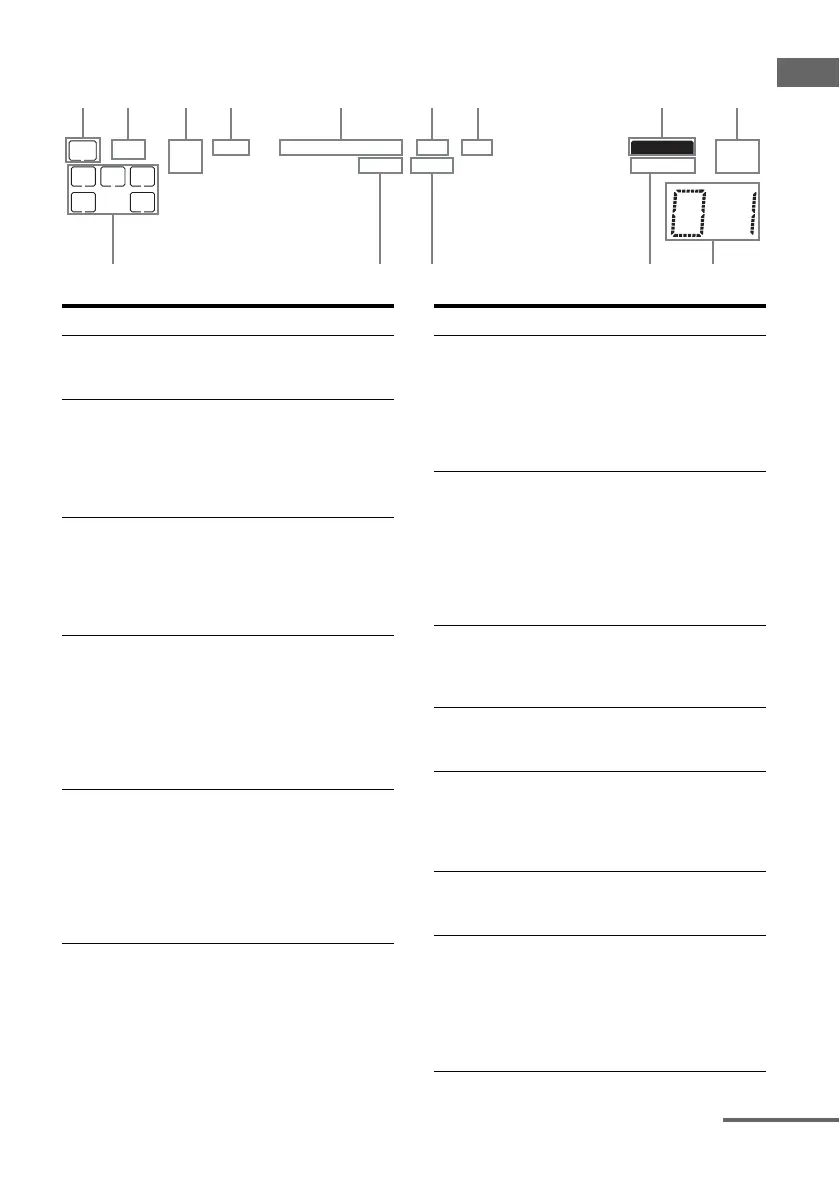
About the indicators on the display
SW
LFE
SP A
SP B
LC
SL S
;
D
;
PL
;
PL II OPT DTS MEMORY ST
MONOD.RANGE
R
SR
COAXHDMI
q;qaqf qsqd
Name Function
A SW Lights up when the audio signal
is output from the SUB
WOOFER jack.
B LFE Lights up when the disc being
played back contains an LFE
(Low Frequency Effect)
channel and the LFE channel
signal is actually being
reproduced.
C SP A/SP B Lights up according to the
speaker system used. However,
these indicators do not light up
if the speaker output is turned
off or if headphones are
connected.
D ;D Lights up when Dolby Digital
signals are input.
Note
When playing a Dolby Digital
format disc, be sure that you
have made digital connections
and that INPUT MODE is not
set to “ANALOG” (page 59).
E ;PL/
;PL II
“; PL” lights up when the
receiver applies Pro Logic
processing to 2 channel signals
in order to output the center and
surround channel signals.
“; PL II” lights up when the
Pro Logic II Movie or Music
decoder is activated.
Name Function
F OPT Lights up when INPUT MODE
is set to “AUTO IN” and the
source signal is a digital signal
being input through the
OPTICAL jack, or when
INPUT MODE is set to “OPT
IN” (page 59).
G DTS Lights up when DTS signals are
input.
Note
When playing a DTS format
disc, be sure that you have made
digital connections and that
INPUT MODE is not set to
“ANALOG” (page 59).
H MEMORY Lights up when a memory
function, such as Preset
Memory (page 57), etc., is
activated.
I Tuner
indicators
Lights up when using the
receiver to tune in radio stations
(page 54), etc.
J Preset
station
indicators
Lights up when using the
receiver to tune in radio stations
you have preset. For details on
presetting radio stations, see
page 56.
K D.RANGE Lights up when dynamic range
compression is activated (page
42).
L COAX Lights up when INPUT MODE
is set to “AUTO IN” and the
source signal is a digital signal
being input through the
COAXIAL jack, or when
INPUT MODE is set to “COAX
IN” (page 59).
continued


 To Next Page