16
US
HT-NT3
4-559-515-12(1)
D:\NORM'S JOB\SONY HA\SO150013\HT-NT3 (PMRF
05)\4559515121_USCaFRLaES (UC2)\US\040BLU.fm
masterpage: Left
Connecting with a wired
network
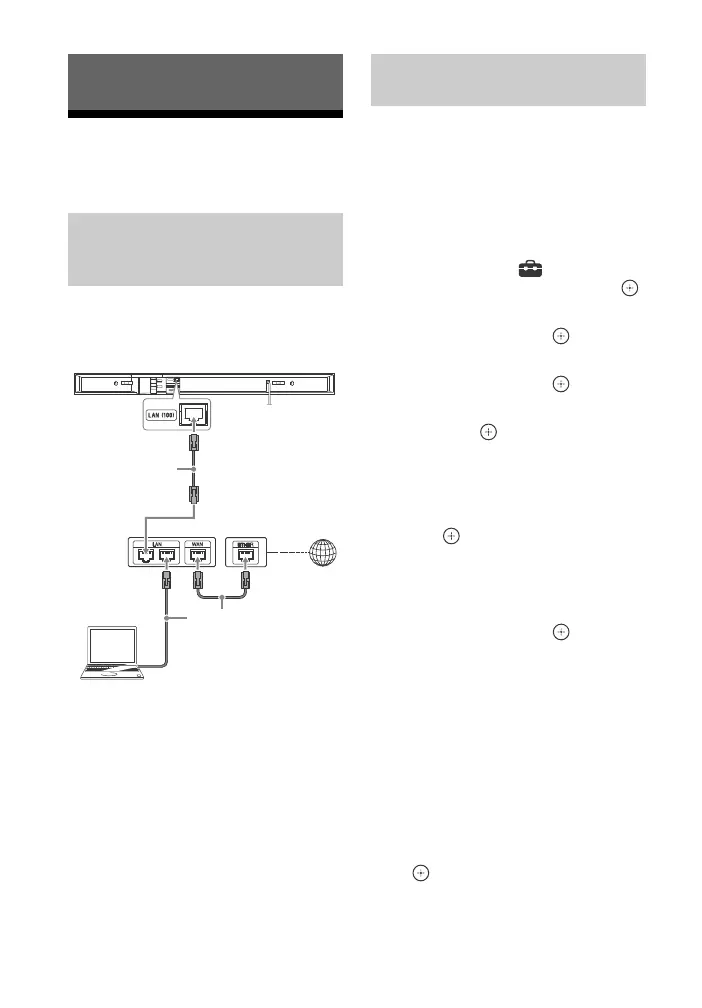
The following illustration is an example
configuration of a home network with
the system and a server.
You do not need to perform the
following set up if you have performed
the [Easy Network Settings].
1 Press HOME.
The home screen appears on the TV
screen.
2 Press to select [Setup] at the
upper right corner, then press .
3 Press / to select [Network
Settings], then press .
4 Press / to select [Internet
Settings], then press .
5 Press / to select [Wired Setup],
then press .
The screen for selecting the IP
address acquisition method
appears on the TV screen.
6 Press / to select [Auto], then
press .
7 Press / to browse information,
then press .
8 Press / to select [Save &
Connect], then press .
The system starts connecting to the
network. For details, refer to the
messages that appear on the TV
screen.
If using a fixed IP address
Select [Custom] in step 6, then follow
the on-screen instructions to select
[Specify IP address]. The IP address
input display appears on the TV screen.
Follow the on-screen instructions to
enter the value for [IP Address], then
press to confirm the values.
Network Function
Connecting the system to
the network using a LAN
cable
LAN cable
(not supplied)
Server
Broadband
router
ADSL modem/
Cable modem
LAN cable
(not supplied)
Internet
Setting up a wired LAN
connection



 To Next Page