21
US
HT-NT3
4-559-515-12(1)
D:\NORM'S JOB\SONY HA\SO150013\HT-NT3 (PMRF
05)\4559515121_USCaFRLaES (UC2)\US\050SET.fm
masterpage:
Right
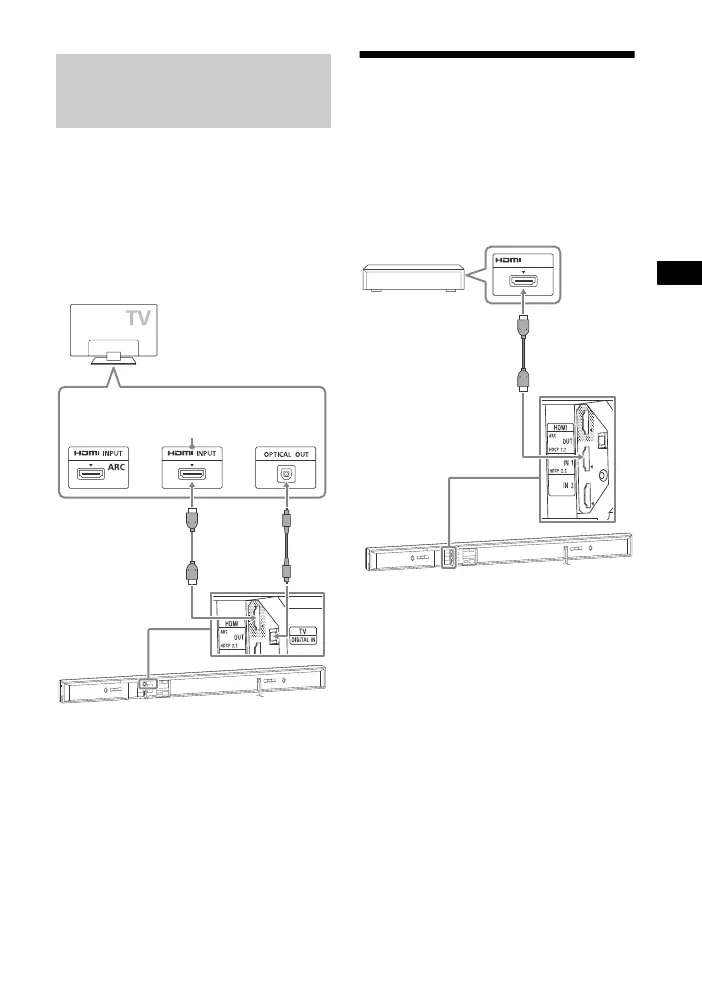
Viewing Copyright-protected 4K Content
If your TV’s HDMI jack is labeled with
ARC and not compatible with HDCP 2.2,
connect the system to your TV’s HDMI
jack that is compatible with HDCP 2.2
using an HDMI cable. Then, connect an
optical digital cable to the optical
output jack of the TV to listen to digital
sound.
Connecting 4K devices
Connect a 4K device to the HDMI IN 1
jack of the system. For details on
whether the device is HDCP 2.2-
compatible, refer to the operating
instructions supplied with the device.
When the TV’s HDMI jack is
labeled with ARC and not
compatible with HDCP 2.2
High Speed
HDMI cable
(supplied)
Optical
digital
cable (not
supplied)
HDCP 2.2-
compatible
HDMI jack
High Speed
HDMI cable
(not supplied)
Blu-ray Disc™
player, cable box or
satellite box, etc.
HDCP 2.2-
compatible
HDMI jack



 To Next Page