EasyManua.ls Logo

Sony HTC-D159 - RF PLL Free-run Frequency Check

Sony HTC-D159
36 pages
Print Icon
To Next Page IconTo Next Page
To Previous Page IconTo Previous Page
Loading...
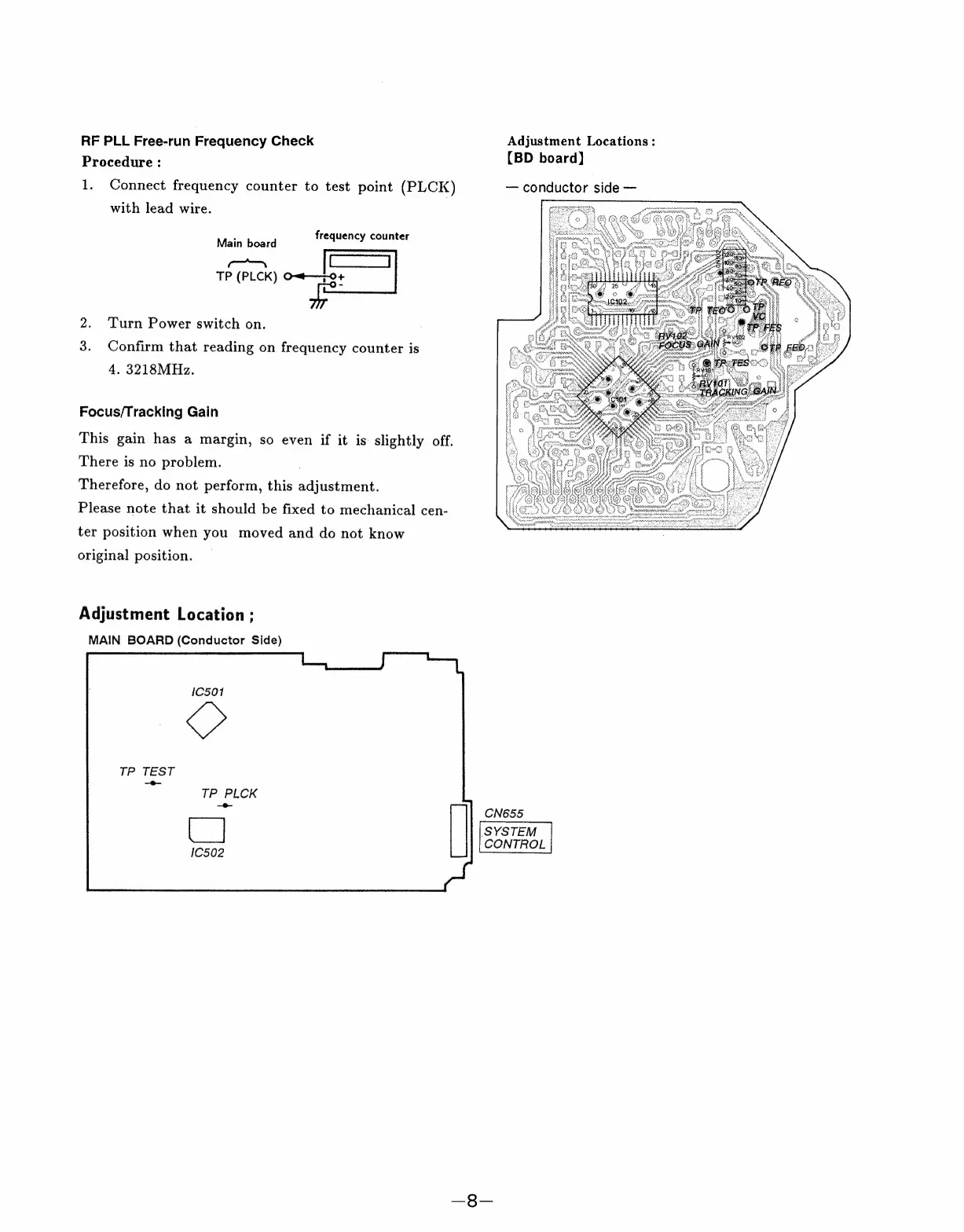
RF
PLL
Free-run
Frequency
Check
Adjustment
Locations:
Procedure
:
(BD
board)
1.
Connect
frequency
counter
to
test
point
(PLCK)
conductor
side
with
lead
wire.
Main
board
frequency
counter
—a
joes)
TP
(PLCK)
O~t—7-0+
2.
Turn
Power
switch
on.
3.
Confirm
that
reading
on
frequency
counter
is
4,
3218MHz.
Focus/Tracking
Gain
This
gain
has
a
margin,
so
even
if
it
is
slightly
off.
There
is
no
problem.
Therefore,
do
not
perform,
this
adjustment.
Please
note
that
it
should
be
fixed
to
mechanical
cen-
ter
position
when
you
moved
and
do
not
know
original
position.
Adjustment
Location
;
MAIN
BOARD
(Conductor
Side)
TP
TEST
—e—
TP
PLCK
CN655
SYSTEM
CONTROL

Related product manuals