Getting Started
masterpage:Right
lename[D:\Sony SEM
5\Revision_HTR210SS\J9050956_2599618112HTR210SS_GB\2599618112\GB03CON_HTR-
10SS-CEL.fm]
11
GB
model name1[HTR-210SS]
[2-599-618-11(2)]
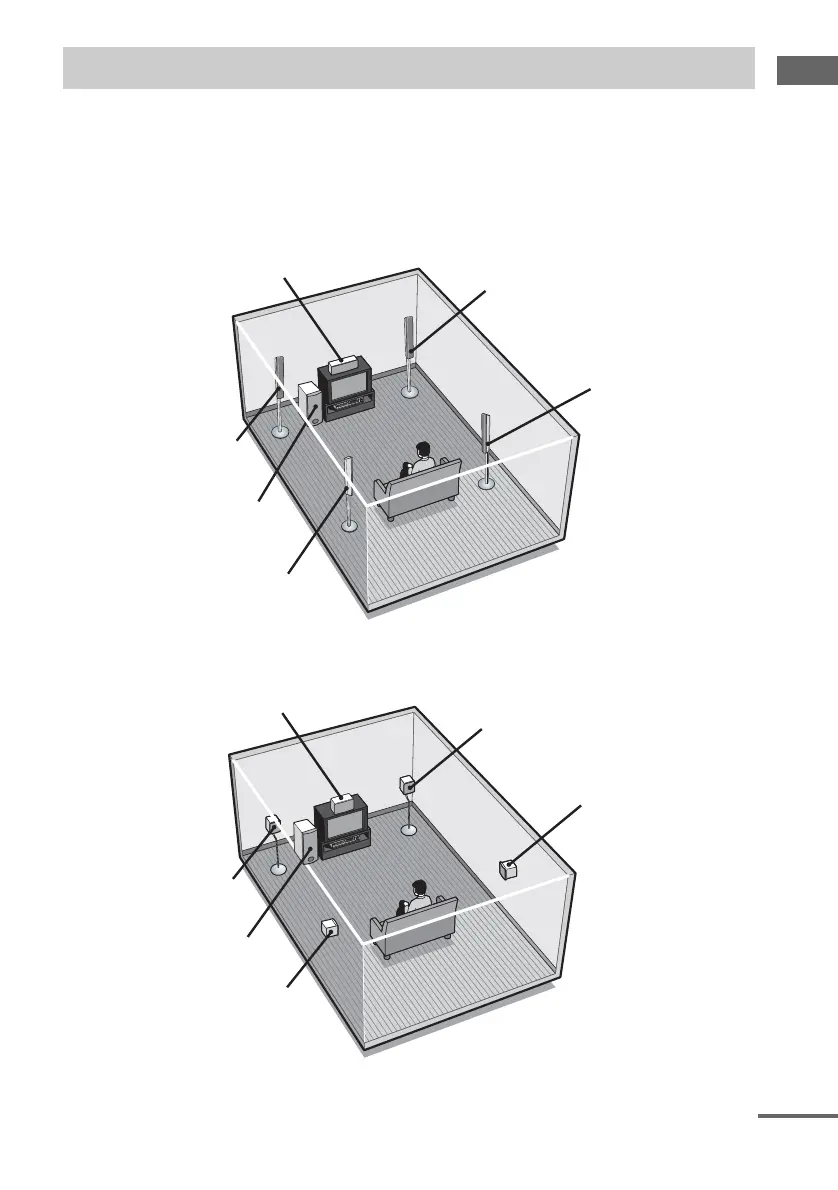
Connect your speakers to the receiver. This receiver allows you to use a 5.1 channel speaker system.
To fully enjoy theater-like multi channel surround sound requires five speakers (two front speakers, a
center speaker, and two surround speakers) and a subwoofer (5.1 channel).
Example of 5.1 channel speaker system configuration
HTD-710SF only
HTR-210SS, HTR-110SS, HTP-32SS and HTD-710SS only
3: Connecting speakers
Front speaker (Right)
Surround speaker (Right)
Center speaker
Front speaker (Left)
Subwoofer
Surround speaker (Left)
Front speaker (Right)
Surround speaker (Right)
Center speaker
Front speaker (Left)
Subwoofer
Surround speaker (Left)
continued
GB01COV_HTR-210SS-CEL.book Page 11 Wednesday, May 18, 2005 10:15 AM



 To Next Page