6-7
HVR-M10C/M10E/M10J/M10N/M10P/M10U
2-4-2. Operation
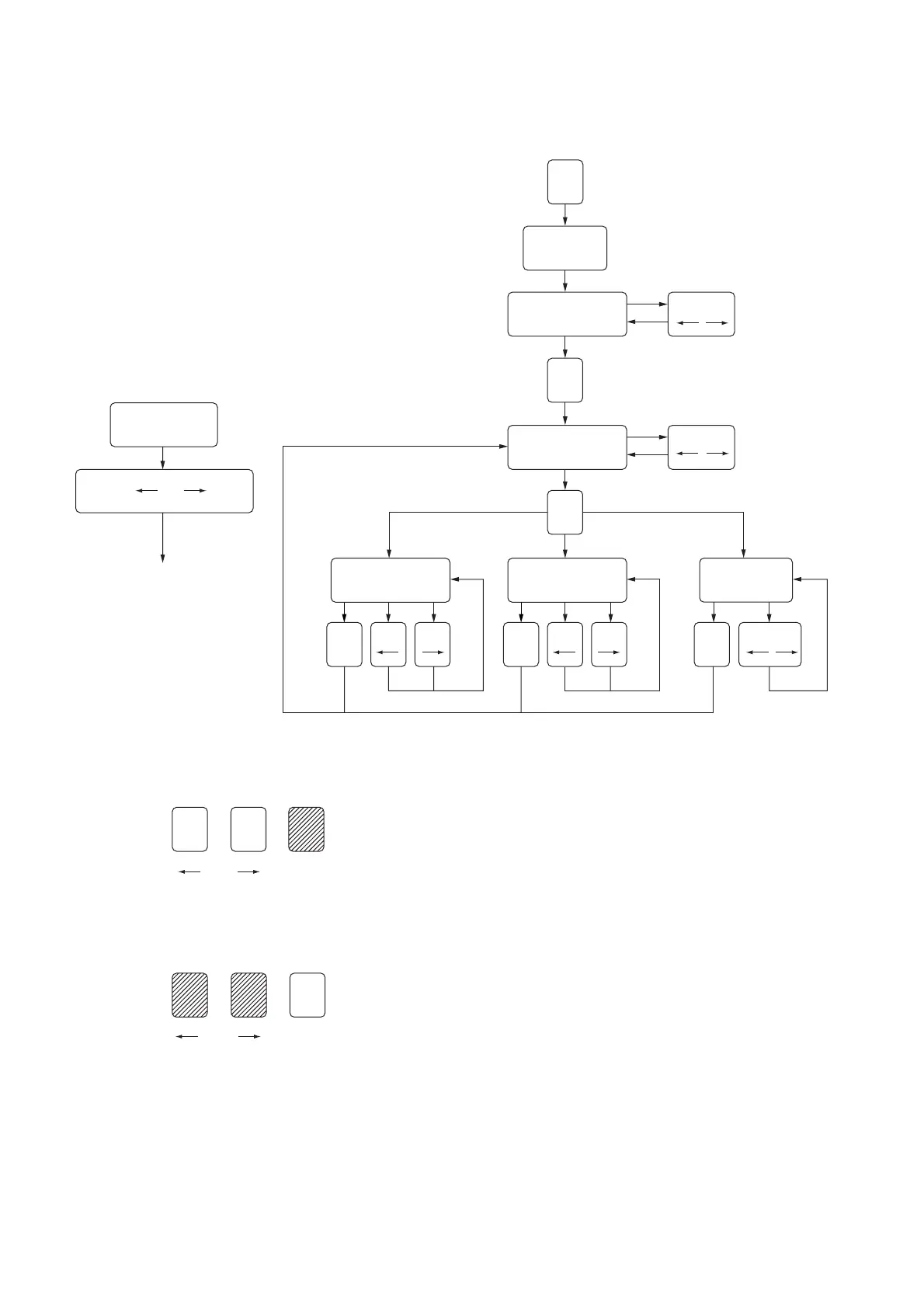
1. Operation Flow Chart
Note: The ROM in the Mode Selector II supports the Z mechanism.
2. Mode Selector II Power On
Turn on the main power of the Mode Selector II as follows.
Press the SEL button.
3. Mode Selector II Power Off
Turn off the main power of the Mode Selector II as follows.
Press the RVS and FF buttons at the same time for 2 seconds or
longer while the power is on.
SEL
SEL
SEL
STEP TEST
MANUAL TEST
AUTO TEST
POWER ON
MECHA SELECT
MODE SELECT
From any status
Press RVS and FF for
2 sec. simultaneously
Main power is
turned off
RVS, FF
RVS, FF
RVS, FFSELRVS FFSELRVS FFSEL
RVS FF SEL
RVS FF SEL









 To Next Page