Chapter 4 Adjusting and Setting Through Menus
Chapter 4 Adjusting and Setting Through Menus 53
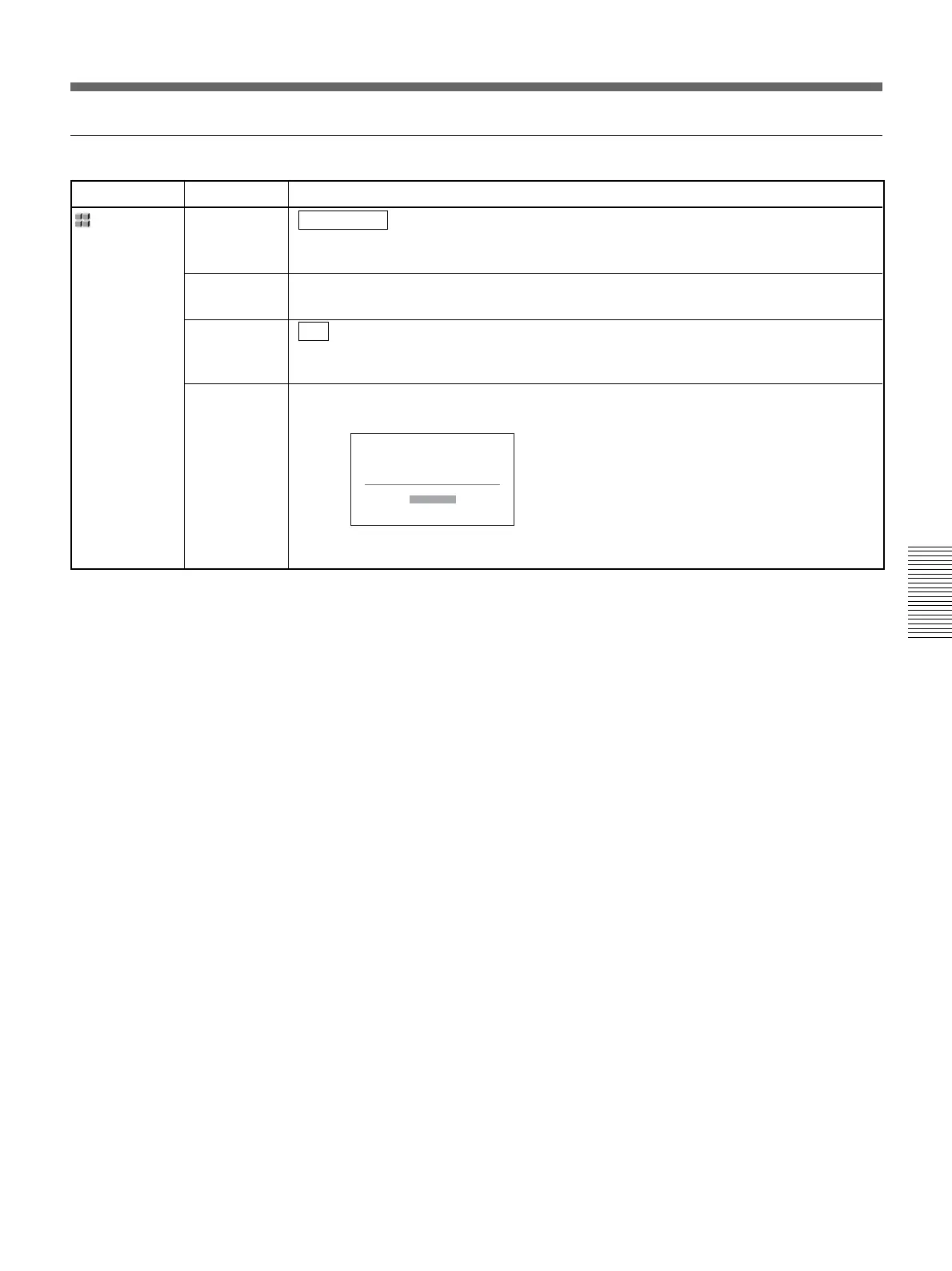
OTHERS menu
Icon/Menu Submenu Setting
OTHERS
DISP
OUTPUT
(page 19)
HOURS
METER
REMOTE
CTRL
(page 18)
50i/60i SEL
(page 33)
LCD PANEL : Displays information such as the time code on the LCD monitor.
V-OUT/PANEL : Displays information such as the time code on the LCD monitor of this
unit and an external monitor.
Refer to page 63 for details.
ON : Uses the supplied wireless Remote Commander.
OFF : Does not use the Remote Commander. This setting will prevent accidental
operation caused by a remote control unit of another equipment.
Switches to the 1080/60i (NTSC) or the 1080/50i (PAL).
1 Press the f/F buttons to select the setting, then press the EXEC button.
2 Press the f/F buttons to select [YES], then press the EXEC button.
50i/60i SEL
Change to 50i?
Reboots
after change.
YES
NO





 To Next Page