ICD-PX720 4-113-173-11(1)
45
GB
Playback
Playing Back a
Message at a Desired
Time with an Alarm
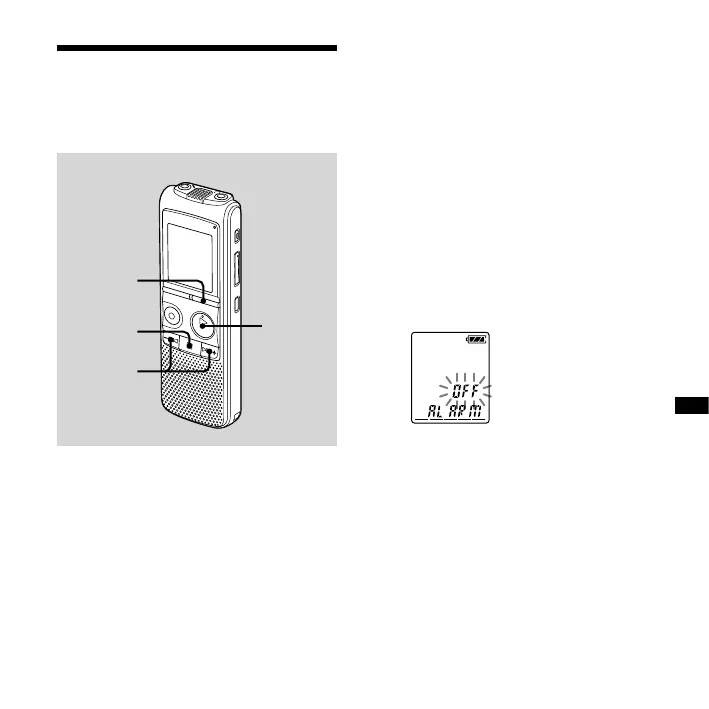
DISPLAY/
MENU
PLAY/
STOP•
ENTER
–,
+
You can sound an alarm and start
playback of a selected message at a
desired time.
You can have the message played back
on a specied date, once every week, or
at the same time every day.
1 Select the message you want to
play back with an alarm.
2 Enter the alarm setting mode.
Press and hold DISPLAY/MENU to
enter the menu mode.
The menu mode window will be
displayed.
Press – or + to select “ALARM,”
then press PLAY/STOP•ENTER.
(If the alarm has already set to the
selected message, “ALARM ON” is
displayed. If you do not wish to
change the setting, press (stop)
and exit the menu mode.)
Note
“ALARM OFF (or ON)” will not appear and
the alarm cannot be set if the clock has
not been set or no message has been
recorded in the selected folder.



 To Next Page