EasyManua.ls Logo

Sony ICF-C103 - Setting the Time

Sony ICF-C103
9 pages
Print Icon
To Next Page IconTo Next Page
To Previous Page IconTo Previous Page
Loading...
Setting
the
Time
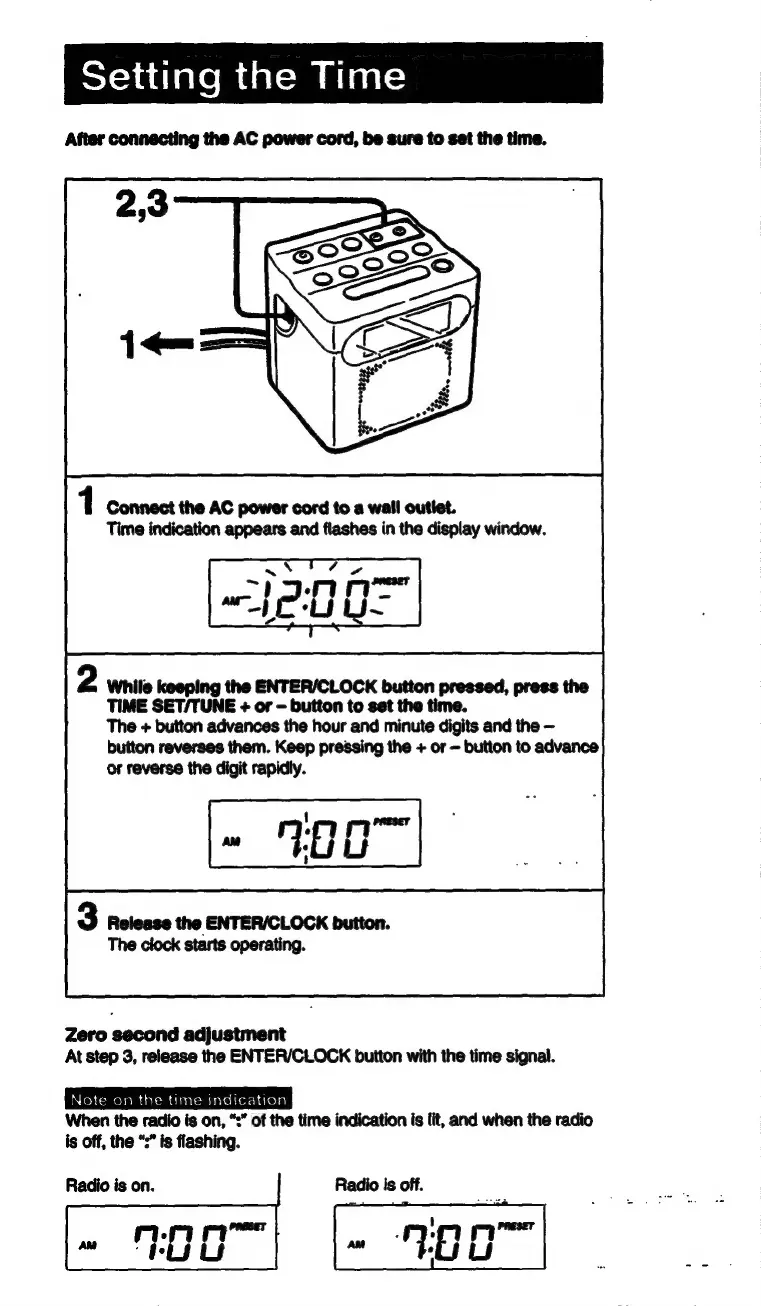
After
connecting
the
AC
power
cord,
be
sure
to
set
the
time.
1
Connect
the
AC
power
cord
to
a
wall
outlet.
Time
indication
appears
and
flashes
in
the
display
window.
2
While
keeping
the
ENTER/CLOCK
button
pressed,
press
the
TIME
SET/TUNE
+
or
button
to
set
the
time.
The
+
button
advances
the
hour
and
minute
digits
and
the
button
reverses
them.
Keep
pressing
the
+
or
button
to
advance
or
reverse
the
digit
rapidly.
3
Release
the
ENTER/CLOCK
button.
The
clock
starts
operating.
Zero
second
adjustment
At
step
3,
release
the
ENTER/CLOCK
button
with
the
time
signal.
Note
on
the
time
indication
When
the
radio
is
on,
“:”
of
the
time
indication
is
lit,
and
when
the
radio
is
off,
the
“:”
is
flashing.
Radio
is
on.

Related product manuals