EasyManua.ls Logo

Sony ICF-CD833 - Setting the Clock; Operating the CD Player; Playing a Disc; Locating Playback Points

Sony ICF-CD833
12 pages
Print Icon
To Next Page IconTo Next Page
To Previous Page IconTo Previous Page
Loading...
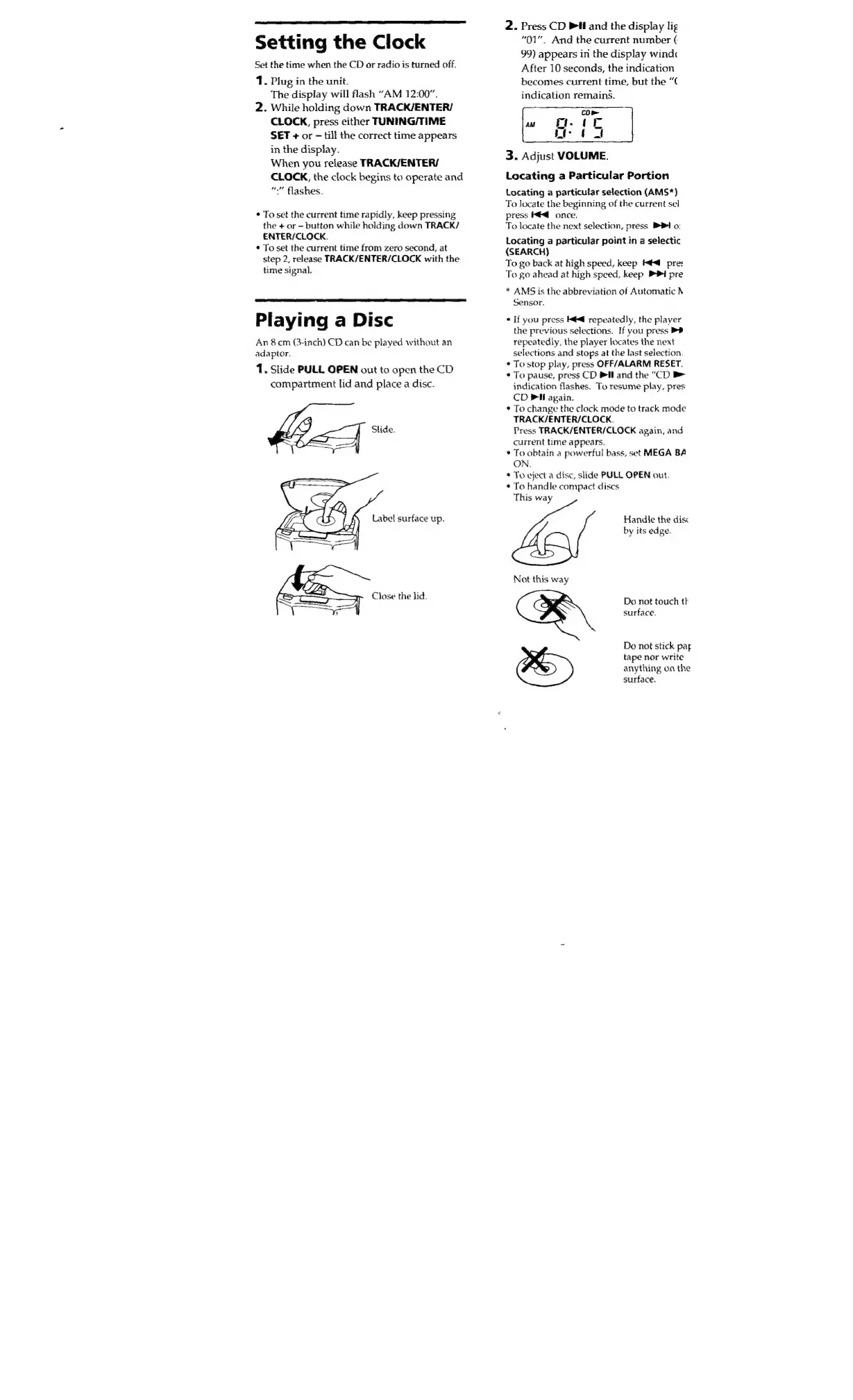
Setting
the
Clock
Set
the
time
when
the
CD
or
radio
is
turned
off.
1.
Plug
in
the
unit.
The
display
will
flash
“AM
12:00”.
2.
While
holding
down
TRACK/ENTER/
CLOCK,
press
either
TUNING/TIME
SET
+
or
till
the
correct
time
appears
in
the
display.
When
you
release
TRACK/ENTER/
CLOCK,
the
clock
begins
to
operate
and
“an
:”
flashes.
>
To
set
the
current
time
rapidly,
keep
pressing
the
+
or
-
button
while
holding
down
TRACK/
ENTER/CLOCK.
e
To
set
the
current
time
from
zero
second,
at
step
2,
release
TRACK/ENTER/CLOCK
with
the
time
signal.
Playing
a
Disc
An
8
cm
(3-inch)
CD
can
be
played
without
an
adaptor.
1,
Slide
PULL
OPEN
out
to
open
the
CD
compartment
lid
and
place
a
disc.
bb]
Slide.
Label
surface
up.
Se
OLL
ka
Close
the
lid.
2.
Press
CD
Pil
and
the
display
lig
“01”.
And
the
current
number
(
99)
appears
in
the
display
wind
After
10
seconds,
the
indication
becomes
current
time,
but
the
“(
indication
remains.
CD
pe
w
G-
U:
of
3.
Adjust
VOLUME.
Locating
a
Particular
Portion
Locating
a
particular
selection
(AMS*)
To
locate
the
beginning
of
the
current
sel
press
kéd
once.
To
locate
the
next
selection,
press
PPh
o:
Locating
a
particular
point
in
a
selectic
(SEARCH)
To
go
back
at
high
speed,
keep
aa
pres
To
go
ahead
at
high
speed,
keep
1
pre
*
AMS
is
the
abbreviation
of
Automatic
N
Sensor.
e
If
you
press
taa
repeatedly,
the
player
the
previous
selections.
If
you
press
PP
repeatedly,
the
player
locates
the
next
selections
and
stops
at
the
last
selection.
e
To
stop
play,
press
OFF/ALARM
RESET.
s
To
pause,
press
CD
PAI
and
the
“CD
b>
indication
flashes.
To
resume
play,
pres:
CD
Pil
again.
e
To
change
the
clock
mode
to
track
mode
TRACK/ENTER/CLOCK.
Press
TRACK/ENTER/CLOCK
again,
and
current
time
appears.
e
To
obtain
a
powerful
bass,
set
MEGA
BA
ON.
x
To
eject
a
disc,
slide
PULL
OPEN
out.
e
To
handle
compact
discs
This
way
Handle
the
dis
by
its
edge.
Not
this
way
Do
not
touch
tk
surface.
Do
not
stick
pat
tape
nor
write
anything
on
the
surface.

Related product manuals