EasyManua.ls Logo

Sony ICF-CD833 - Radio Operation; Manual Tuning; Preset Tuning; Alarm and Sleep Timer Functions

Sony ICF-CD833
12 pages
Print Icon
To Next Page IconTo Next Page
To Previous Page IconTo Previous Page
Loading...
Notes
>
Do
not
open
the
CD
compartment
lid
during
playing,
otherwise,
the
disc
will
be
damaged.
Be
sure
to
stop
the
disc
first.
e
When
you
press
CD
Pl,
if
there
is
no
disc
in
the
CD
compartment,
the
“00”
indication
flashes
for
about
10
seconds
and
the
unit
will
be
turned
off.
elf
the
Eco]
alarm
time
comes
during
listening
to
the
CD,
the
track
changes
to
that
preset
by
pressing
BAND/WAKE
UP
TRACK.
Playing
the
Radio
Manual
Tuning
1.
Press
RADIO/SLEEP.
The
“RADIO”
indication
lights
and
the
band
and
frequency
of
the
last
station
chosen
appear
in
the
display.
After
10
seconds,
the
indication
becomes
the
current
time
but
the
“RADIO”
indication
remains.
2.
Press
BAND/WAKE
UP
TRACK
to
select
the
band,
FM
or
AM.
Each
press
of
BAND/WAKE
UP
TRACK
changes
the
band
from
FM
to
AM
or
vice
versa.
3.
Tune
in
a
station
by
pressing
TUNING)
TIME
SET
+
or
-.
The
FM
channel
step
is
set
to
0.1
MHz
and
the
AM
channel
step
is
set
to
10
kHz.
Beeps
sound
at
the
band
edge.
After
10
seconds,
the
indication
becomes
the
current
time
but
the
“RADIO”
indication
remains.
4.
Adjust
VOL.
To
turn
off
the
radio,
press
CD
or
OFF/ALARM
RESET.
To
improve
radio
reception
FM:
Extend
the
FM
wire
antenna
to
improve
FM
reception.
AM:
Rotate
the
unit
horizontally
for
optimum
reception.
A
ferrite
bar
antenna
is
built
into
the
unit.
To
check
the
station
you
are
listening
to,
press
RADIO.
The
band
and
frequency
appear
for
10
seconds.
Preset
Tuning
You
can
preset
up
to
five
FM/AM
stations
(one
station
for
each
MEMORY
PRESETS
number
button
1
to
5.)
Setting
the
Alarm
You
can
set
the
CD,
radio
and
buzzer
alarms
at
the
preset
time.
Before
setting
the
alarm,
be
sure
to
set
the
clock.
(See
“Setting
the
Clock”.)
Setting
the
Alarm
Time
To
set
the
ECD)
alarm
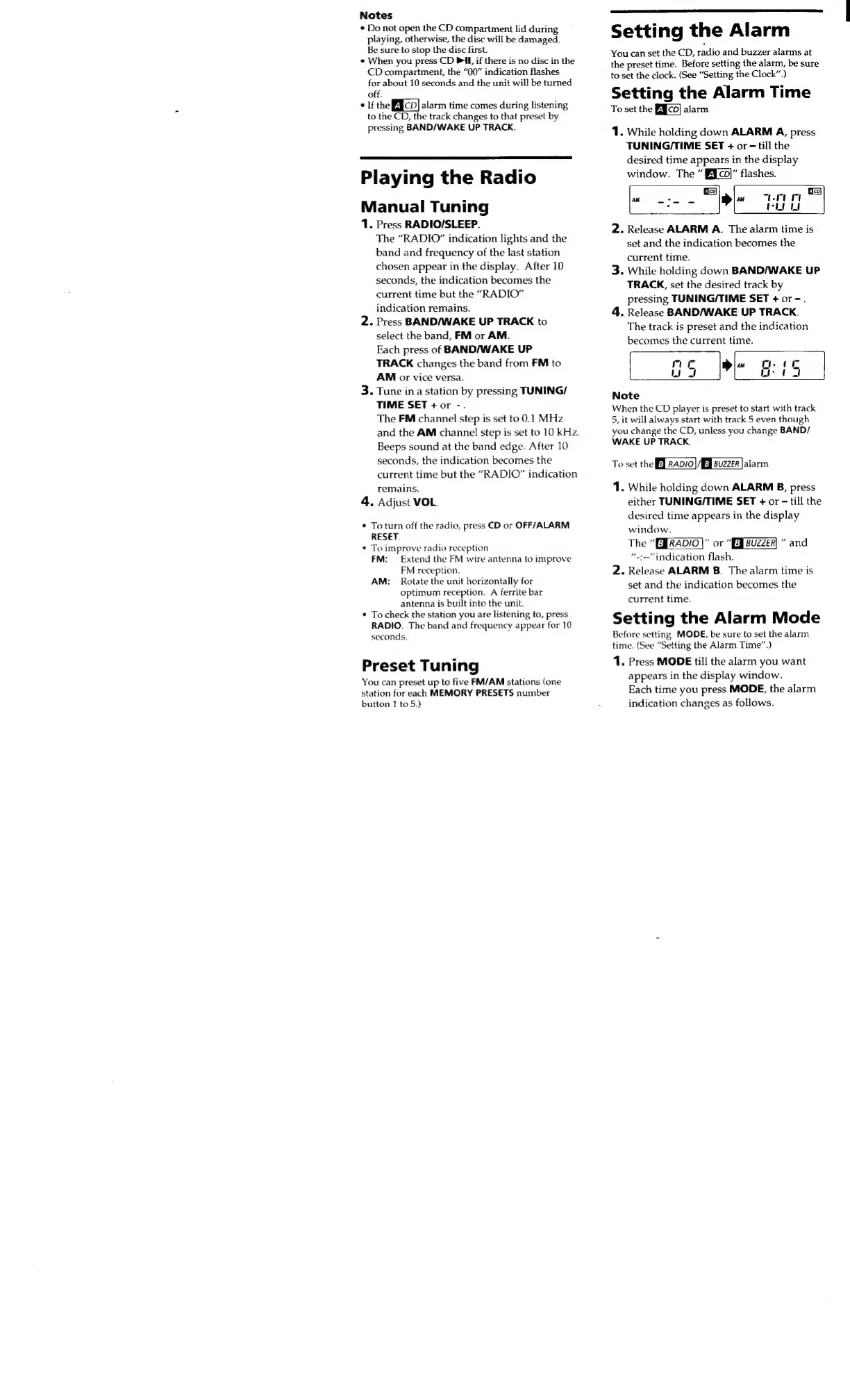
1.
While
holding
down
ALARM
A,
press
TUNING/TIME
SET
+
or
-
till
the
desired
time
appears
in
the
display
window.
The
Efco)“
flashes.
Geo)
Eco}
AM
Stee,
AM
wm
P
Ñ
Te
Che
LU
2.
Release
ALARM
A.
The
alarm
time
is
set
and
the
indication
becomes
the
current
time.
3.
While
holding
down
BAND/WAKE
UP
TRACK,
set
the
desired
track
by
pressing
TUNING/TIME
SET
+
or
-.
4.
Release
BAND/WAKE
UP
TRACK.
The
track
is
preset
and
the
indication
becomes
the
current
time.
rm
ut
~~,
LT
Note
When
the
CD
player
is
preset
to
start
with
track
5,
it
will
always
start
with
track
5
even
though
you
change
the
CD,
unless
you
change
BAND/
WAKE
UP
TRACK.
To
set
the
B
rapi0)
AE]
suzzer
alarm
1.
While
holding
down
ALARM
B,
press
either
TUNING/TIME
SET
+
or
-
till
the
desired
time
appears
in
the
display
window.
The
“ERADIO|”
or
“EJBUZZEA
and
“~:--"
indication
flash.
2.
Release
ALARM
B.
The
alarm
time
is
set
and
the
indication
becomes
the
current
time.
Setting
the
Alarm
Mode
Before
setting
MODE,
be
sure
to
set
the
alarm
time.
(See
“Setting
the
Alarm
Time.)
1.
Press
MODE
till
the
alarm
you
want
appears
in
the
display
window.
Each
time
you
press
MODE,
the
alarm
indication
changes
as
follows.

Related product manuals