EasyManua.ls Logo

Sony ICF-SW1 - How to Set the Clock; Direct Tuning

Sony ICF-SW1
28 pages
Print Icon
To Next Page IconTo Next Page
To Previous Page IconTo Previous Page
Loading...
ICF-SW1
AN-101
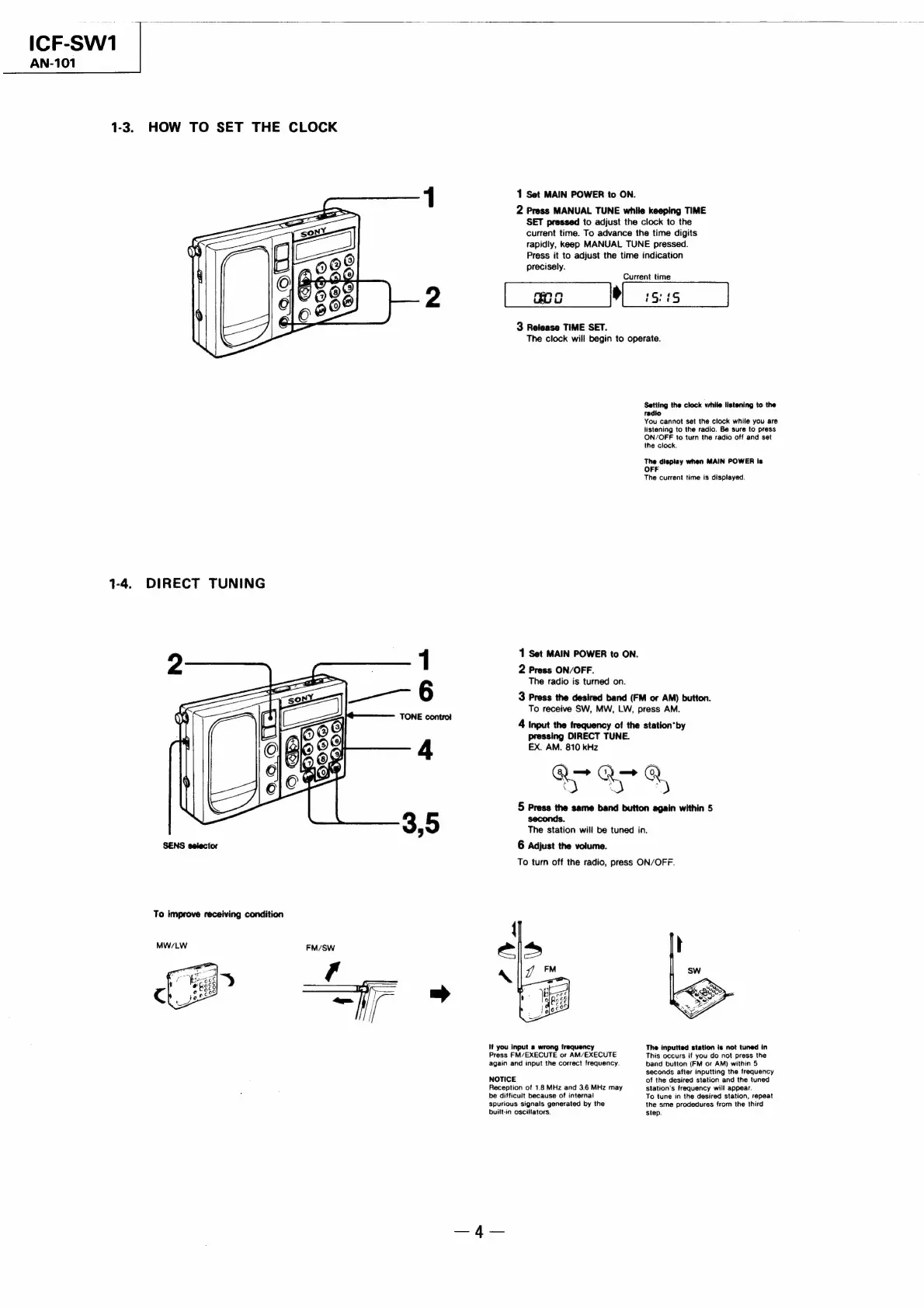
1-3.
HOW
TO
SET
THE
CLOCK
1
Set
MAIN
POWER
to
ON.
2
Press
MANUAL
TUNE
while
keeping
TIME
SET
pressed
to
adjust
the
clock
to
the
current
time.
To
advance
the
time
digits
rapidly,
keep
MANUAL
TUNE
pressed.
Press
it
to
adjust
the
time
indication
precisely.
Current
time
[
woo
Wises
3
Release
TIME
SET.
The
clock
will
begin
to
operate.
Setting
the
clock
vhile
listening
to
the
radio
You
cannot
set
the
clock
while
you
are
listening
to
the
radio.
Be
sure
to
press
ON/OFF
to
turn
the
radio
off
and
set
the
clock.
The
display
when
MAIN
POWER
is
OFF
The
current
time
is
displayed.
1-4.
DIRECT
TUNING
1
Set
MAIN
POWER
to
ON.
2
Press
ON/OFF.
The
radio
is
turned
on.
3
Press
the
desired
band
(FM
or
AM)
button.
To
receive
SW,
MW,
LW,
press
AM.
4
Input
the
frequency
of
the
station"by
pressing
DIRECT
TUNE.
EX.
AM.
810
kHz
OOF
@,
5
Press
the
same
band
button
again
within
5
seconds.
The
station
will
be
tuned
in.
SENS
selector
6
Adjust
the
volume.
To
turn
off
the
radio,
press
ON/OFF.
To
improve
receiving
condition
If
you
input
a
wrong
frequency
The
inputted
station
is
not
tuned
in
Press
FM/EXECUTE
or
AM/EXECUTE
This
occurs
if
you
do
not
press
the
again
and
input
the
correct
frequency.
band
button
(FM
or
AM)
within
5
seconds
after
inputting
the
frequency
NOTICE
of
the
desired
station
and
the
tuned
Reception
of
1.8
MHz
and
3.6
MHz
may
station’s
frequency
will
appear.
be
difficult
because
of
internal
To
tune
in
the
desired
station,
repeat
spurious
signals
generated
by
the
the
sme
prodedures
from
the
third
built-in
oscillators.
step.

Related product manuals