EasyManua.ls Logo

Sony ICF-SW1 - Preset Tuning; Automatic Radio Turn-On

Sony ICF-SW1
28 pages
Print Icon
To Next Page IconTo Next Page
To Previous Page IconTo Previous Page
Loading...
ICF-SW1
AN-101
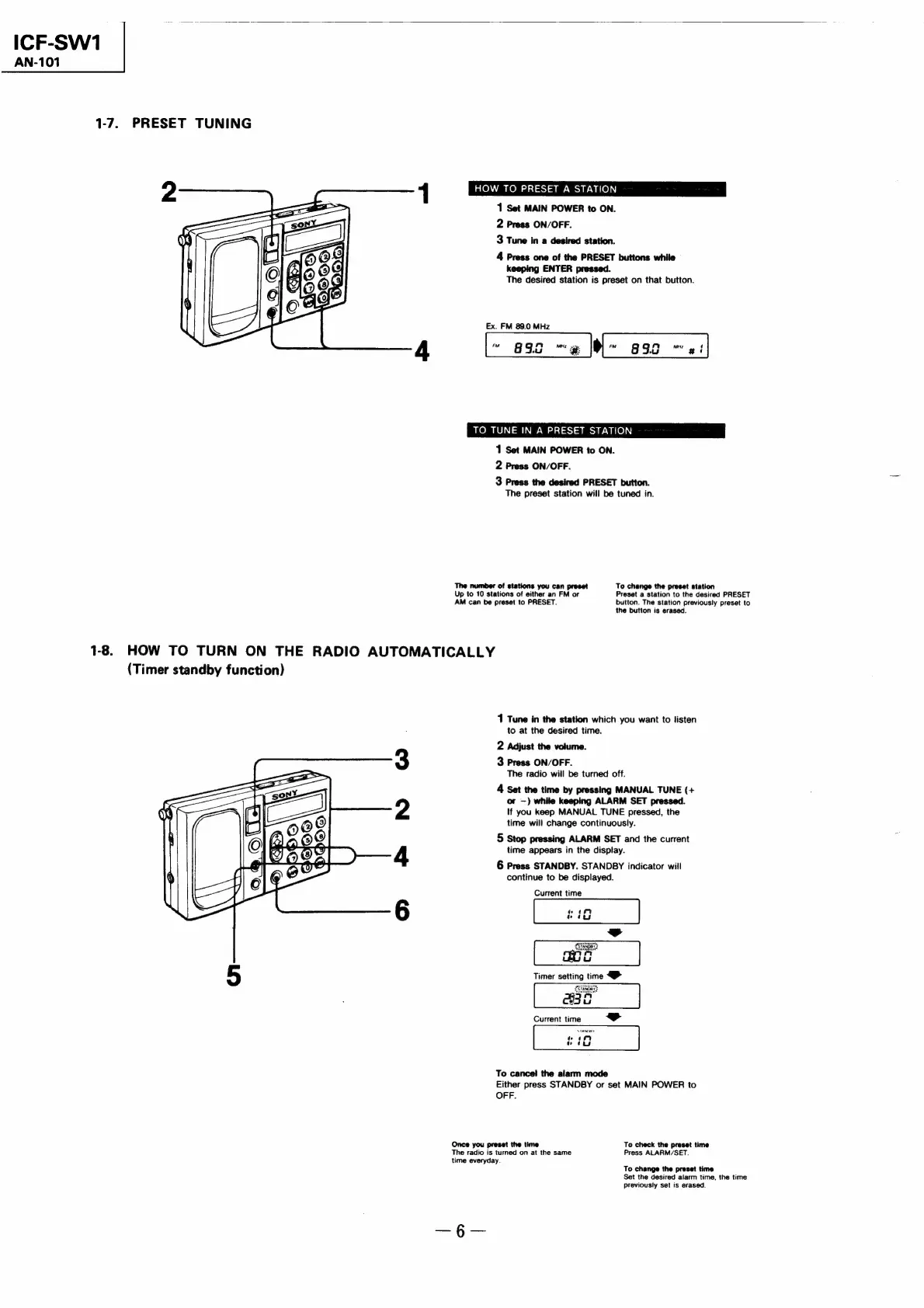
1-7.
PRESET
TUNING
HOW
TO
PRESET
A
STATION
1
Set
MAIN
POWER
to
ON.
2
Press
ON/OFF.
3
Tune
in
a
desired
station.
4
Press
one
of
the
PRESET
buttons
while
keeping
ENTER
pressed.
The
desired
station
is
preset
on
that
button.
Ex.
FM
89.0
MHz
TO
TUNE
IN
A
PRESET
STATION
1
Set
MAIN
POWER
to
ON.
2
Press
ON/OFF.
3
Press
the
desired
PRESET
button.
The
preset
station
will
be
tuned
in.
The
number
of
stations
you
can
preset
To
change
the
preset
station
Up
to
10
stations
of
either
an
FM
or
Preset
a
station
to
the
desired
PRESET
AM
can
be
preset
to
PRESET.
button.
The
station
previously
preset
to
the
button
is
erased.
1-8.
HOW
TO
TURN
ON
THE
RADIO
AUTOMATICALLY
(Timer
standby
function)
Oo
Ff
DO
oO
1
Tune
in
the
station
which
you
want
to
listen
to
at
the
desired
time.
2
Adjust
the
volume.
3
Press
ON/OFF.
The
radio
will
be
turned
off.
4
Set
the
time
by
pressing
MANUAL
TUNE
(+
or
—)
while
keeping
ALARM
SET
pressed.
If
you
keep
MANUAL
TUNE
pressed,
the
time
will
change
continuously.
5
Stop
pressing
ALARM
SET
and
the
current
time
appears
in
the
display.
6
Press
STANDBY.
STANDBY
indicator
will
continue
to
be
displayed.
Current
time
Current
time
ad
To
cancel
the
alarm
mode
Either
press
STANDBY
or
set
MAIN
POWER
to
OFF.
Once
you
preset
the
time
To
check
the
preset
time
The
radio
is
turned
on
at
the
same
Press
ALARM/SET.
time
everyday.
To
change
the
preset
time
Set
the
desired
alarm
time,
the
time
previously
set
is
erased.

Related product manuals