EasyManua.ls Logo

Sony ICF-SW1 - Sleep Timer; Active Antenna Usage

Sony ICF-SW1
28 pages
Print Icon
To Next Page IconTo Next Page
To Previous Page IconTo Previous Page
Loading...
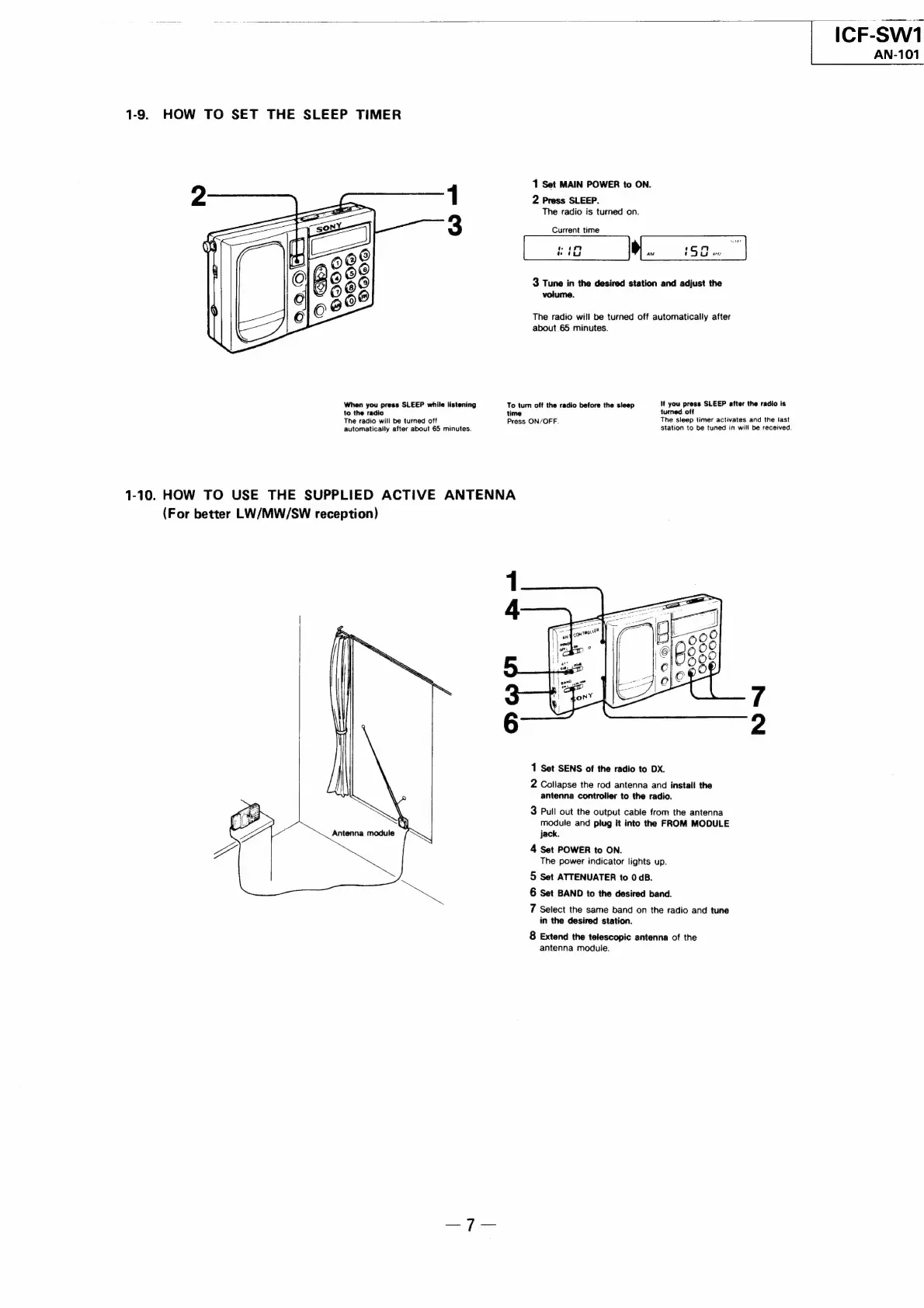
1-9.
HOW
TO
SET
THE
SLEEP
TIMER
When
you
press
SLEEP
while
listening
to
the
radio
The
radio
will
be
turned
off
automatically
after
about
65
minutes.
1-10.
HOW
TO
USE
THE
SUPPLIED
ACTIVE
ANTENNA
(For
better
LW/MW/SW
reception)
To
turn
off
the
radio
before
the
sleep
Press
ON/OFF.
ICF-SW1
AN-101
1
Set
MAIN
POWER
to
ON.
2
Press
SLEEP.
The
radio
is
turned
on.
Current
time
Notes
nm
aM
:
9G
tes
3
Tune
in
the
desired
station
and
adjust
the
volume.
The
radio
will
be
turned
off
automatically
after
about
65
minutes.
if
you
press
SLEEP
after
the
radio
is
turned.
off
The
sleep
timer
activates
and
the
last
station
to
be
tuned
in
will
be
received.
1
Set
SENS
of
the
radio
to
DX.
2
Collapse
the
rod
antenna
and
install
the
antenna
controller
to
the
radio.
3
Pull
out
the
Output
cable
from
the
antenna
module
and
plug
it
into
the
FROM
MODULE
jack.
4
Set
POWER
to
ON.
The
power
indicator
lights
up.
5
Set
ATTENUATER
to
0
dB.
6
Set
BAND
to
the
desired
band.
7
Select
the
same
band
on
the
radio
and
tune
in
the
desired
station.
8
Extend
the
telescopic
antenna
of
the
antenna
module.

Related product manuals