8
Using Your New TV
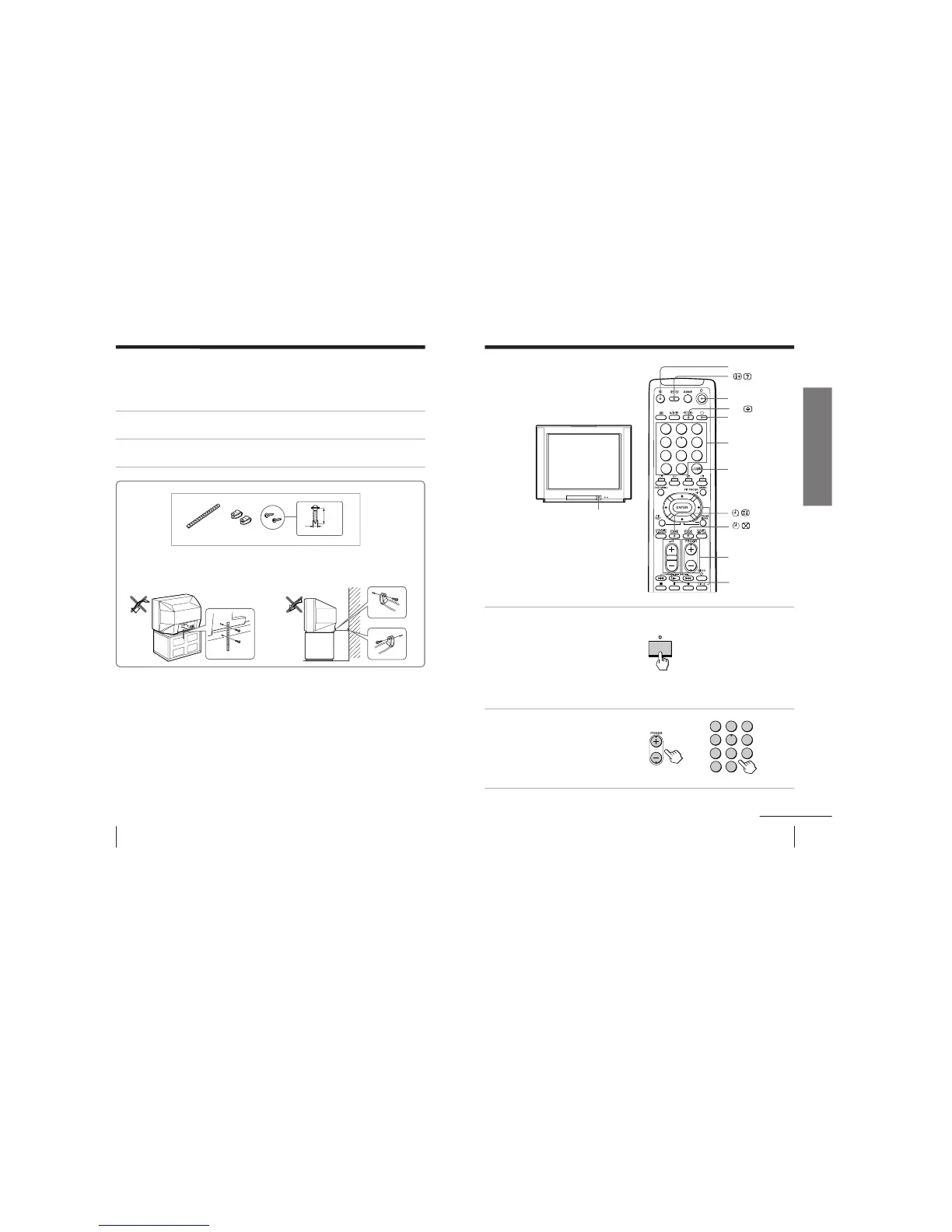
Securing the TV
To prevent the TV from falling, secure the TV using one of the following methods:
A
With the supplied screws, attach the band to the TV stand and to the rear of
the TV using the provided hole.
B
Put the cord or chain through the clamps to secure the TV against a wall or
pillar.
Note
• Use only the supplied screws. Use of other screws may damage the TV.
20
mm
AB
3.8mm
9
Using Your New TV
Using Your New TV
Watching the TV
This section explains functions used
while watching TV. Most operations can
be done using the remote.
1
Press U to turn on the TV.
When the TV is in the
standby mode (the u
indicator on the TV is lit),
press u on the remote or
on the TV.
The PROGR +/–, . +/–,
and … indicators on the
TV light up.
2
Press PROGR +/– or
number buttons to select
the TV program.
For double digit numbers,
press ÷, then the number
(e.g., for 25, press ÷, then
2 and 5).
¤
u
…
;
Number buttons
JUMP
. +/–
U
PROGR +/–
continued



 To Next Page