6
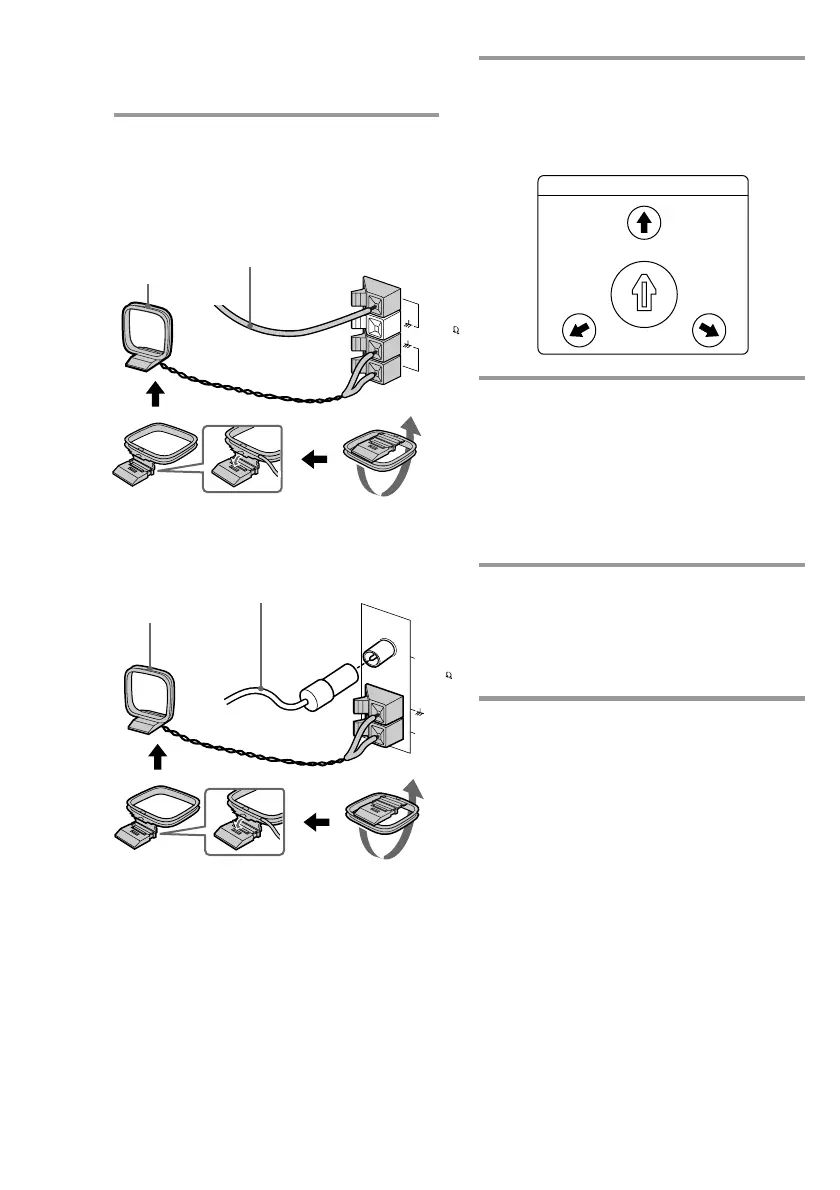
2 Connect the FM/AM antennas.
Set up the AM loop antenna, then
connect it.
AM loop antenna
Extend the FM wire
antenna horizontally.
Except for European models
For European models
AM loop antenna
Extend the FM wire
antenna horizontally.
Step 2: Hooking up the system
(continued)
FM 75
AM
AM
COAXIAL
FM 75
3 If your system has a VOLTAGE
SELECTOR on the rear panel, set it
to the position of your local power
line voltage.
4 Connect the power cord to a wall
outlet.
The demonstration appears in the
display.
If the supplied adapter on the plug does
not fit your wall outlet, detach it from
the plug (only for models equipped with
an adapter).
5 Deactivate the demonstration mode
by pressing DISPLAY (for LBT-
W5000/W300/XB700/XB500 only)
or DEMO (STANDBY) (for other
models) while the system is off.
To connect optional AV
components
See page 41.
VOLTAGE SELECTOR
220V
120V
230
240V
-


 To Next Page