Using the Menu
18
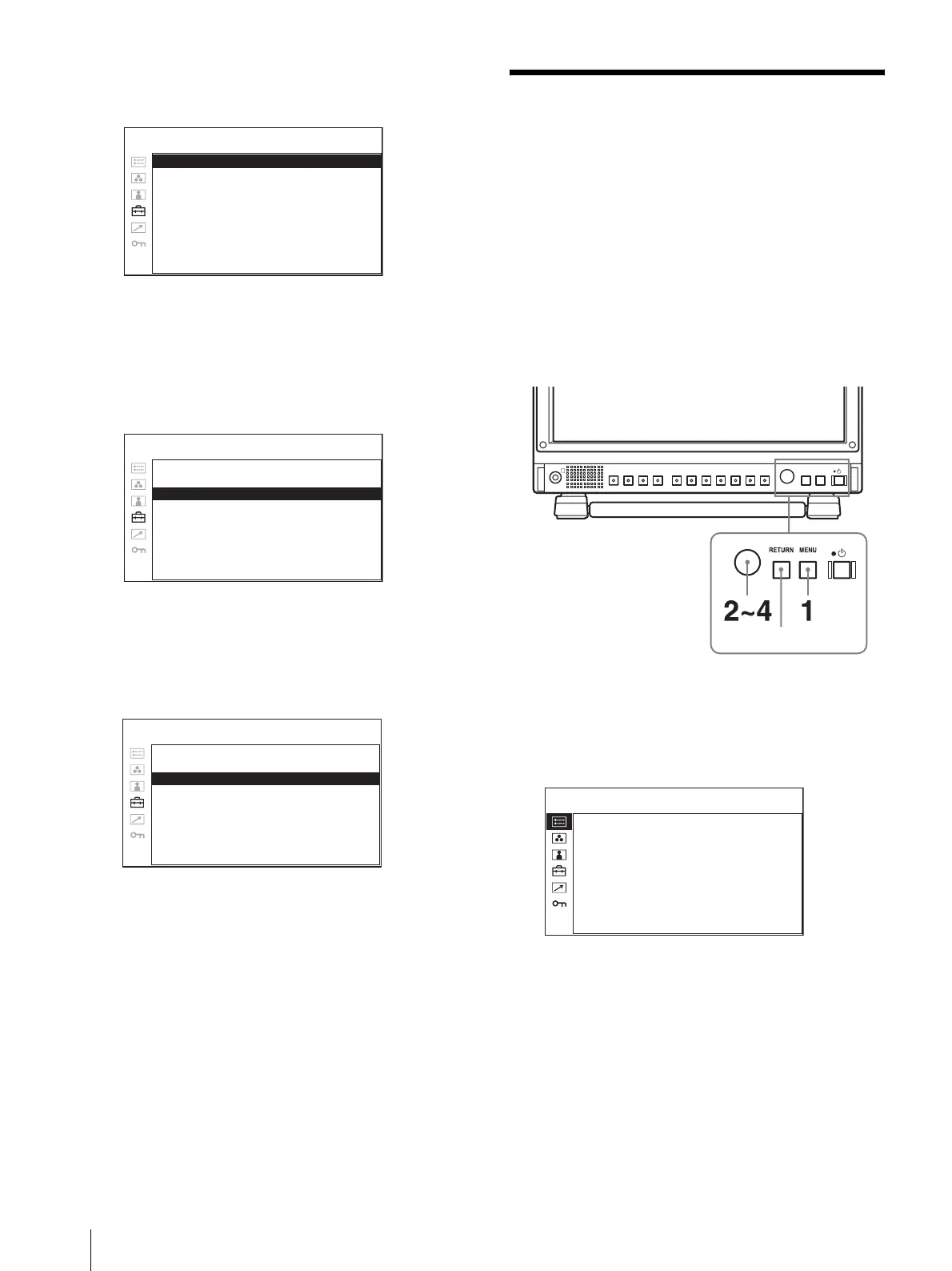
The setting items (icons) in the selected menu are
displayed in yellow.
4
Turn the menu selection control to select
“LANGUAGE”, then press the menu selection
control.
The selected item is displayed in yellow.
5
Turn the menu selection control to select a
language, then press the menu selection control.
The menu changes to the selected language.
To clear the menu
Press the MENU button.
The menu disappears automatically if a button is not
pressed for one minute.
Using the Menu
The unit is equipped with an on-screen menu for making
various adjustments and settings such as picture control,
input setting, set setting change, etc. You can also
change the menu language displayed in the on-screen
menu.
To change the menu language, see “Selecting the Menu
Language” on page 17.
The current settings are displayed in place of the x
marks on the illustrations of the menu screen.
1
Press the MENU button.
The menu appears.
The menu presently selected is shown in yellow.
2
Turn the menu selection control to select a menu,
then press the menu selection control.
NTSC SETUP: xxxxxx
FORMAT DISPLAY: xxxxxx
LANGUAGE: ENGLISH
POWER SAVING: xxxxxx
I/P MODE: xxxxxxx
LED BRIGHTNESS: xxxxxx
RGB RANGE: xxxxxx
SD PIXEL MAPPING: xxxxxxx
USER CONFIG – SYSTEM SETTING
NTSC SETUP: xxxxxx
FORMAT DISPLAY: xxxxxx
LANGUAGE: ENGLISH
POWER SAVING: xxxxxx
I/P MODE: xxxxxxx
LED BRIGHTNESS: xxxxxx
RGB RANGE: xxxxxx
SD PIXEL MAPPING: xxxxxxx
USER CONFIG – SYSTEM SETTING
NTSC SETUP: xxxxxx
FORMAT DISPLAY: xxxxxx
LANGUAGE: ENGLISH
POWER SAVING: xxxxxx
I/P MODE: xxxxxxx
LED BRIGHTNESS: xxxxxx
RGB RANGE: xxxxxx
SD PIXEL MAPPING: xxxxxxx
USER CONFIG – SYSTEM SETTING
RETURN button
FORMAT
xxxxxxxxx
xxxxxxxx
COLOR TEMP
xxx
HDMI FORMAT
xxxxx
NTSC SETUP
x
SCAN MODE
xxxxxxxx
POWER SAVING
xx
I/P MODE
xxxxxxx
STATUS 1/2


 To Next Page