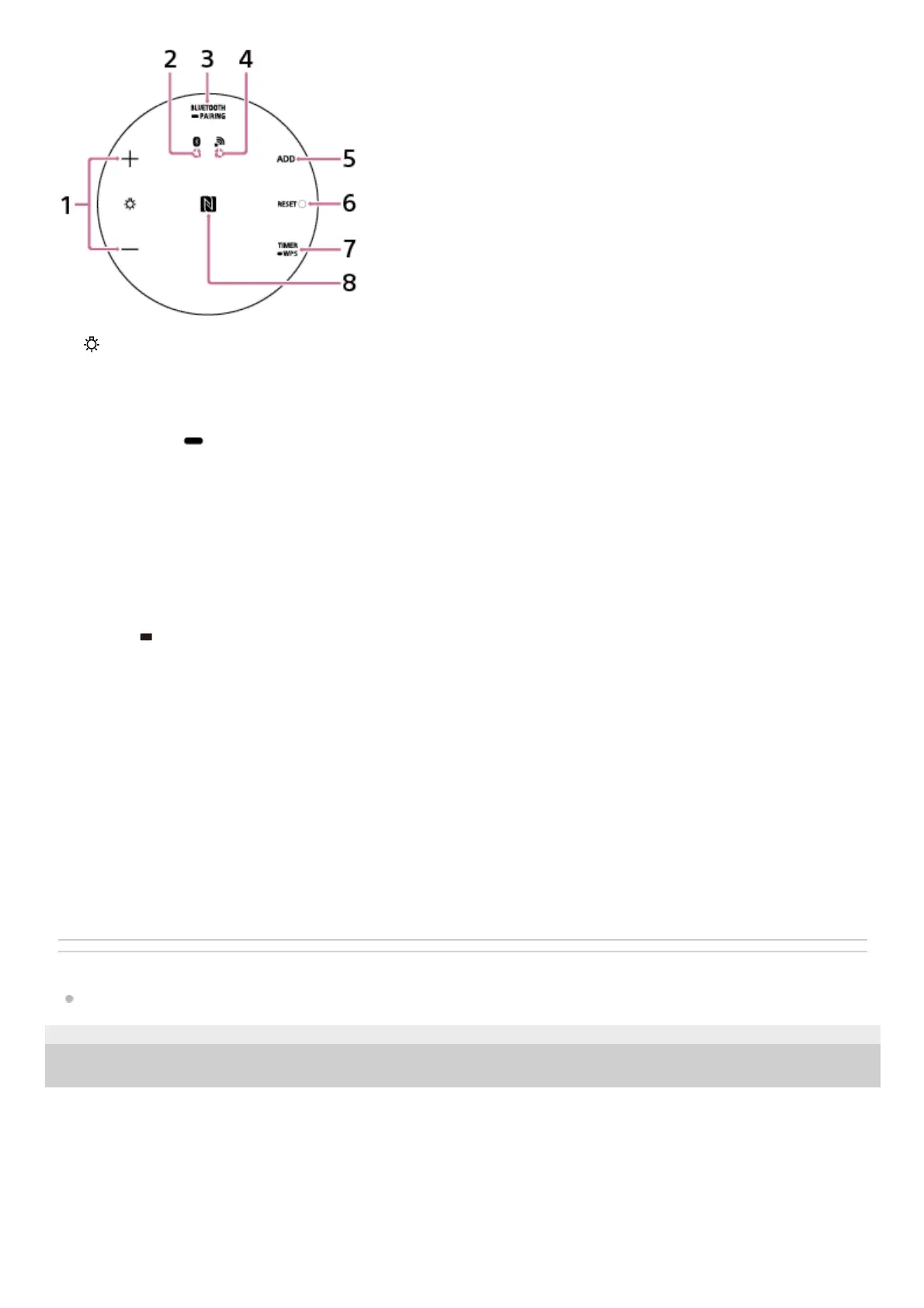
For our visually impaired customers:
The power button and volume buttons are located on the side of the speaker that is covered by cloth.
From the right of the USB cable’s port, there are 2 buttons, underneath the cloth, that adjust the volume.
The button for raising the volume has a tactile dot to help you locate it. Use this as a mark for operations.
To the left of the USB cable’s port are the power button and connection button, underneath the cloth. The button on the
outer side is the power button.
Related Topic
About the indicators
4-748-325-11(1) Copyright 2019 Sony Corporation
(illumination LED) +/– buttons
Adjust the brightness of the illumination LED.
1.
BLUETOOTH indicator2.
BLUETOOTH/
PAIRING button
Press briefly to switch to output from a device connected via BLUETOOTH connection.
Press and hold to put the speaker into pairing mode.
3.
Network indicator4.
ADD (Speaker Add function) button5.
RESET button6.
TIMER/
WPS button
Press briefly to set the Sleep Timer.
Press and hold to connect to a Wi-Fi network through a Wi-Fi router that has a Wi-Fi Protected Setup™ (WPS)
button.
7.
N-Mark
Touch here when connecting by One-touch (NFC).
8.



 To Next Page