EasyManua.ls Logo

Sony M-425 - Playing a Tape; Playback Controls; Increasing Playback Speed

Sony M-425
14 pages
Print Icon
To Next Page IconTo Next Page
To Previous Page IconTo Previous Page
Loading...
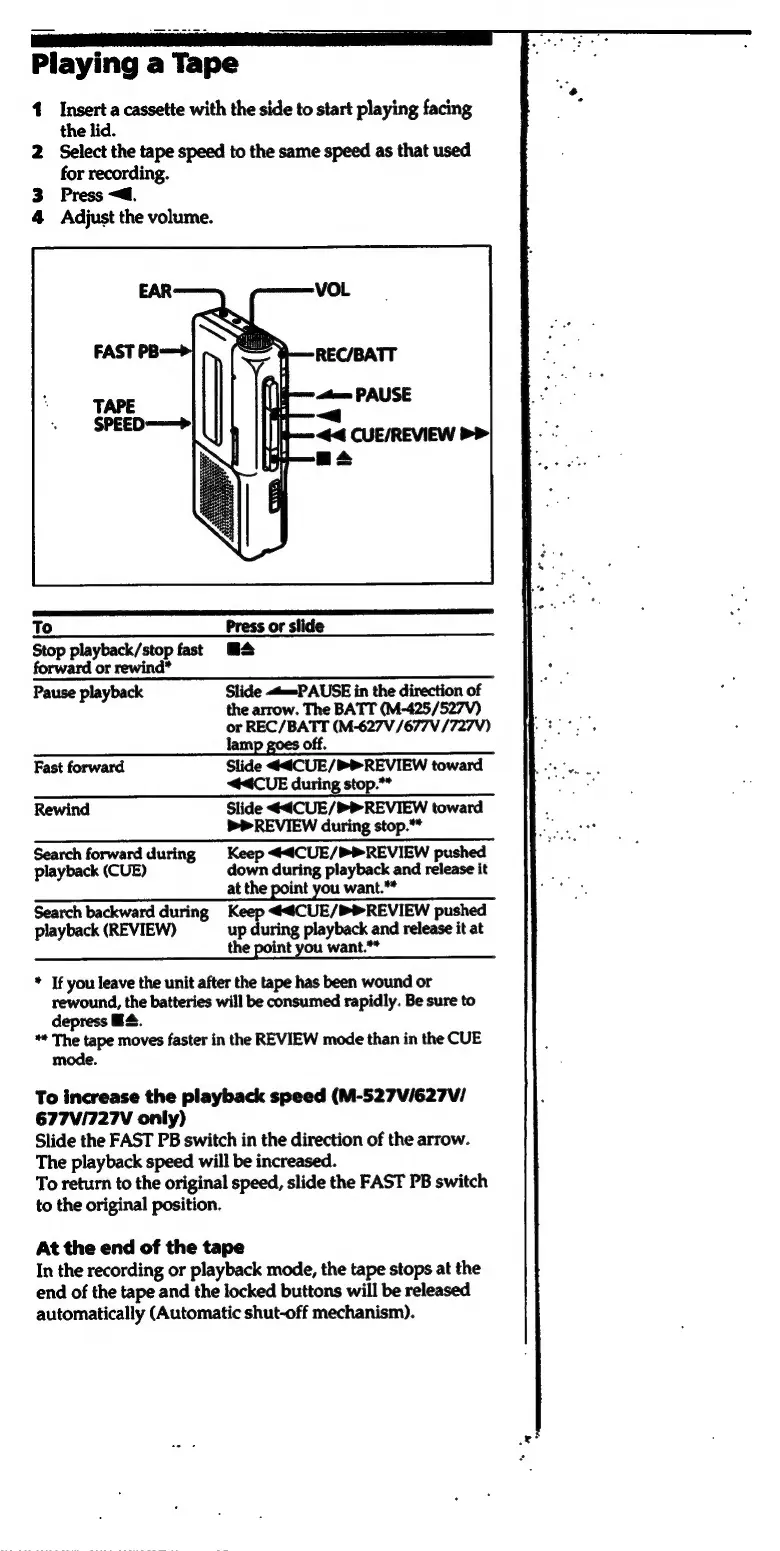
Playing
a
Tape
1
Insert
a
cassette
with
the
side
to
start
playing
facing
the
lid.
2
Select
the
tape
speed
to
the
same
speed
as
that
used
for
recording.
3
Press
<a.
4
Adjust
the
volume.
To
Press
or
slide
Stop
playback/stop
fast
M4
forward
or
rewind*
Pause
playback
Slide
«<t=-PAUSE
in
the
direction
of
the
arrow.
The
BATT
(M-425/527V)
or
REC/BATT
(M-627V/677V
/727V)
lam
off.
Fast
forward
Slide
€4CUE/PPREVIEW
toward
<4CUE
during
stop.**
Rewind
Slide
€4CUE/®PREVIEW
toward
PREVIEW
during
stop.”
Search
forward
during
Keep
<<€CUE/PPREVIEW
pushed
playback
(CUE)
down
during
playback
and
release
it
at
the
point
you
want."*
Search
backward
during
Keep
<€CUE/®®REVIEW
pushed
playback
(REVIEW)
up
during
playback
and
release
it
at
the
point
you
want."*
*
If
you
leave
the
unit
after
the
tape
has
been
wound
or
rewound,
the
batteries
will
be
consumed
rapidly.
Be
sure
to
depress
HS.
**
The
tape
moves
faster
in
the
REVIEW
mode
than
in
the
CUE
mode.
To
increase
the
playback
speed
(M-527V/627V/
677V/727V
only)
Slide
the
FAST
PB
switch
in
the
direction
of
the
arrow.
The
playback
speed
will
be
increased.
To
return
to
the
original
speed,
slide
the
FAST
PB
switch
to
the
original
position.
At
the
end
of
the
tape
In
the
recording
or
playback
mode,
the
tape
stops
at
the
end
of
the
tape
and
the
locked
buttons
will
be
released
automatically
(Automatic
shut-off
mechanism).

Related product manuals