EasyManua.ls Logo

Sony MDM-X4 Mk2 - MIDI Synchronization Using the MIDI Clock; Setup and Connections; Creating a Tempo Map

Sony MDM-X4 Mk2
11 pages
Print Icon
To Next Page IconTo Next Page
To Previous Page IconTo Previous Page
Loading...
ne
ee
ee
MIDI
Synchronization
Using
the
MIDI
Clock
You
can
use
the
MIDI
clock
to
synchronize
this
unit
with
sequencers
(ete.)
that
are
not
MTC
(MIDI
Time
Code)
compatible,
A
tempo
map
must
be
created
in
order
to
use
the
MIDI
clock.
For
these
operations,
this
unit
wil]
output
the
sync
signals.
Make
sure
the
svne
setting
of
vour
sequencer
is
on
external
syne.
Notes
*
When
using
the
MIDI
clock
for
synchronization,
be
sure
to
create
the
tempo
map
before
vou
start
recording
(see
"Creating
a
tempo
map”
to
the
right
for
details).
Also,
be
sure
to
listen
to
the
MIDI
sound
source
coming
trom
the
sequencer
before
vou
start
recording
It
is
extremely
difficult
to
create
a
perfect
match
between
a
recorded
song
and
the
timing
of
the
tempo
map.
Therefore,
if
vou
create
a
tempo
map
after
recording.
the
synchronization
will
be
incorrect
Fempo
information
will
not
be
stored
on
the
disc
if
vou
create
a
tempo
map
but
do
not
make
an
actual
recording
*
When
using
a
sequencer
that
supports
MIDI
clock
and
MID!
song
position,
vou
can
start
plavback
from
an
arbitrary
position
in
the
song.
At
this
time.
the
sequence
locates
the
current
song
position
and
starts
running
in
sync.
Some
sequencers,
however,
mav
not
be
able
to
follow
this
unit
when
vou
use
this
unit’s
locate
function
Be
sure
to
check
the
sequencer’s
search
before
synchronized
operation.
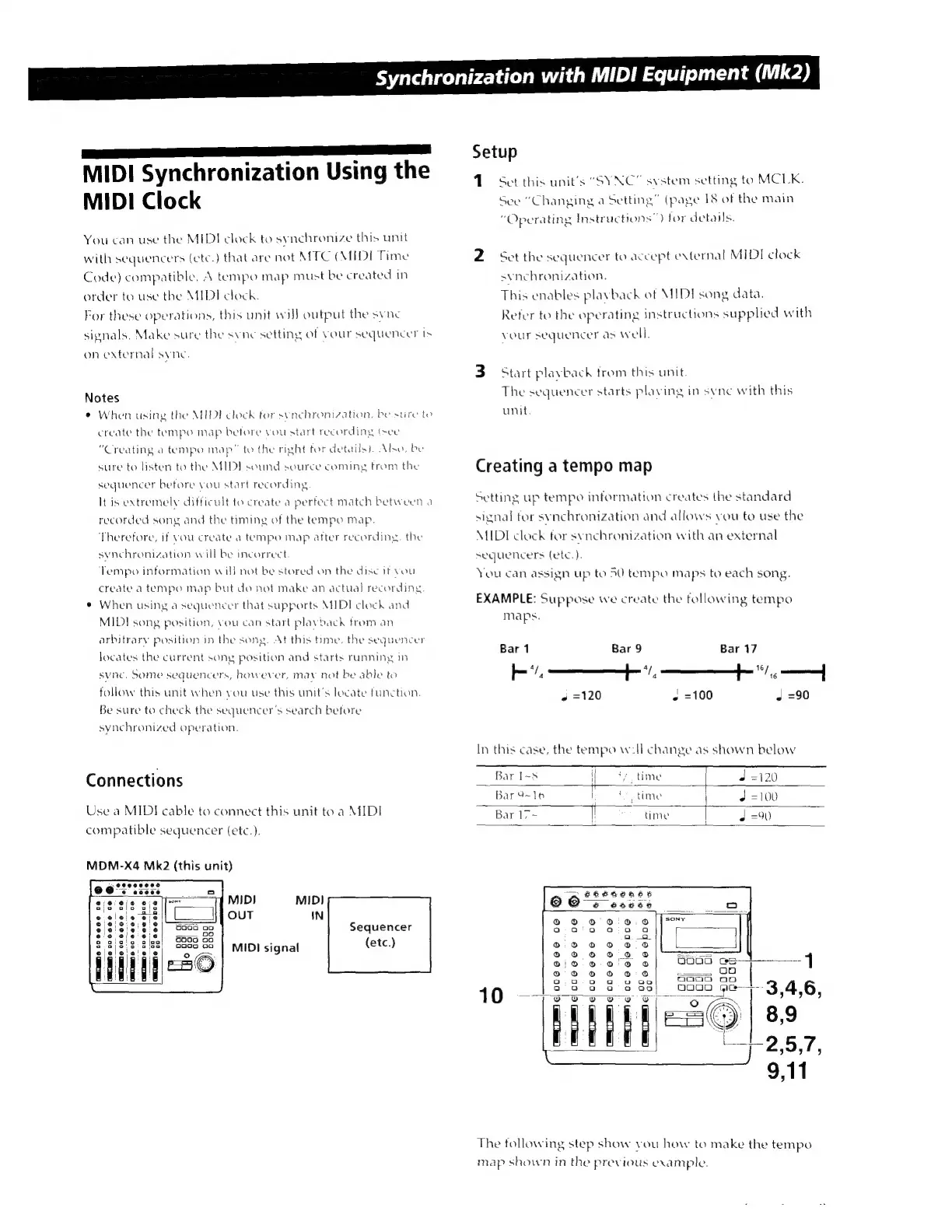
Connections
Use
a
MIDI
cable
to
connect
this
unit
to
a
MIDI
compatible
sequencer
(etc.).
MDM-X4
Mk2
(this
unit)
e
le
*
oo
.
e e
e
oe
|?|
MIDI
MIDI
OUT
IN
!
i
p
oo
ane
oo
6660D06
|3
Sequencer
TD
Oe
000066
ve
|
MIDI
signal
(etc.)
AIM
e
06666
mme
ca
seco
ce
|,
QM
6
c0666e
oe
o
o
o
o
©
o
o
a
o
Synchronization
with
MIDI
Equipment
(Mk2)
Setup
1
Set
this
units
“SYNC”
system
setting
to
MCLK.
See
"Changing
a
Setting”
(page
18
of
the
main
"Operating
Instructions")
for
details.
2
Set
the
sequencer
to
accept
external
MIDI
clock
synchronization.
This
enables
playback
of
MIDI
song
data.
Refer
to
the
operating
instructions
supplied
with
vour
sequencer
as
well.
3
Start
playback
from
this
unit.
The
sequencer
starts
plaving
in
svnc
with
this
unit.
Creating
a
tempo
map
Setting
up
tempo
information
creates
the
standard
signal
tor
synchronization
and
allows
you
to
use
the
MIDI
clock
for
synchronization
with
an
external
sequencers
(etc).
You
can
assign
up
to
50
tempo
maps
to
each
song.
EXAMPLE:
Suppose
we
create
the
following
tempo
maps.
Bar
1
Bar
9
Bar
17
IP.
Á.
——
0
—À
+
=120
«
=100
J
=90
In
this
case,
the
tempo
will
change
as
shown
below
Bar I-5
Do
yo
time
d
=120
Bar
9-16
|
(time
|
J
=100
Bar 17~
I
time
|
4
=90
|
oo011.:::*
4
è
eo0€9
005020209
a
a
o Q a o
a.a
0.0000
86
D
000070
©
9/0
0
0'0
©
1
©
©
0060
Q00
-
|
o
o
o a
oco
ao
10
See
0000
pe
3,4,6,
|
]
]
T
||
8,9
E.
-
=
l
J
J
ssp
2,5,7,
The
following
step
show
vou
how
to
make
the
tempo
map
shown
in
the
previous
example.

Related product manuals