EasyManua.ls Logo

Sony MDM-X4 Mk2 - Example of a MIDI System; System Connections and Features

Sony MDM-X4 Mk2
11 pages
Print Icon
To Next Page IconTo Next Page
To Previous Page IconTo Previous Page
Loading...
Synchronization
with
MIDI
Equipment
(Mk2)
*
Record
Exit
(Command
07)
:
Stops
recording
on
all
tracks.
*
MMC
Reset
(Command
0D)
:
Resets
MMC
related
information
to
the
state
it
was
in
at
power
on.
*
Write
(Command
40,41)
:
Writes
or
changes
data
in
the
specified
information
field
(for
Track
Record
Ready
only).
Locate
(Command
44)
:
Locates
the
specified
time
code.
Group
(Command
52)
:
Checks
the
device
ID
list
to
see
whether
or
not
the
unit
belongs
to
the
current
group.
If
it
belongs
to
the
group,
that
group
ID
is
used
to
receive
MMC
data.
This
unit
can
store
up
to
16
IDs.
*
Track
record
ready
(Response
4F)
:
Turns
REC
SELECT
on/off.
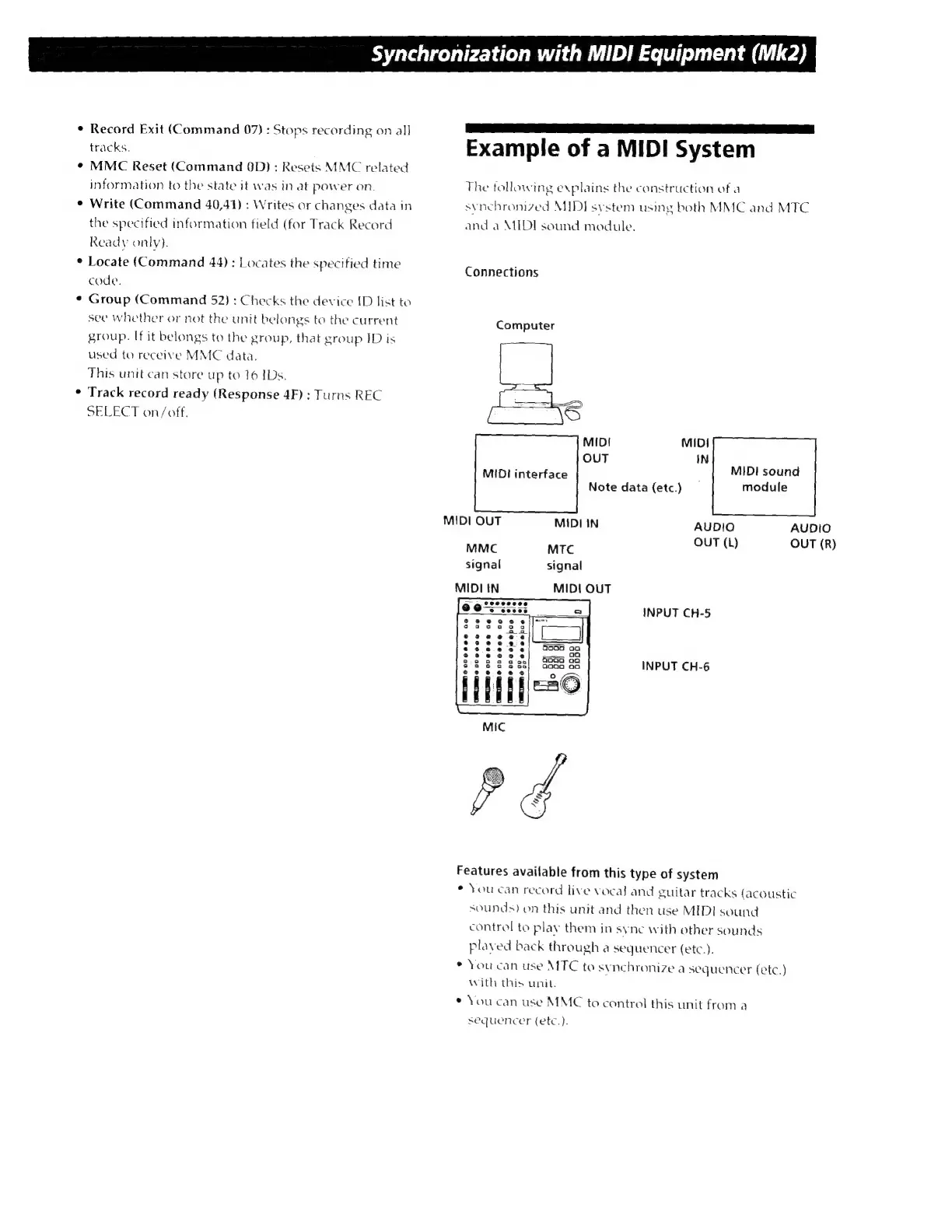
Example
of
a
MIDI
System
The
tollowing
explains
the
construction
of
a
synchronized
MIDI
system
using
both
MMC
and
MTC
and
a
MIDI
sound
module.
Connections
Computer
On
MIDI
OUT
MIDI
interface
MIDI
sound
Note
data
(etc.)
module
MIDI
QUT
MIDI
IN
AUDIO AUDIO
OU
MMC
MTC
T
(L)
OUT
(R)
signal
signal
MIDI
IN
MIDI
OUT
9
e^:
iss
INPUT
CH-5
$3233?
e
2
e
096
Sie
3832
838
INPUT
CH-6
Mic
Features
available
from
this
type
of
system
*
You
can
record
live
vocal
and
guitar
tracks
(acoustic
sounds?
on
this
unit
and
then
use
MIDI
sound
control
to
play
them
in
sync
with
other
sounds
plaved
back
through
a
sequencer
(etc.).
*
You
can
use
MTC
to
synchronize
a
sequencer
(etc.)
with
this
unit.
*
You
can
use
MMC
to
control
this
unit
from
a
sequencer
(etc.).