Connection
13
GB
Connecting the Headphone System
Connecting the processor to digital
components
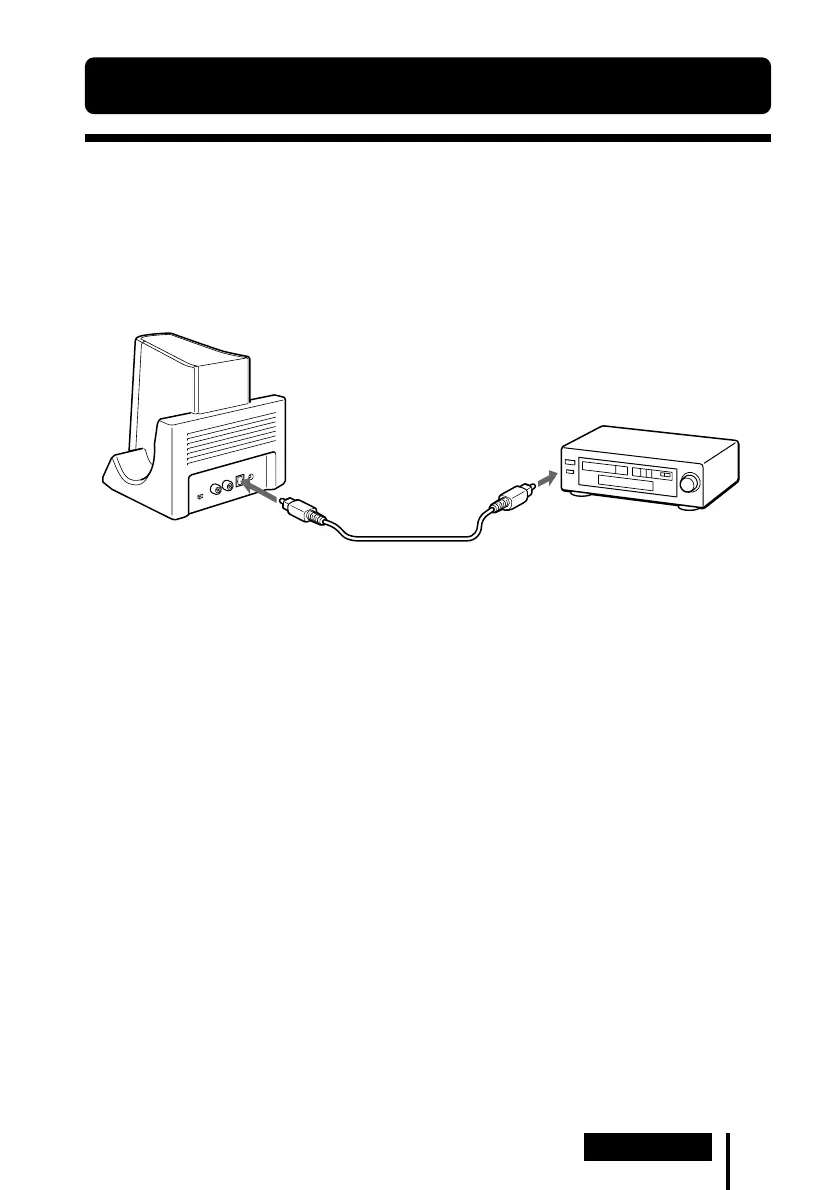
Use the supplied optical digital connecting cable to connect the optical digital output
jack*
1
on a DVD player or other digital component*
2
to the DIGITAL IN jack of the
processor.
Notes
• The optical digital connecting cable is an extremely high-precision device and is sensitive to
jolts and external pressure. Therefore, be careful when inserting and removing the cable plug.
• The digital input for the processor does not support sampling frequencies of 96 kHz. Set the
digital output setting for the DVD player to 48 kHz when using this system. Noise may be
heard when a 96 kHz digital signal is input.
*
1
If the connected equipment supports PCM output only, all surround sound effects will be
processed by DOLBY PRO LOGIC II.
*
2
Connection to the optical digital output jack on your personal computer is not guaranteed to
work with this system.
DTS
•A DTS-compatible DVD player is required for playback of DVDs recorded in DTS audio. (For
more details, see the instruction manual of your DVD player.)
• When playing CDs recorded in DTS format, noise may occur when fast forwarding or
rewinding. This is not a malfunction.
• If the DTS digital output is set to “OFF” on the DVD player, no sound may be heard even if the
DTS output is selected in the DVD menu.
• No sound may be heard when a DVD player and this unit is analogue-connected. In this case,
use a digital connection.
1 Connection
To DIGITAL
IN jack
Processor
DVD player, or other digital
component having an optical
digital output jack
To optical
digital
output jack
Optical digital connecting
cable (supplied)
Match the orientation of
the plug with the jack, and
then insert until the plug
fits into place.
(Continued)



 To Next Page