Preparation
7
GB
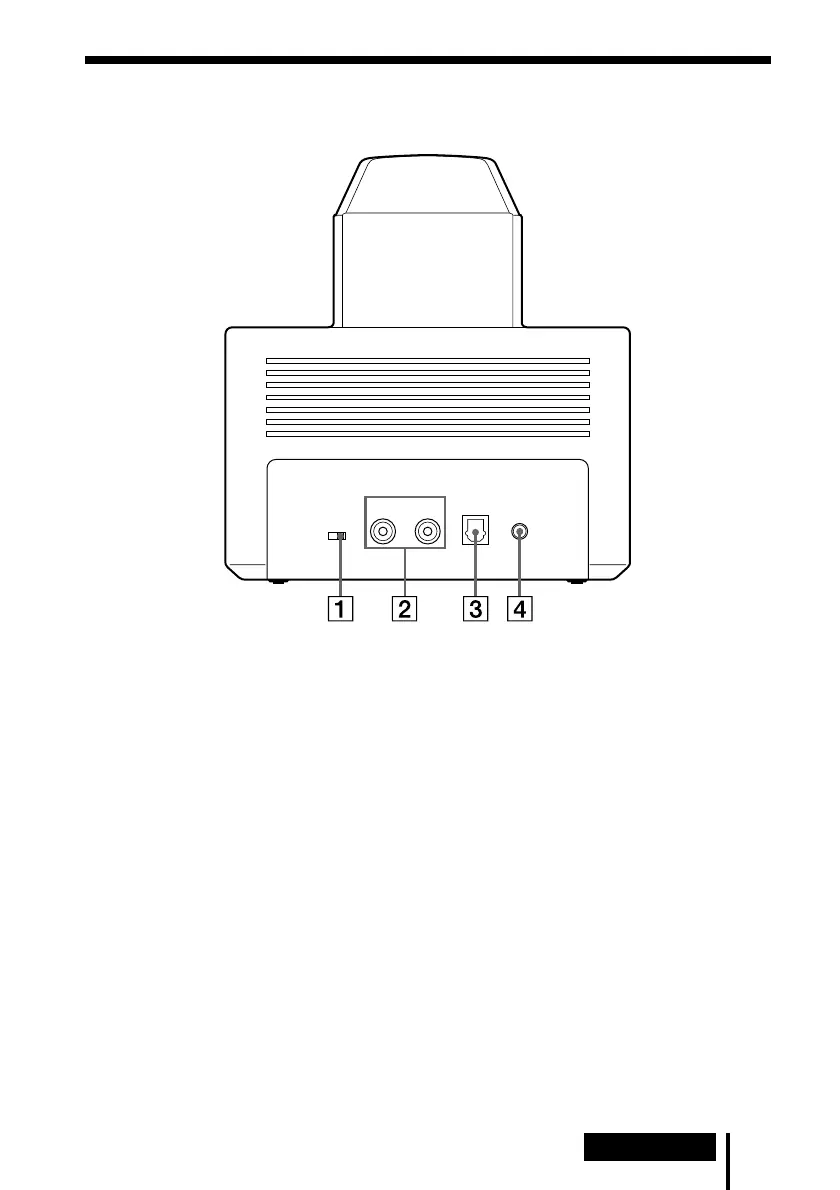
Rear Panel of the Processor
LINE IN
AT T
DIGITAL IN
L
DC IN 9V
R
0dB -8dB
1 ATT (attenuator) switch
Set this switch to “0dB” if the volume is
too low at analogue input. Normally, this
switch should be set to “–8dB.”
2 LINE IN jacks
(see page 14 for details)
Connect the audio output jacks on audio
or video component (sold separately),
such as a video cassette player or TV, to
these jacks.
3 DIGITAL IN jack
(see page 13 for details)
Connect a DVD player, or other digital
component (sold separately) to this jack.
4 DC IN 9V jack
Connect the supplied AC power adaptor
to this jack. (Be sure to use the supplied
AC power adaptor. Using products with
different plug polarity or other
characteristics can cause a malfunction.)



 To Next Page